Every change, printed on the roll.
What changed in the Desktop App, the captain app, the owner dashboard, the kitchen screen, printing and this site, dated, newest first. Like our ledger, this page is append-only: nothing here is rewritten later.
- Desktop App
- 0.1.375 Nov 2026
- Captain app
- 0.2.24 (38)4 Nov 2026
5 NovDesktop App 0.1.37 for Windows and Mac5 NovBook a short Custom payment as a loss4 NovDiscount the difference on Custom and split payments4 NovFire KOT or settle without printing paper4 NovCaptain app 0.2.24 on Google Play
November2026
Desktop App 0.1.37 for Windows and Mac
Fire KOT ▾ now offers Fire KOT, no print, and Settle · no print sits beside Settle and print bill. Discounts work with Custom and split payments, and a short Custom payment can be booked as Discount or Loss. Existing installs from 0.1.9 onward use the usual Restart to update notice.
See it: easykot.com/download
Book a short Custom payment as a loss
When a named Custom payment comes in below the bill, Settle now asks Discount or Loss, the same as UPI, Cash and Card. Loss keeps the bill total and writes the difference off on the loss report; Discount still needs a cashier or manager.
See it: Desktop App → open a check → Settle → Custom
Discount the difference on Custom and split payments
For a named Custom payment, enter what the guest paid and check the discount before settling. In Part payment, choose Discount to close the bill at the amount you received.
See it: Desktop App → open a check → Settle
Fire KOT or settle without printing paper
Fire KOT is now a split key: the ▾ offers Fire KOT + print or Fire KOT, no print, and a no-print round still shows on the kitchen screen. In the payment dialog, Settle · no print and Settle ₹X · print bill sit side by side, and a no-print settle skips the receipt preview. The Desktop App remembers your last choice, and the dashboard marks a round that never printed as not printed.
See it: Desktop App → open a check → Fire KOT ▾
Captain app 0.2.24 on Google Play
Phones installed from Google Play update there. Order numbers on the phone now read as plain digits, like 2001 instead of T2-001, on a takeaway's card in Running, in the Today tab, on the bill and on kitchen tickets the phone prints. Each phone keeps its own block of numbers, so two devices never give the same number.
Desktop App 0.1.34 for Windows and Mac
Order numbers on bills, kitchen tickets, the kitchen screen and every register screen now read as plain digits, like 1042 instead of T1-042. Each Desktop App keeps its own block of numbers, so two devices never give the same number, and Orders search finds a bill by 1042, #1042 or the old T1-042. Existing installs from 0.1.9 onward use the usual Restart to update notice.
See it: easykot.com/download
Order numbers read 1042, not T1-042
The order number on the bill, the kitchen ticket and every screen is now plain digits, so it no longer looks like a table name. Each Desktop App and phone keeps its own block, 1001 and up on the first, 2001 and up on the second, so two devices never give the same number, and it stays with the order when guests change tables. The owner dashboard finds a bill by either form. Desktop App 0.1.34 prints it on bills and kitchen tickets; phones get it with Captain app 0.2.24.
See it: Dashboard → Orders → search 1042
Devices and Staff & pay are together in the dashboard
Switch between Devices and Staff & pay on the same page. You can still jump straight to either tab from the sidebar.
See it: Owner dashboard → Devices → Staff & payGuide: Staff PINs & roles →
Cash box shows the steps, quick reasons, and what to check after a count
In Desktop App 0.1.33, Cash box lists the three steps for a first shift, offers one-tap reasons such as Vegetables, and says what Cash in or Paid out will do before you press it. With no shift open, Settle shows one small Start cash shift link instead of a box and never blocks the payment; starting the shift there takes you straight back to that bill. A short or over count says what to check next.
See it: Desktop App → Orders → Cash boxGuide: Open and close a cash shift →
A clearer cash box, from opening cash to the closing count
In Desktop App 0.1.33, cash movements need a reason, slips show who recorded them, the closing count shows the opening cash, net cash sales and money added or taken out, and the closing action stays within reach on shorter screens. On the phone, hiding expected cash until closing comes with the next Captain app update.
See it: Desktop App → Orders → Cash box; Captain app → Device → Cash boxGuide: Open and close a cash shift →
Cashiers can manage printers
In the next Desktop App update, cashiers can add or edit a local printer and inspect waiting print jobs without internet. Other settings and the owner dashboard stay restricted.
A weekly and a monthly report in your inbox
See how the week or the month went from one glance at your phone: net sales and how it moved, bills, average bill, discounts and expenses. The Weekly report comes on your week start day at 9 am store time, and the Monthly report on the 1st at 10 am, with GST for your CA when the month collected any, plus Estimated profit once that month has expenses entered. A week or month with no sales sends nothing, and each email has its own switch.
See it: Dashboard → Settings → NotificationsGuide: Owner reports & daily summary →
Tutorial videos on the owner dashboard
Every page of the owner dashboard now has a Tutorials button at the top. It opens our YouTube channel, with setup and how-to videos in English and Hindi.
See it: Owner dashboard → Tutorials
Desktop App 0.1.31 for Windows and Mac
Installed apps pick this update up on their own. It brings the Day close question for old unpaid checks: did the money come in? Before you answer, it shows what each answer does to Sales, the payment totals and the cash box. Web POS has the same change.
Day close now asks whether an old unpaid check's money came in
Close out the day now lists the old unpaid checks with a tick box each and asks one question: did the money come in? Pick Yes, add the payment to record it as Cash, UPI or Card and move the sale into today (no bill prints, the drawer stays shut), Yes, but skip the details to leave the check as Paid · Auto closed with no report changed, or No, the guest did not pay to write the food off with a typed reason and a manager's PIN. Before anything is saved, a panel says what the answer does to Sales, the payment totals and the cash box.
See it: Desktop App → Orders → Day closeGuide: Old unpaid checks at Day close →
October2026
Captain app 0.2.23 on Google Play
Phones installed from Google Play update there. It brings Cancel order with a reason and one last check of the table and bill, the Today tab with the day's bills and Reprint bill, the Prep list on the phone kitchen screen, and a tick box for each dish.
Desktop App 0.1.30 for Windows and Mac
Installed apps pick this update up on their own. It brings one last check before Cancel order closes a bill: the table, the bill amount and your reason, with Keep order to go back.
The Desktop App checks the bill before it cancels an order
Pick a reason on Cancel order and the Desktop App now shows the table, the bill amount and that reason, then asks once more, the same as the phone. Keep order takes you back to choose again, and a double click stops at the question. Still no manager PIN.
See it: Desktop App → open check → Cancel order (beside Settle) → pick a reasonGuide: Discounts, voids & refunds →
The phone checks the bill before it cancels an order
Pick a reason on Cancel order and the phone now shows the table, the bill amount and that reason, then asks once more. Keep order takes you back to choose again, so a quick tap in a rush does not close the wrong bill. Still no manager PIN.
See it: Captain app → Running → open the check → Cancel order → tap a reasonGuide: How a waiter takes an order →
Change your restaurant name yourself in Settings
Settings → Restaurant now has a Restaurant name box, so you can correct or change the name you chose at signup. It prints at the top of every bill, and every Desktop App and Captain phone picks it up the next time it is online. The name cannot be left empty.
See it: Owner dashboard → Settings → Restaurant → Restaurant name
Desktop App 0.1.29 for Windows and Mac
Installed apps pick this update up on their own. It brings Cancel order with a reason beside Settle, Orders showing who cancelled and why, no kitchen ticket for a cancelled table, the tick box at the start of each dish on the Kitchen screen, and a clear screen instead of a startup error when saved data will not open. Web POS has the same changes.
A check cancelled on a phone now leaves the Desktop App
If a phone or another till cancels the check open on your screen, the Desktop App lets go of it and tells you, with the reason. The next dish starts a new order. Before, the dish was refused with "Order is closed (void)". If you are already on Settle, you can still take the whole bill.
Cancel an order on the Desktop App, with a reason
Cancel order sits beside Settle at the bottom of the order panel, a smaller key with a red outline. Pick a reason or write your own; that click is the confirmation, with no manager PIN, and the Orders list shows the cancelled bill with the reason and who cancelled. If the kitchen already made the food the dialog says so first. Once any money is recorded on the bill the key is greyed out: settle the balance or refund instead. The same key is on an empty check's detail in Orders.
See it: Desktop App → open check → Cancel order (beside Settle)Guide: Discounts, voids & refunds →
A Desktop App that cannot open its saved data now explains itself
When the Desktop App cannot open its saved data, it now says why instead of showing a startup error: either the computer's keychain is holding the key back (sign in to the computer, then press Try again) or the key no longer opens the data. In that second case, Start fresh moves the old data aside on the computer without deleting it and lets you connect again; sales that never uploaded stay in that old data, so call support first if the till sold offline.
Cancel an order from the captain phone, with a reason
Open the check and press Cancel order, then tap a reason or write your own, with no manager PIN. A check with every dish removed now shows Empty on Running instead of counting as a table waiting. Once money is recorded on the bill the phone cannot cancel it; settle or refund at the counter. The Desktop App's Orders list and the owner dashboard show the reason and who cancelled.
See it: Captain app → Running → open the check → Cancel orderGuide: How a waiter takes an order →
A Prep list on the phone kitchen screen
On a phone used as the kitchen screen, a Prep key at the bottom switches the ticket cards for the same Cook together list the Desktop App shows: each dish, how many plates to cook, and the tables waiting for them. A plate with a note stays on its own line. The Cooks station filter and the All day view are still Desktop App only.
See it: Captain app → sign in with a Chef PIN → Prep
A Today tab on the captain app with the day's bills
The captain app has a Today tab listing every order of the current day as Paid, Running or Cancelled, with what was collected, how many bills and the Cash / UPI split on top. Tap a bill to see its items, tax, payments and who took the money or cancelled it. Reprint bill prints a copy marked DUPLICATE on the phone's printer, or at the counter when the phone does not print. It shows today only; earlier days stay in the dashboard's reports.
See it: Captain app → Today → tap a paid bill → Reprint billGuide: Captain app setup on waiter phones →
Password recovery now matches sign in
The password reset pages now match sign in on phones and larger screens, including the Check your email and Password changed messages.
See it: Owner dashboard → Forgot password?
Desktop App 0.1.28 for Windows and Mac
Installed apps pick this update up on their own. A Desktop App the owner disconnected can be linked again from Settings → Connected devices with a new setup code; it joins as a new till and the sales rung while it was disconnected upload once it connects.
A clearer sign-in page
You can now check your password as you type it, then hide it again. The sign-in page has a clearer layout on phones and larger screens.
See it: Owner dashboard → Sign in
A clearer start to your free trial
The signup page shows your 3-month free trial, no-card reassurance and next setup steps. On phones, the form comes first; on larger screens, you can also see the EasyKOT register.
See it: Owner dashboard → Start your free trial
Reconnect a Desktop App the owner disconnected
When the owner revokes a Desktop App on the Devices page, its banner sends you to Settings → Connected devices, and that screen now takes the new setup code instead of only saying the app is linked. It joins as a new till with a new bill series, and sales rung while it was disconnected upload once it connects. Arrives in Desktop App 0.1.28.
See it: Desktop App → Settings → Connected devices
Desktop App 0.1.27 for Windows and Mac
Installed apps pick this update up on their own. On the Kitchen screen a cook can now tap each dish as it is ready; when every dish is ticked the ticket shows All ready and Bump turns green. Bump still clears the ticket for the whole kitchen.
Tick each dish as it is ready on the kitchen screen
On the Desktop App and the captain app, a cook taps a dish on a kitchen ticket to tick it as prepared. When every dish is ticked the ticket says All ready, and Bump or Done still clears it for the whole kitchen. Ticks stay on the screen they were made on.
See it: Desktop App → Kitchen, or captain app → Device → Kitchen screen
Turn a spare phone into the kitchen screen
The captain app has Switch to kitchen screen on the Device tab for owner, manager and cashier PINs, so a phone shows the kitchen's tickets without a Chef PIN. Tap Floor on the board to come back. A Chef PIN still opens only the board, which suits a phone that stays in the kitchen.
See it: Captain app → Device → Kitchen screen
Read a supplier bill photo before adding the expense
Upload one bill photo to suggest the supplier, date, purchase amount and category. Check and apply the details, then choose how it was paid before saving. Each restaurant has 60 accepted scans per month; manual entry stays available.
See it: Owner dashboard → Expenses → Add expense → Scan bill
Clearer settings, with a quick way back to billing
Billing & service groups billing controls, sounds, service alerts and kitchen display options, while Connected devices brings restaurant connection and device sharing together. Back to billing stays visible, with separate Add expenses and Owner dashboard tools.
See it: Desktop App → Settings
Add expense categories from Settings
In Reports & accounts, use Add category beside Expense categories to name a new cost and choose its reporting group. The Desktop App reference section has been removed from Settings.
See it: Owner dashboard → Settings → Reports & accounts → Add categoryGuide: Owner settings — GST, day end and emails →
Settings grouped by what you want to change
Settings now opens on Restaurant, with separate sections for Menu & kitchen, Reports & accounts, Notifications and Desktop App. For Indian restaurants, GST & bills brings GST registration, invoice details and FSSAI together in one card.
See it: Owner dashboard → SettingsGuide: Owner settings — GST, day end and emails →
Day close opens on today
Day close in the owner dashboard now opens on today's business date. It used to open on the last day of the report week, often a day still to come, with every number at zero. Any earlier date you pick still loads as before.
See it: Owner dashboard → Orders → Day close
Staff & pay fits a phone screen
On a phone, Staff & pay no longer slides sideways. The Pay, Edit, Reset PIN, Connect phone and Remove buttons now wrap inside each person's card, and the note on your own row sits on its own line.
See it: Owner dashboard on a phone → Staff & pay
Typing dishes by hand is now a proper start on Get started
On Get started, Add your menu now has a Type dishes myself button for owners with no menu card to upload, right under the import. It opens the Menu page ready to type, with Quick add in view and the cursor already in its Name box. The sample menu and the dish library stay under Other ways in, and an empty Menu page now offers typing too.
See it: Owner dashboard → Get started → Add your menu → Type dishes myself
Owner sign-in opens the register without asking for a PIN
When you connect a Desktop App or Web POS with your owner email and password, it now opens straight on the register as you instead of showing the PIN pad. Connecting with a setup code still asks for a PIN, because a code does not say who is at the counter.
See it: Connect this Desktop App or Connect this browser register → Owner sign-in
A shorter signup form: one password box, India picked for you
Create your store now asks for your password once, with a Show button on the box to check what you typed. The restaurant country is one line set to India with Change beside it, and the invite code box opens from a link only if you have one. Country and currency still cannot be changed after signup.
See it: easykot.com → Start free
Desktop App 0.1.24 for Windows and Mac
On a register with a busy month of sales a tap on a dish could take a second or more to show up on the check, and the wait grew as the month filled up. The check now updates right away. Quick add shows what this counter rang most in the last 7 days and is read once when the register starts, so it never slows a tap.
See it: Desktop App → Cashier, tap any dish
Customer visits and paid subscription time stay accurate
Prepared for a future update: bills automatically closed at day end will count in customer visits and spending, using the saved bill total. Two subscription periods paid at the same time will each keep their full period of access.
Desktop App 0.1.22 for Windows and Mac
Choose from five ready-made bill layouts and three KOT layouts, or customise text size, bold text, alignment, section order and an optional business message. Bill and KOT settings stay separate, Standard restores the familiar output, and Test this preview sends a sample before you save. Adding a printer now scans first and shows brand tips only when the scan finds nothing.
See it: Desktop App → Settings → Printers & KDS → Receipt layoutGuide: Receipt printer font size and bill/KOT layout →
Import with AI now tells you which dishes it could not read
After reading your menu, a second check looks for dishes on the pages that never made it into the review grid and names them above it, so you can add them before you publish. Prices printed as 220 / 440 come in as Half and Full. One import's PDFs can now be up to 22 MB together, down from 25 MB for one PDF.
See it: Dashboard → Menu → Import with AI
Every report page now has one period button that names its dates
Reports, Orders, Expenses and the other report pages show one button with the dates you are looking at, such as This week · 12–18 Oct. Tap it for every preset, your own From and To dates, and a refresh. Reports now reads top down: which report, then which view and period, then your numbers.
See it: Dashboard → Reports
Dragging a table on the dashboard layout now saves it
A table you drag on the Tables & floors layout saves its new spot as soon as you let go, and the layout says when it is saved. Clicking a table to select it no longer stops you picking another one.
See it: Dashboard → Tables & floors
Desktop App 0.1.21 for Windows and Mac
Matching dishes from several kitchen rounds now appear as one line on the final bill, while KOTs keep each new round separate. Hindi and Arabic names and standard portions print on KOTs and bills, paid checks no longer reopen payment after changing the customer, and the first barcode scan is no longer missed while the menu opens. Existing installs from 0.1.9 onward use the usual Restart to update notice.
See it: easykot.com/download
Install EasyKOT Captain from Google Play
Install EasyKOT Captain from the public Play listing, then scan the owner dashboard QR or enter its setup code to connect the phone. If the older website APK is already installed, update it from Device → Updates and do not uninstall it while orders are pending.
Print Hindi and Arabic dishes on bills and KOTs
Desktop App 0.1.21 and Captain app 0.2.18 print Hindi and Arabic item names, modifiers, notes and bill headings without replacing them with question marks. Kitchen item names and notes use larger text. Printing works offline.
Choose Hindi or Arabic for standard portion names
Choose English, Hindi or Arabic in your dashboard settings. Standard Half and Full portions use your chosen language in the menu list and dish editor, while dish names, custom portion names and prices stay unchanged.
See it: Owner dashboard → Settings → Printers & KDS → Preferred menu language
Create expense categories that match your restaurant
Add your own category while entering one expense or a bulk batch, and select it without losing the details you already entered. Its name carries through P&L and expense CSV downloads. The Desktop App can use it in Bulk add expenses while online.
See it: Owner dashboard → Expenses → Add expense or Bulk add → Add categoryGuide: Owner reports & daily summary →
Find your phone country code faster
Search by country name, country code or calling code when adding your mobile number. India starts selected, with UAE, Singapore, US and UK at the top of the list and flags beside them. Your saved number keeps its country selection.
See it: Create your store → Mobile number, or Settings → Your account
Keep Web POS updates quiet while you sell
Web POS settings keeps Check for updates and Switch restaurant off the billing screen until you need them. A saved update shows a small Reload update notice. Refresh can apply it before billing opens when open bills, pending changes, sync issues and other Web POS tabs are clear.
See it: Web POS → Web POS settings
Reload Web POS updates and switch restaurants
Use Check for updates, then Reload update when your open bills, print documents and pending changes are finished and other Web POS tabs are closed. Lock staff keeps the restaurant connected; Switch restaurant opens a protected reset that leaves synced sales in the old account. An empty downloaded menu offers Add menu to open the owner dashboard in another tab.
See it: Web POS → Check for updates / Switch restaurant
Use the full register in a browser
Open your restaurant's full register in Web POS from the owner dashboard or download page. After setup and the first download, that prepared browser can keep selling offline, and bills and KOTs open in the normal browser print dialog. The Desktop App remains recommended for daily service and is required for printer discovery, automatic printing and cash drawers.
See it: Owner dashboard → Get started → Open web POS
Combine repeat rounds into one item on the final bill
The next Desktop App and captain app builds will combine matching repeats into one line on the final bill. Jeera Pulav sent as 2, then 1, then 1 will read 4 on the bill, while every KOT still sends only its new round.
Desktop App 0.1.20 for Windows and Mac
Installed apps pick this update up on their own. It brings Reprint KOT on a round that has gone to the kitchen, discounts that come off the subtotal before GST, the same check staying open when you remove its last item, and kitchen counts that keep look-alike dishes apart.
See it: Desktop App → an order with a fired round → Reprint KOT
Captain app 0.2.14
For phones in Google Play testing and phones installed from easykot.com. Phones that print get Reprint KOT after Send KOT, removing the last item keeps the same check open for its replacement, and the first screen links to the setup video.
See it: Captain app → Device → Updates, or easykot.com/download
Set up tables and floors from the owner dashboard
Open Tables & floors to add tables, choose their seats, shape and floor, and arrange the layout. Changes reach connected phones and Desktop Apps when they sync. Finish open checks and bring offline devices online before removing a table.
See it: Dashboard → Tables & floorsGuide: Table & floor plan setup →
Reprint a kitchen ticket from the order itself
In Desktop App 0.1.20 and Captain 0.2.14, once a round has gone to the kitchen the Fire KOT key (Send KOT on the phone) reads Reprint KOT. One tap prints that round again on the printer connected to that device, with REPRINT under the KOT number so the kitchen knows it is a copy. No PIN and no extra screen; the key turns back into Fire KOT as soon as you add a dish. A phone without its own printer says so and leaves the reprint to the counter.
See it: Desktop App → an order with a fired round → Reprint KOT
Pick a shorter date range in one tap when a report asks for it
When Orders is filtered by a dish or an exception, or Items sold covers more history than it can read at once, the dashboard now offers Today, Yesterday, This week, Last week and This month right beside the message, instead of a red error.
See it: Dashboard → Orders → filter by a dish over a long range
Keep the same check open while correcting an order
In Desktop App 0.1.20 and Captain 0.2.14, removing the last item from an unpaid check leaves that same check open so you can add its replacement. The Desktop App keeps a slow add pending until it finishes, while letting you close the panel and check the ticket.
Keep kitchen counts and bill reprints consistent
In Desktop App 0.1.20 and Captain 0.2.14, Cook together and All day keep different dishes, portions and extras apart even when their names match. Bills issued from now on keep their original GST scheme when reprinted after a settings change. Bills issued before the update keep their existing reprint behaviour.
Get started recognises an Android app you already installed
Already have EasyKOT on your Android phone? Choose it in Get started, then tap Run the counter and sign in with your owner email and password. The phone path makes the PIN optional and lets you start billing without a laptop or setup code; you can connect a printer later.
See it: Dashboard → Get startedGuide: Set up EasyKOT on an Android phone →
Add another dish after removing every item
In Desktop App 0.1.20, removing every item from an unpaid check lets you tap another dish straight away. The same check stays open for the replacement dish, and every removal stays in its history. Portions and extras work too.
See it: Desktop App → remove every item → tap another dish
Captain app 0.2.13 for website installs
Phones installed from easykot.com can now update from 0.2.8. A captain who carries a small Bluetooth or Wi-Fi printer can choose Take orders and print them and print the KOTs and bills for their own tables. Yesterday's untouched checks leave Running after the day's cutoff, and the phone calls your billing computer the EasyKOT Desktop App.
See it: Captain app → Device → Updates, or easykot.com/download
An email when your renewal payment is declined
If your bank or UPI AutoPay declines a subscription renewal, the owner now gets an email with the amount and a link to retry. EasyKOT keeps working while the payment is retried. A decline inside your own checkout, or one a retry has already paid, sends nothing.
See it: Owner dashboard → Billing
Desktop App 0.1.19 for Windows and Mac
Installed apps pick this update up on their own. It carries the EasyKOT Desktop App name, kitchen tickets that keep Bump within reach, yesterday's untouched checks leaving the floor after the day's cutoff, and Paper out or Cover open from supported USB printers on a Mac.
See it: Desktop App → Settings → Desktop App
One name for the app on your billing computer: EasyKOT Desktop App
The app on your billing laptop or PC was called Register in its own settings, till on this website and counter on the waiters' phones. It is now EasyKOT Desktop App: its Settings section is Desktop App, Multi-terminal is now Multi-device, and the captain phone says Connect to the EasyKOT Desktop App when you link it over Wi-Fi. Where a bill or KOT may print on a counter phone instead, the phone still says the counter. Billing, printing and your data do not change; the new names arrive with Desktop App 0.1.19 and the Captain 0.2.13 testing update.
See it: Desktop App → Settings → Desktop App
Change the discount already on a check
In Desktop App 0.1.20, reopening Discount restores the saved amount and highlights its quick percentage when one was used. Choose another percentage or type the new amount to replace the discount; type ₹0 to remove it. Discounts entered here come off the subtotal, and GST is calculated on the reduced amount.
See it: Desktop App → open check → Discount
Get started is five steps, and you choose your own register PIN
Signing up now lands straight on Get started with no PIN to write down: you choose your own register PIN as step 2, before the till ever asks for it. The five steps are Add your menu, Choose your register PIN, Download the register, Connect your register and Ring your first sale, and any of them opens out of order, so you can download first at the till laptop. Download lists Windows, Mac and the Android app with the exact clicks for the Windows and Mac warning screens, and picking Android turns the connect step into signing in on the phone.
See it: Owner dashboard → Get startedGuide: Set up your restaurant — signup to first bill →
A WhatsApp button on every dashboard page, with your page already named
Tap WhatsApp in the top bar of any dashboard page to open a chat with EasyKOT support that already says which page you were on and your restaurant's name. Get started also has a Stuck on a step? card, and a WhatsApp link inside the download and connect steps. The message names only the page and the restaurant.
See it: Owner dashboard → WhatsApp in the top bar
The phone setup QR is bigger and sharper
The QR under Staff & pay → Connect phone and Devices → Add device now shows at full size with a clear white border, so it is easier for a phone to read off a laptop screen. In the Captain 0.2.13 testing update, the optional Connect to the counter screen also has a Back button that returns to the PIN pad instead of closing the app.
See it: Dashboard → Staff & pay → Connect phoneGuide: Captain app setup on waiter phones →
A captain's phone starts on Only my orders again
In the Captain 0.2.13 testing update, a waiter's phone no longer calls itself the counter. Running starts with Only my orders ticked, so each captain sees the tables they served, with the rest counted under Show all. The owner's counter phone still starts with every order.
See it: Captain → Running → Only my orders
Yesterday's unpaid checks stop holding tables after the day's cutoff
In Desktop App 0.1.19 and the Captain 0.2.13 testing update, a check opened before the day's cutoff with nothing done on it since leaves the floor and the Running tab, and its table shows free. A party still being served across the cutoff keeps its table. The register's Orders screen lists a leftover with food under From earlier days as Paid · Auto closed, matching the dashboard, and staff can still record the real payment there.
See it: Desktop App → Orders → Open → From earlier daysGuide: Day close on the Desktop App →
Supported USB printers on a Mac report paper and cover problems
In Desktop App 0.1.19, supported USB printers on a Mac can show Paper out or Cover open instead of staying on Can’t verify. A reported fault pauses affected printing until it is cleared; printers that do not answer status checks keep the Can’t verify state and can still print.
See it: Desktop App → Settings → Printers & KDS → Check printer
Long kitchen tickets keep every item and Bump within reach
In Desktop App 0.1.19, long tickets keep the table, timer and Bump or Done here visible while large controls page through every dish, modifier and note. Tickets, Prep, All day and Cooks categories support touch and keyboard navigation.
See it: Kitchen screen → Tickets
Set up a carried printer from Device without resetting the phone
The Captain 0.2.12 testing update lets owners choose Use this phone myself and stay signed in after printer setup; Set up for a staff member still ends at the staff PIN screen. Connected captains can add a carried printer from Device → Printing without resetting, while Only my orders sits beside the Running count and Device groups its printing, shift and connection details. During this setup, EasyKOT keeps the current printer until the captain confirms that the test slip printed.
See it: Captain app → Device → Printing → Carry a printer for my ordersGuide: Captain app setup on waiter phones →
Register 0.1.18: choose which older tickets to print
Available for Windows and Mac. Older KOTs and bills wait for your Print choice instead of coming out together when a printer reconnects. Print only the tickets still needed, or Discard them; newer tickets keep printing as usual.
See it: Register → Settings → Printers & KDS → Print queue, or Review on the red print barGuide: Thermal printer not printing — fixes by symptom →
Older tickets wait for your Print choice
In Register 0.1.18, KOTs and bills requested more than 5 minutes ago wait for your choice when a printer reconnects. Choose Print for tickets still needed, or Discard; newer tickets keep printing as usual. Show 10 more lets you review the rest of a long queue.
See it: Register → Settings → Printers & KDS → Print queue, or Review on the red print barGuide: Thermal printer not printing — fixes by symptom →
September2026
KOT printing on phones connected earlier
A phone connected as a Captain can print its own KOTs even while bill numbers are being set up. Bill numbers finish setting up when the phone connects to the internet, without clearing its orders.
See it: Captain app → Device → Printers
Connect captain phones from Staff & pay over mobile data
Add a captain in Staff & pay, tap Connect phone, and let them scan the one-use QR before signing in with their own PIN. Mobile data or any Wi-Fi can download the restaurant and carry orders; the direct counter link is optional. A captain who prints can choose Bluetooth or Wi-Fi, pick 58 mm or 80 mm paper, and confirm a Test print before printing turns on; the phone flow arrives with the next captain app update.
See it: Owner dashboard → Staff & pay → Connect phoneGuide: Captain app setup on waiter phones →
Removed staff lose captain access after the roster updates
Staff & pay now refuses a PIN already used by another active person. If the owner removes a staff member, that person's captain phone returns to sign-in as soon as the roster update arrives.
See it: Owner dashboard → Staff & payGuide: Staff PINs & roles →
A captain's Running tab starts with only their own orders
A captain's phone now has an Only my orders box under the Running summary, ticked to start: the list is the tables you opened, added dishes to or sent a KOT for, with a line counting the others and Show all to bring them back. The counter phone starts unticked and shows every order, and each phone remembers its own choice.
See it: Captain app → Running → Only my orders
Captains can print their own KOTs and bills on a printer they carry
On Android, the first screen now offers Take orders and print them for captains who carry a small Bluetooth printer: that phone prints the KOTs and bills for its own tables, with its own bill numbers and even with no internet, and no other printer prints them. The counter phone shows under each running order whose printer the KOT came out of, or that it has not printed yet.
See it: Captain app → first screen → Take orders and print them (Android)
Captain app 0.2.8 for Android testers and website installs
The customer sheet stays above the Android keyboard while you enter a name or number. Adding a dish shows a brief confirmation, and sending a KOT confirms the saved round while kitchen delivery remains visible separately.
See it: Captain app → Device → Updates, or easykot.com/download
Captain dish and customer entry preview
This preview became Captain 0.2.8: each saved dish confirms what was added to the tab, and the customer sheet stays above the Android keyboard while you enter a name or number.
See it: Captain app → Free → choose a table → add dishes; Review order → Customer
Register 0.1.16 for Windows and Mac
Installed registers pick this update up automatically. It keeps unsent Bulk add expenses rows editable after you close the screen during a save.
See it: Register → Settings → About, or easykot.com/download
Continue an interrupted bulk expense entry
If you close Bulk add expenses during Save filled rows, rows that were never sent keep their amounts and return editable when you reopen. If a sent row's result is uncertain, it says Retry needed and keeps the original details for a safe retry.
See it: Register → Settings → Register → Bulk add expenses
Clear confirmation when a table order and KOT are saved
The first saved dish confirms which table's order has started with a short sound and message. After Send KOT, the phone confirms that the round is saved and keeps kitchen delivery status separate, including while it is waiting for a connection.
See it: Captain app → Free → choose a table → add a dish → Review order → Send KOTGuide: How a waiter takes an order →
Cash counts flag payments recorded after counting
If cash is recorded after a drawer was counted, Day close and Cash counts now show later activity. The saved count stays unchanged, and payments from the next shift stay separate.
See it: Owner dashboard → Reports → Close & exceptions → Cash countsGuide: Owner reports & daily summary →
Captain app 0.2.6 (18) for Android internal testers and website installs
Device → Updates checks for a newer Android version and opens the right update channel for this phone. Website installs can open the matching APK. Closed Alpha testers remain on 0.2.4 (16).
See it: Captain app → Device → Updates, or easykot.com/download
Update the captain app from the phone
The Device tab now checks for a newer Android version and points each phone to its own update source. Phones installed from easykot.com can get the matching website APK. Closed testing remains on 0.2.4 (16).
See it: Captain app → Device → UpdatesGuide: Captain app setup on waiter phones →
Captain app 0.2.5 (17) for Android internal testers
Google Play internal testers can update to this build. It puts customer names and numbers on bills, adds small drawings on quiet screens, and lets you retry or discard printer jobs that stop after 5 minutes. The APK on easykot.com/download remains 0.2.4 (16).
Register 0.1.15 for Windows and Mac
Installed tills pick this up on their own. It adds Bulk add expenses and gives you control of printer jobs that need another try.
See it: Register → Settings → About, or easykot.com/download
Add several expenses from the till
Bulk add expenses shows your most-used suppliers and categories first. Enter the amounts you need and save only those rows; blank rows are ignored.
See it: Register → Settings → Register → Bulk add expenses
Add several expenses from one table
Bulk add shows your most-used suppliers and categories with every amount blank, so you can enter several bills without changing the regular Add expense flow. It saves only filled rows, leaves blanks alone, and keeps a failed row ready to retry without creating the same expense twice.
See it: Owner dashboard → Expenses → Bulk addGuide: Owner reports & daily summary →
Day close keeps sales honest even when nobody presses a button
At your configured cutoff, eligible synced bills appear as Paid · Auto closed in Orders and sales without inventing cash, a payment or a loss. Open an issued bill to record only new money received and review the remaining Sales loss, or use the optional Day close page to review bills, actual collections and count the current drawer.
See it: Owner dashboard → Orders → Day close
Settings is always one tap away, and every page has its own link
Settings now has a prominent button in the sidebar and a labelled button in the top bar on a laptop or phone. Every main owner-dashboard page keeps its own address, so a shared link opens the same page after sign-in and Back, Forward and reload stay where you expect.
See it: app.easykot.com/settings
Collections now follow the day the money moved
Sales, Dashboard, Accounts and the daily summary now put each payment on the day it was recorded, even when a part-paid bill settles later; refunds reduce Net collections on the day they happen. Average order stays tied to bills closed in the selected dates, and GST discounts now match the taxable value printed on the bill.
See it: Owner dashboard → Accounts → Sales
Find, export and explain the exact bills you need
Orders can now filter by Dine-in or Takeaway and Cash, UPI or Card, and search reaches item names as well as bill, invoice and table. Excel and CSV follow the same dates and filters, while each opened bill shows its payments, refunds and a readable History of changes.
See it: Owner dashboard → Orders
Your mobile number, so we can help you on WhatsApp
Sign-up now asks for your mobile number, with a country picker for owners outside India, so our team can help you set up on WhatsApp and send you the setup videos. Already have an account? A banner at the top of the dashboard asks once; Not now keeps it away for 30 days. You can change the number any time.
See it: Owner dashboard → Settings → Your account
Old tickets no longer pour out when the printer comes back
A ticket or bill that could not print keeps trying for 5 minutes, then stops and waits for you, even after the printer is back. The print queue shows the newest 10 with the table, order number and how long ago, and each one has Retry now and Discard; Discard all clears the rest in one go.
See it: Register → Settings → Printers & KDS → Print queue, or Review on the red print barGuide: Thermal printer not printing — fixes by symptom →
"Didn't sell" no longer lists dishes you removed
After removing the sample menu, Items sold listed every one of its dishes under Didn't sell. Only dishes still on your menu show there now; a dish that sold before you removed it still keeps its name in the list.
See it: Owner dashboard → Items sold → Didn't sell in these dates
Download Items sold and your bills as Excel or CSV
Items sold and Orders have Download Excel and CSV buttons for the dates on screen. The bills file has the invoice number, table, items, discount, GST, total and how it was paid, ready for your CA. Up to a year per file; the other reports are not downloadable yet.
See it: Owner dashboard → Orders → Download ExcelGuide: Orders list & items sold →
Reports no longer say "Not calculated yet" for days before your first bill
A new store that picked This year saw a note saying hundreds of days were not calculated yet, though those days had no bills at all. Reports now count only the days since your first bill, so the note shows up only when a day's sales really are still being worked out.
See it: Owner dashboard → Items sold → This year
Every bill in one list: the new Orders page
The owner dashboard now has Orders: every bill in the dates you pick, newest first, with its table, items, how it was paid and the total. Filter to Settled, Running or Written off, search by bill, invoice or table, and tap a bill to see it row for row as the register printed it.
See it: Owner dashboard → OrdersGuide: Orders list & items sold →
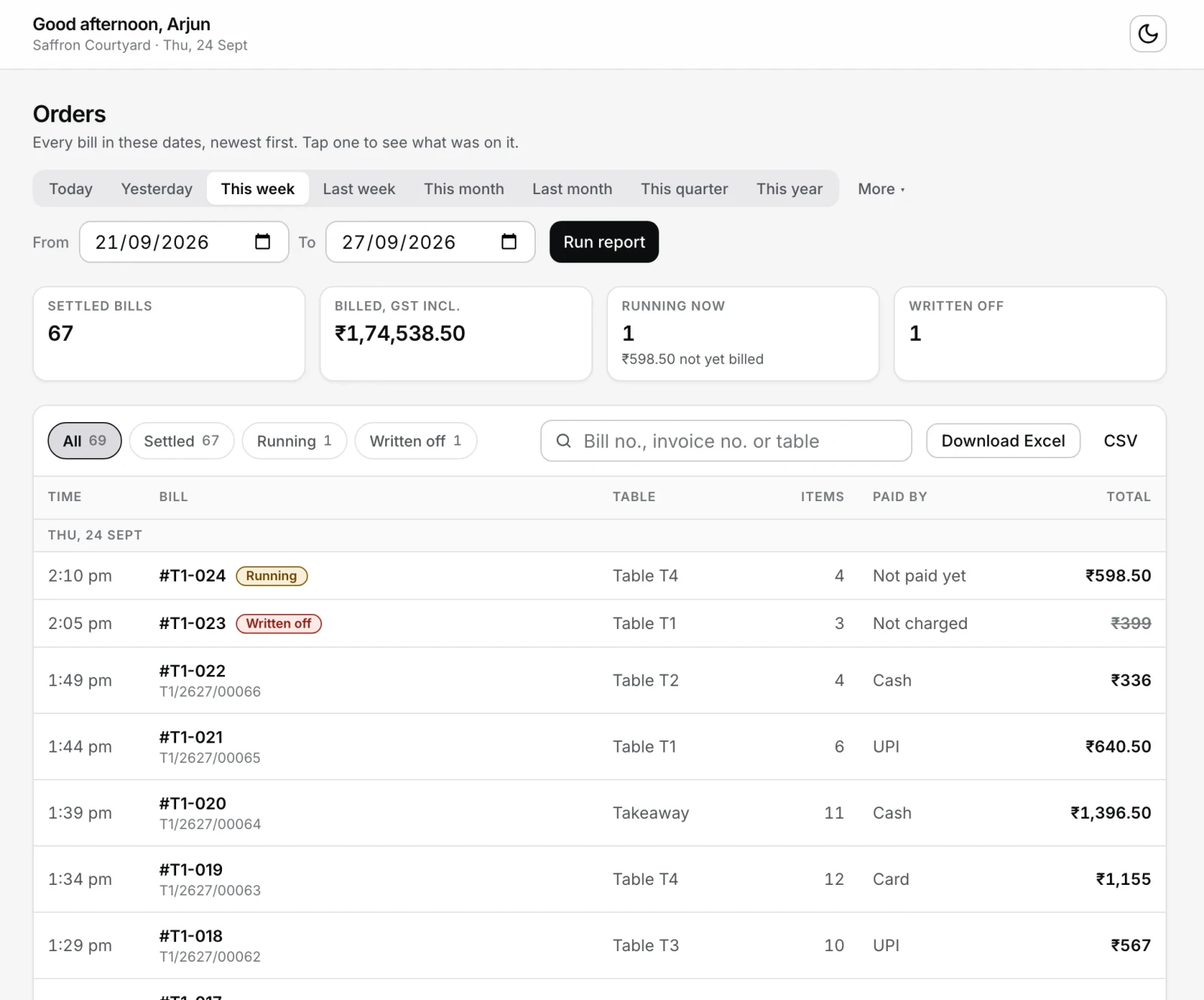
See your best sellers: the new Items sold page
Items sold ranks every dish by how many sold or by how much it made, with totals by category and a list of what did not sell at all. It needs no dish costs, so it works from the first day. Sales are shown before the bill's discount and GST.
See it: Owner dashboard → Items soldGuide: Orders list & items sold →
The Dashboard shows today's latest bills and fits a phone
A Latest orders card lists today's newest bills and opens one on a tap, and Top sellers links to the full Items sold list. On a phone the cards sit two across, the dates come from one dropdown, and the two-week chart's labels no longer print over each other.
See it: Owner dashboard → DashboardGuide: Orders list & items sold →
Register 0.1.14 for Windows and Mac
Installed tills pick this up on their own. It lets you take the customer off a paid bill, stops a Mac from getting stuck after Restart to update, and adds small drawings to quiet moments at the till.
See it: Register → Settings → About, or easykot.com/download
Small drawings on the register's quiet screens
An empty ticket, the first bill a new till prints, a kitchen board that has just cleared and the sign-in pad after a break now carry a small drawing that plays once and then sits still. Nothing on the sell path waits for one. Turn them all off in Settings under Little animations.
See it: Register → Settings → Register → Little animations
The Running tab stops flashing "Nothing running" over open tables
Switching to Running and back no longer flashes "Nothing running" over tables that are still open. It waits for your open tables to load before deciding the floor is empty.
See it: Captain app → Running
A dashboard tab left open no longer goes blank when you open a screen
If the owner dashboard stayed open while an update went out, the next screen you opened could go blank and drop you back on the Dashboard. It now shows Loading… for a moment, picks up the new version and opens the screen you tapped.
A Mac register no longer gets stuck after Restart to update
Once in a while a Mac could hang during the restart after an update, and macOS then said EasyKOT "is not open anymore" until the Mac was restarted. The register now shuts down cleanly before it opens again. A Mac already stuck needs one restart. The restart that installs this version still runs the old shutdown, so if you then see two EasyKOT icons in the Dock, keep using the one that opened and restart the Mac after closing time.
Take the customer off a paid bill
Attached the wrong person, and the real guest gave no details? Open the bill in Orders and tap Remove customer. The bill keeps its amount and payment, the customer stays in your list, and Add customer puts someone back.
See it: Register → Orders → a paid bill → Remove customerGuide: Customer name & number on the bill →
Register 0.1.13 for Windows and Mac
Installed tills pick this up on their own. It puts a customer's name and number on the bill and lets anyone at the till remove a sent dish with a reason, no manager PIN. On a Mac, the install window now carries the EasyKOT design.
See it: Register → Settings → About, or easykot.com/download
Removing a sent dish at the till takes a reason, no manager PIN
Anyone at the till who takes orders (owner, manager or cashier) removes a dish the kitchen already has by picking a reason, the same as on the captain app, and it is recorded under their own name. Refunds and day-close write-offs still ask for a manager's PIN.
See it: Register → cart → remove a sent item
Put a customer's name or number on the bill
Tap the person icon on the cart or on the captain's order screen, or fill in the optional Name and Number at Settle, and the customer is saved and printed on the bill. Find that bill again on the Orders list by part of the name or four digits of the number, and fix a typo with Edit contact there or on the new Customers page in the owner dashboard. No message goes to the customer and there is no delivery address yet, just a name and a number.
See it: Register → cart → the person iconGuide: Customer name & number on the bill →
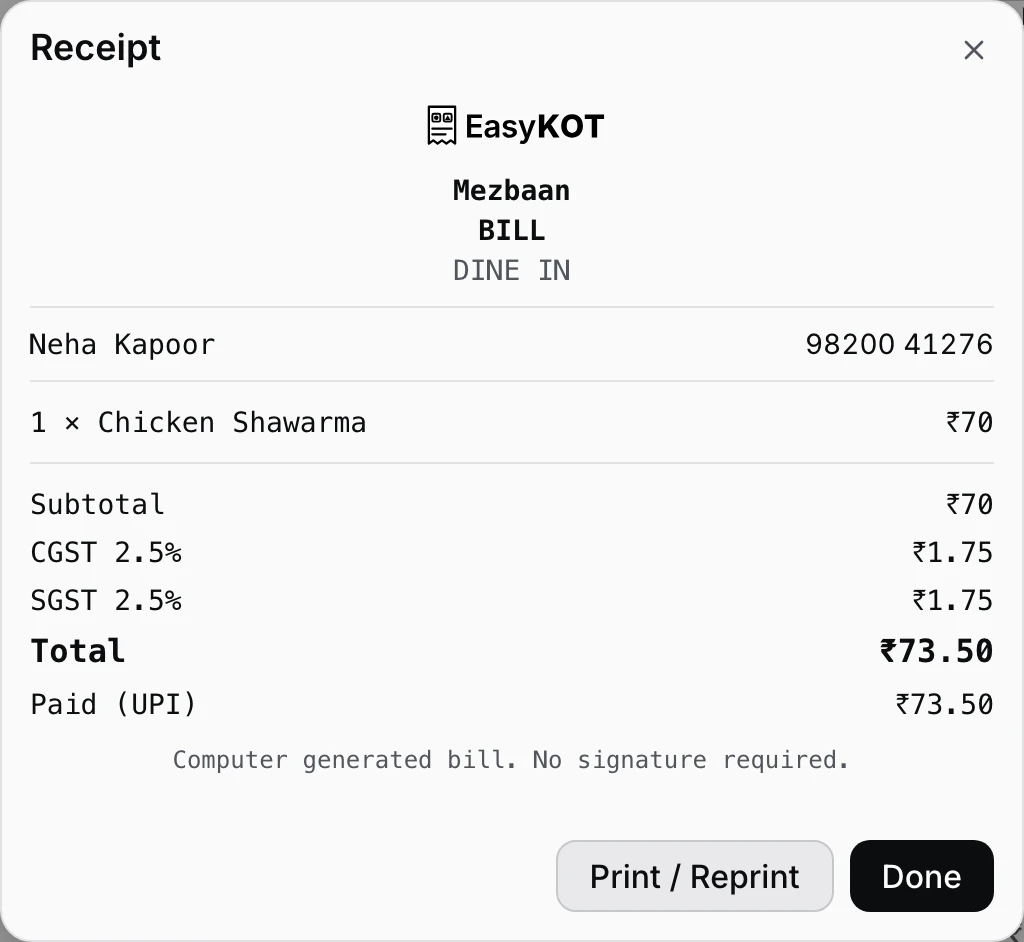
The store name on the bill and the number on the KOT print centred
On a real printer the top line of every bill and KOT landed against the left edge while the lines under it were centred; it prints in the middle now. The bill's number, order and table sit under a rule as label and value rows, a bill with a customer on it prints their number in full, and a parcel KOT prints the customer's name, For Neha Kapoor, so the bag can be called out.
See it: Register → ring an order → Print bill
An 80mm wide paper size for printers that fit 48 characters a line
Many 80mm printers fit 48 characters on a line, and a bill laid out at 42 on one of them leaves a blank strip down the right side. Pick 80mm wide under Paper size to use the whole roll. 80mm at 42 characters stays the usual choice, because a printer that only fits 42 wraps every money line at 48, and the test slip's row of digits shows which one yours is.
See it: Register → Settings → Printers & KDS → your printer → Paper size
Put categories and portion sizes in the order your menu card uses
Press Reorder on the Categories panel and move categories with the arrows; the till and the captain app follow. In a dish's Portions, the arrows move a size such as Quarter above Half on every dish at once.
See it: Dashboard → Menu → Categories → Reorder
Sell a dish in Quarter, Half and Full, even on a menu you typed by hand
Open a dish, tap Sell in portions, and it starts with Half and Full at the dish's price. Type Quarter (or any size) beside Add size, set its price, and save. A new size stays off every other dish until you price it there.
See it: Dashboard → Menu → Edit a dish → Portions
Captain app 0.2.4 for Android
Download it from easykot.com/download, or install it from Google Play if your phone is on the tester list. It carries the two-column menu, the Send KOT button and confirmation-only removal below.
See it: easykot.com/download → AndroidGuide: Captain app setup on waiter phones →
A waiter removes a fired item with one confirmation, no manager PIN
Taking the last unit of a fired line off a check asks the captain to confirm once and records who did it. A busy floor cannot wait for a manager; the captain is responsible and the removal stays in the check's history. When every item is removed and nothing was paid, the table frees itself.
See it: Captain app → open table → item → Remove
The fire button says what it does: Send KOT
The button that sends a round to the kitchen reads Send KOT with the count of new items, and the menu shows two columns with a separate quantity per portion, so Half and Full of one dish sit on their own lines.
See it: Captain app → open table → Send KOT
Register 0.1.12 for Windows and Mac
Installed tills pick this up on their own. It carries the printer and second-till fixes from the 17 and 18 September wave: a part refund now reaches the other tills, and a Mac register no longer freezes at start-up.
See it: Register → Settings → About, or easykot.com/download
GST is one choice for the whole store, and every dish follows it
Settings → GST takes one answer: Not GST-registered, GST 5%, GST 18% (restaurant in a hotel) or Composition scheme, and every dish picks the store's rate up at every till. A menu whose dishes carry no rate shows a warning on the Menu page with one button, Apply GST 5% to every dish with no rate, counted across the whole menu. Nobody sets GST dish by dish any more.
See it: Owner dashboard → Settings → GSTGuide: Your first GST bill →
A new store starts with GST switched off
A restaurant that signs up today rings dishes at their menu price and prints no tax line, so there is nothing to find in Settings first. An owner who is GST-registered switches it on in the dashboard and the whole menu charges from the next sale, with no dish-by-dish pass. Existing stores are untouched.
See it: Owner dashboard → Settings → GSTGuide: Your first GST bill →
The payment receipt email with the GST invoice PDF now arrives
Paying for EasyKOT sends the owner a receipt with the tax invoice attached. Before this the email never left, while the payment and the invoice themselves were fine. The "we couldn't collect your renewal" email had the same fault and now sends too.
See it: Owner dashboard → Billing
A composition scheme store prints a bill of supply, with no tax on it
Settings → GST takes Not GST-registered, Regular GST or Composition scheme, and says which document that store's bills will be before you save. A composition store's bills come out headed BILL OF SUPPLY with the declaration the law prescribes and no tax rows, and the register and the captain ring every item at 0%. A regular store's bill is now headed TAX INVOICE, prints the rate beside the tax (CGST 2.5%, SGST 2.5%) and ends with the computer-generated signature line.
See it: Owner dashboard → Settings → GSTGuide: Your first GST bill →
Register 0.1.11, and in-app updates that can actually install
Until this build no register could install an update from inside the app: the download failed its check at the end and the strip quietly vanished. 0.1.11 downloads with a progress bar and a Restart to update button, checks again every four hours instead of only at launch, shows its version at the bottom left of the rail, and reaches Macs as well as Windows. A register on 0.1.1 to 0.1.8 has to be reinstalled by hand once from easykot.com/download; after that updates arrive on their own.
See it: easykot.com/download
Dismiss the red print alert for a whole printer outage
One Dismiss covers that printer's outage, so new orders to the same offline printer do not bring the bar back. It returns only for something new: another printer going down, the same printer failing again after it recovered, or a ticket that ran out of retries. No ticket is dropped, and Settings → Print queue still lists every one of them.
See it: Register → Settings → Print queue
Part pay now takes only the amount you type
Arming Part pay used to leave the full bill sitting in the amount box, so pressing Settle collected the whole check with no warning. The box is blank now, and Settle stays disabled, with the reason beside it, until a smaller amount is typed.
See it: Register → Pay → Part pay
Fourteen register fixes: floor, kitchen board and printer setup
A second party seated on an occupied table now shows under Counter & parcels instead of disappearing, bumping a ticket clears it from the kitchen board at once, and Remove on a printer asks first, naming the printer, its address and role. A till with no printer saved shows its stuck queue in the tickets bar rather than leaving the jobs invisible, and a barcode scanner can no longer keep ringing up sales past the subscription lock.
A disconnected register says so instead of blaming the Wi-Fi
Revoke a till from Devices and it now reads "This register was disconnected by the owner", points at Settings → Register, and offers Connect this register on the lock screen. Selling keeps working offline and no unsynced sale is touched. "Sync failed" also means sync failed now: at every boot the register used to report a clean sync without reaching anything.
See it: Owner dashboard → Devices
A part refund taken at one till now shows on the other tills
Refund part of a settled bill at the counter and the second register, or the captain's phone, now shows it. Until now the other terminals dropped every partial refund and every part payment, so one till said refunded ₹200 and the next still said paid in full.
A crash while printing leaves the ticket on the queue, not lost
Force-quit the register with a KOT going to a hung printer, reopen it, and the job appears under Settings → Print queue as "may have printed", with It printed and Print again. It used to sit at Printing forever with both buttons dead. A printer moved from Kitchen to Receipt also stops taking that station's KOTs, which it used to keep doing silently.
See it: Register → Settings → Print queueGuide: Thermal printer not printing — fixes by symptom →
The bill on screen is the same document as the bill on paper
A GST-registered store's settle preview now reads TAX INVOICE and carries the address, state, GSTIN and FSSAI line, matching the slip the printer produces. It used to say BILL over its own CGST and SGST rows. A store with no GSTIN saved under Invoice identity still says BILL, on both.
Captain app: nine fixes, from PIN guessing to an honest printer check
Five wrong manager PINs on a phone now cost time, climbing to a minute, whether they were typed on the sign-in pad or the approval sheet. Check printer stops claiming a Bluetooth printer accepted a connection when nothing ever knocked, a test print whose link drops no longer marks a working printer offline, and a dish taken off stock while a portion sheet is open can no longer be rung up. A waiter who glances at a notification and comes straight back is still connected.
See it: Captain app → Device
Nine fixes to the register's money, kitchen board and bill numbers
A dish whose portions are all out of stock is refused by name instead of selling at the seed price, two people hitting Fire on the same table no longer send the first round to the pass twice, and two tills opened together cannot collide on KOT numbers. A table settled on a captain phone now prints a bill carrying a real invoice number in the till's own series, with its issue date. A check voided on a phone while the till takes cash for it stays settled, and the day's takings keep the money.
The owner dashboard fits a phone
Below tablet width the sidebar folds into a Menu button and every page gets the whole screen instead of the strip beside the rail. Tap Menu and the same navigation slides in from the left. The Invoice identity card is full width again, so a 14-digit FSSAI number can be read.
See it: Owner dashboard → Menu
Import with AI is its own card, separate from the template upload
Drop a PDF, photos of the printed card, or a spreadsheet in your own layout with no required column names, and the AI reads it while you review every dish before anything saves. Use our template sits below it: our columns, parsed instantly, free, no AI, and a sheet without a name and a price column is turned away with a pointer to the AI card.
See it: Owner dashboard → Menu → Import with AIGuide: Menu setup & AI import →
A printer set up with Detect printers prints again
A printer that answers a status query with its own name (a real Epson, a TVS) used to break its own setup: every receipt, KOT and drawer kick failed before it was even queued, and nothing warned you. Sales recorded, kitchen silent, no bill. Settings → Printers & KDS also loses the Share printer diagnostics card.
See it: Register → Settings → Printers & KDSGuide: Connect a thermal printer →
Signing out lands on Welcome back, not on Create your store
An owner who signed out used to be shown the signup panel again, in effect asked to create a second store, until the page was reloaded. Start free on easykot.com now also opens Create your store in a tab that already had the dashboard open.
A refund on a subscription payment reaches the Billing page
A full refund, or a bank dispute lost, now marks the invoice Refunded, takes the paid period away and drops the register back to trial or grace. Before this a refunded owner kept the month for free and nothing recorded it; a partial refund is recorded against the payment. Paying again after a declined card in the same window now says the payment succeeded instead of failed.
See it: Owner dashboard → Billing
One refund promise everywhere: our mistakes yes, change of mind no
The three free months are where you decide. A paid period, monthly or yearly, is yours from the day it starts and is not refunded; we refund our own mistakes, such as a duplicate charge, a charge after cancelling, or a fault we cannot fix. The 7-day change-of-mind refund is gone from the refund policy, the pricing page and the fine print under the pay button.
Register 0.1.7: discount, write-off and FSSAI lines on the bill
Installed tills update themselves to this build. It carries the discount and written-off rows that make a bill add up, the FSSAI licence line under the address, and GST charged on the discounted price. A till goes from 0.1.4 straight to this one.
See it: easykot.com/download
GST is charged on the discounted price, not the full one
A discount comes off the food's taxable value and GST is charged on what is left, which is what the store actually owes (CGST Act s.15(3)(a)). The guest pays the same total: 10% off a ₹189 bill reads Discount ₹18.00 and GST ₹8.10 instead of ₹9.00, total ₹170.10 as before, and the bill reads Subtotal, Discount, Taxable value, CGST, SGST, TOTAL. Bills discounted before this build keep the tax they were issued with, and a discount can no longer take a part-paid check below what was already paid.
Captain app 0.2.3 for Android
Install it from Google Play if your phone is on the tester list, or download the same release from easykot.com/download. It carries the honest kitchen status below.
See it: easykot.com/download → AndroidGuide: Captain app setup on waiter phones →
The captain stops calling a delivered round "Not sent to kitchen"
On a phone with no counter laptop paired, only rounds still waiting on the handset get the red Not sent to kitchen warning, and it clears itself a few seconds after the connection comes back. A round that has left the phone but no counter has taken reads a calm Sending to kitchen, and Sent to kitchen now means a register has picked the ticket up. A waiter following the old warning would have had the kitchen cook a dish twice.
See it: Captain app → open table
A table settled on the phone prints a clean first bill at the till
Cash or UPI taken on the captain's phone now prints the paid receipt at the counter as the original, the same paper the register hands over at its own settle. Every one of those first bills used to come out stamped DUPLICATE, COPY 2, and counted as a reprint on the audit. A reprint is still something a person taps, and it still says so.
A discount and a written-off amount now print on the bill
A discount prints as its own row between the tax lines and TOTAL, so the rows add up to the total. A check settled short keeps the full TOTAL, prints what was paid, then Written off under it. The on-screen receipt shows the same rows as the paper, including Round off, which only the paper used to print, and reprints and the captain's bill carry them too.
The FSSAI number prints on every bill
Type the 14 digits from your certificate under Invoice identity and they print under the address on every bill, GST or not, on reprints and on the captain's bills. The label follows the first digit, so nobody has to pick between Lic. No. and Reg. No., and a number that is not valid is never saved. Until it is saved the field says it will print, not that it does.
See it: Owner dashboard → Settings → Invoice identity
Captain app 0.2.2: Bluetooth prints one copy, not two
A KOT, a bill or a test page sent from an Android phone over Bluetooth used to come out twice, and the job then sat under Printers saying it may or may not have printed. One copy now, and the job reports that it was sent. The same build gives the phone's back button a step back and shows on the Device tab the version you actually installed.
See it: Captain app → Device → Printers → Test printGuide: Bluetooth printer + Android phone →
Android's back button goes to the previous screen, not out of the app
Back, or the back swipe, now steps back one screen: an open order returns to the floor, the settle sheet returns to the order, a setup form returns to the step before it. A table you opened and left without adding anything stays free, with no empty order behind it. Screens with nothing behind them still close the app, as before.
The download page is open to everyone, with the first-open warnings
easykot.com/download lists the current Windows .exe, Mac .dmg and captain .apk, always the newest release, with no access key. Clicking a download opens a panel showing the exact screens Windows and macOS put in front of an unsigned app and which button to press, with a copy button for the one Mac command. Show the steps reopens it without downloading again.
See it: easykot.com/download
The price carries its GST line, and the invoice is a tax invoice
EasyKOT is billed by KODEYARD under GSTIN 27DVXPS0694K1ZF, so every price on the site reads with its tax, and each charge produces a tax invoice with the supplier's registration on it, not a plain receipt.
Captain app 0.2.0: the first run asks one question
What will this phone do: run the counter, or take orders at the tables. The three-step enrol, pair and PIN sequence is gone, and the answer decides the rest of setup. A phone that runs the counter prints KOTs and bills itself, and setup now scans the QR instead of pasting 140 characters.
See it: Captain app → first openGuide: Captain app setup on waiter phones →
A cash box on the register: float, paid-outs and a blind count at shift end
Start the shift with a float, write a paid-out as it happens (₹450, vegetables), then close the shift: you type the counted cash first, and only then does the register show expected, counted and the difference in words, balanced or short by ₹100. Cash sales stay hidden until you have counted. Day close's first section points at a shift that is still open.
See it: Register → Orders → Cash box
Yesterday's bills at the till: open an earlier day, view it, reprint, refund
Orders has an Earlier tab: pick any business day, search by table, order number, bill number, dish or amount, and open a settled bill to read the receipt on screen beside Reprint and Refund. Each settled row shows how it was paid, Cash, UPI, Card or Split. The customer who comes back with yesterday's slip is answered at the till now.
See it: Register → Orders → Earlier
A refund needs a manager's PIN, not the cashier's own
Approving a refund asks for a manager's or the owner's PIN, and a cashier's PIN is refused, including the cashier who rang the bill. Whoever approved it is recorded on the refund.
See it: Register → Orders → a settled bill → Refund
The dashboard opens with last night in one line
Net sales before GST, order count and average bill for yesterday sit above today's cards, and the cards now name the day they mean. A brand new store's drill-downs land on the reports with a card telling you to start your first period, instead of a bookkeeping form and nothing else.
See it: app.easykot.com → Dashboard
A second till and the phones stay live on the shop network
Every order, fire, bump and settle rung on a joined register reaches the main till's Orders, Floor, kitchen screen and printer without a refresh. A joined till used to disappear from the main till, and both printed. Wi-Fi that drops and comes back reconnects on its own, and the main till's badge counts the phones and tills actually on it.
See it: Register → Settings → Multi-terminal
Register 0.1.4, with the start-up dialog and the first week of September
Installed tills pick this up through the updater. It carries the dialog that now appears when the window will not load, and the fixes from the first week of September.
See it: Register → Settings → About
A register that fails to load now says so, with Try again
If the window comes up blank, after 60 seconds a dialog explains in plain language that no sales were lost and the till is not damaged, and offers Try again, Keep waiting or Quit EasyKOT. It used to stay blank forever with nothing to press.
Set up a phone by scanning the QR the dashboard shows
The captain app's first screen leads with Scan the setup QR: point it at the code under Devices, Add device on the owner dashboard and the phone connects in one motion. The 140-character paste box is still underneath. The dashboard row turns to connected by itself once the code is used, instead of waiting over a code that already worked.
See it: app.easykot.com → Devices → Add deviceGuide: Captain app setup on waiter phones →
Skipping setup on a new phone reaches the demo menu
On a fresh install, the skip that offers the demo menu landed on the pairing screen with no code, no way forward and no way out. It reaches the demo menu now, and a re-pair opened from the Device tab can be cancelled.
The password reset link from the email works
Clicking the reset link said the link is incomplete, for every valid link, which locked out any owner who forgot a password. The form now opens and the new password sets.
See it: app.easykot.com → Forgot password?
EasyKOT Captain is on Google Play, for testers
Up to 100 people on the tester list can install the captain app from the internal-test link, with no wait. It is not public on Google Play yet.
Register 0.1.3, the first public build for Windows and Mac
The first build anyone can download and install, and the first that later releases can update on their own. The Mac build runs on both Apple Silicon and Intel.
See it: easykot.com/download
A till must reach the internet once every 30 days, and it warns from day 20
From 20 days without a completed sync the register dims a shade more each day and offers one Sync now button; on day 30 it stops selling until a sync lands. A till that is online never sees this, because the register syncs on its own. When a store's subscription lapses the banner says cloud sync is paused, offline sales carry on and nothing is wiped.
The captain app no longer asks to draw over other apps
The installed app no longer asks for the draw over other apps permission, which it never used. It came from the default Android template, not from anything in EasyKOT.
Printer setup asks which roll it takes, and the test slip proves the answer
Adding a printer asks 58mm or 80mm before Save printer and Print test page become tappable, with a line saying 58mm is about three fingers wide and 80mm is the usual bill. The test slip prints a row of digits exactly as wide as the size you chose, so a wrong answer wraps onto a second line and the slip names the setting to change. The captain app asks the same question.
See it: Register → Settings → Printers & KDSGuide: Connect a thermal printer →
Dashboard: how today is going, the moment you sign in
Sales, orders, average bill, what is still open on the floor, how you were paid today and your top sellers, with no period to pick. Every figure is compared against the same weekday last week, because a Saturday is worth several Tuesdays. It re-reads itself every minute while the tab is in front.
See it: app.easykot.com → Dashboard
Adding an expense is one screen and, for the usual costs, three taps
Press Add expense and the amount box is already focused. Chips built from your own last six months fill in who, what and how you paid it last time, twenty-three common restaurant costs file themselves under the right heading, and typing bijli bill or kiraya picks the category for you. Any row can be opened and edited afterwards.
See it: app.easykot.com → Expenses → Add expense
Accounts: your weekly sheet as a period you open, close and carry forward
Start a period with the cash in the business and you get six figures across the top: sales collected, online payouts, expenses paid, staff paid, profit, and the cash carried forward. Type the aggregator payouts and the money you took out, write a note on the period, then close it; the next one opens by itself at the closing balance. A bill logged into a closed week shows what changed and offers Recalculate rather than rewriting anything silently.
See it: app.easykot.com → AccountsGuide: Weekly accounts →
Staff pay, advances, and a labour cost that is a real number
Set a monthly salary, daily wage or hourly rate on anyone, give an advance mid-month, and Pay salary arrives prefilled net of it. Labour then shows the accrued cost of the days that have happened so far beside what you actually paid out, and each expense records where the money came from: cash, bank or UPI, the owner's pocket, or not paid yet. Every report carries the same period picker and says how fresh its numbers are.
See it: app.easykot.com → Staff & pay
The printer row says what is actually wrong, and a failed bill asks you what to do
Paper running low, Paper out, Cover open, Cutter jammed, Printer paused, Offline, or a router keeping devices apart: each read from the printer's own reply, in English with a Hindi line, and a printer that answers nothing is never shown green. If the bill printer is down at settle, the sale is saved first and you are offered Retry now, Fix printer, another printer, or keep it for reprint. Check printer runs five tests with a guided fix, and a printer that moved overnight is found again on its own.
See it: Register → Settings → Printers & KDSGuide: Thermal printer not printing — fixes by symptom →
Kitchen stations: bind a printer to a corner and one fire prints one ticket per corner
Tandoor food goes to the tandoor printer and the rest to the main kitchen, from a single Send KOT. If a station printer is dead the ticket hops once to the backup, and the dashboard can email you when a kitchen printer has failed five jobs in a row mid-service.
See it: app.easykot.com → Settings → Kitchen stationsGuide: Kitchen stations — split one order across corners →
Register, Orders and Kitchen switch instantly, and the cart keeps its place
Screens stay alive once visited, so moving between them is a show rather than a rebuild of a 300 item grid; the cart, the search box and the scroll position survive the round trip. The "Your store has no menu yet" banner stops flashing on every switch, cart lines wrap to two lines before truncating so two chicken dishes are told apart, and money on a floor tile wraps instead of clipping to ₹1,5.
See it: Register → Orders → Kitchen
August2026
A locked register has a way back in, and PINs can be reset from the dashboard
Type your PIN on the keyboard, and if nobody present knows one, Can't sign in? offers three doors in order: an owner or manager PIN (works with no internet), the owner's email and password, or connecting the register again. The dashboard finally has a Staff page to see the roster, add people and reset any PIN including your own, plus a forgot-password flow. A till enrolled to an account nobody can open any more can erase itself and join a different restaurant, and unsynced sales block that reset until they are uploaded.
See it: Register → Lock → Can't sign in?Guide: Staff PINs & roles →
Your night counts as one night: the trading day starts at 4am
A kitchen serving until 2am used to have its takings split across two report dates. Sales, bill numbers, the kitchen ticket window, labour hours and a late-night expense now all roll at 4am, and Settings has a card, When your day ends, to move that between 12am and 6am with a worked example that changes as you pick. The morning summary arrives at 8am and holds if a till that was selling last night has not synced yet, waiting until noon at the latest and then naming the till that stayed dark.
See it: app.easykot.com → SettingsGuide: Owner reports & daily summary →
Switch off the daily summary or the day close email
Settings → Notifications adds switches for the daily summary and the day close email, both on by default. A receipt and a renewal notice always send, because one is a tax document and the other is what keeps the register on. Every EasyKOT email now looks like EasyKOT rather than a plain default.
See it: app.easykot.com → Settings → NotificationsGuide: Owner settings — GST, day end and emails →
Each kitchen screen picks what it cooks
A checkbox row at the top of every kitchen screen lists Everything plus your top level menu categories. Tick Tandoor on the tandoor corner's screen and it sees only tandoor rounds, in the tickets, the prep lane, the all day counts and that device's Kitchen badge. A ticket that also carries another corner's food says so and its button becomes Done here, which clears only that screen. Ticking nothing is the whole kitchen, so a single screen store sees no change.
See it: Register → KitchenGuide: Kitchen display (KDS) setup →
A settled bill rings, parcels carry their handle, and a printer phone stays awake
A settle now plays a three note sound, distinct by ear from the new order ding, with its own switch under Settings → Register. Takeaway cards on the captain floor show their order handle so two parcels are told apart, the Device tab names the phone the way a manager sees it, and Android offers to open battery settings while phone printing is on. The captain's veg and non-veg marks now use the same brown and green as the printed bill.
See it: Register → Settings → Register
The owner dashboard is live at app.easykot.com
Sign in from any browser on any device: no install, no terminal. Devices is the tab to start with, because it mints the setup codes that enroll a till or a captain phone, and a price you edit under Menu reaches the register and the phone by sync.
See it: app.easykot.com → DevicesGuide: Set up your restaurant — signup to first bill →
The Floor screen answers at a glance, and Orders stays fast for the life of the store
A table that needs attention wears one small amber chip on its corner, with a count when several stack, instead of three badges spilling onto the row below. Counter and parcel cards are a uniform height with the money on the right and never clipped, and a stale check reads 26d 20h rather than 644h 33m. Orders and the kitchen board keep a rolling window of history per device, so a two year old store opens as fast as a new one.
See it: Register → FloorGuide: Table & floor plan setup →
The register dings when an order arrives that it did not ring
A captain fires from the phone and every register and kitchen screen in the store plays a two note chime as the order lands, over the internet or over the shop's own Wi-Fi. Your own orders on that till stay silent, a locked register still chimes, and it is off with one switch per device under Settings → Register.
See it: Register → Settings → Register
A settled check leaves the kitchen screen without a bump
Settle from the captain or the register and the check's tickets clear off every kitchen screen within seconds, so the Kitchen count stops climbing with rounds nobody is cooking. It applies to dine-in and parcel alike. A counter shop where people pay before the food is cooked turns off Clear kitchen tickets on settle under Settings → Register, and every ticket then waits for the chef's bump.
See it: Register → Settings → RegisterGuide: Kitchen display (KDS) setup →
Prep lane: cook one dish once for every table that ordered it
A third view on the kitchen screen, Prep + tickets, docks a production lane beside the tickets: 3 · Veg Fried Rice · T2 · T5 · T7, count first and then where each plate goes. Press a row and every ticket it feeds lights up on the rail. Only identical prep merges, a line with a cook's note is split out on its own with the note shouted, and each batch wears its oldest table's clock so batching can never hide a late table.
See it: Register → Kitchen → Prep + ticketsGuide: Kitchen display (KDS) setup →
An iPhone prints KOTs and GST bills to a Wi-Fi thermal printer
Add a printer by its IP on the Device tab, run a test print, then arm Print from this phone with a manager PIN, and KOTs and bills print from the iPhone while the app is open. The app says the limit out loud: an iPhone cannot print in the background, so a dedicated printer phone is still an Android, and Bluetooth printers remain Android only because Apple allows only its certified models.
See it: Captain app → Device → Add printerGuide: Connect a thermal printer →
Drive the real register in your browser at easykot.com/demo
No signup and no install: a 212 dish menu, punch an order, fire the KOT, settle by cash, UPI or card and read the GST receipt. It is the register itself, so your demo order survives a refresh and even airplane mode, and the screens that need hardware say so in plain words rather than looking broken. It needs a laptop sized screen; a phone gets a WhatsApp demo card instead.
See it: easykot.com/demo
Seating a table that already has a running check asks first
Pick an occupied table and the register names the money on it ("T1 is running a ₹240 check. Seat anyway?") and still lets you go ahead, because big parties do get shared. A brand new store now opens with five tables, T1 to T5, instead of an empty floor.
See it: Register → FloorGuide: Table & floor plan setup →
KOTs and bills stop printing the logo, so the paper goes to the ticket
Thermal paper is for the order and the numbers, not a header. The logo is off both the kitchen ticket and the customer bill.
A phone can run the restaurant: print KOTs, print bills, keep a cash shift
The captain app prints KOTs and GST bills straight to the store's thermal printer over Bluetooth or the shop Wi-Fi, so a service can run with the laptop switched off. Arming the phone as the store's printer takes a manager PIN; turning it off is one tap, because a jammed printer at rush is an emergency. Android only, and the phone must be enrolled as a register for its bills to carry an invoice number.
See it: Captain app → DeviceGuide: Run a POS without a laptop →
The phone works away from the shop Wi-Fi, for the waiter and for the chef
A waiter in the corner the Wi-Fi never reached, or on mobile data, still gets the round to the kitchen, and a chef on cellular data sees the board and can clear a ticket from it. The phone picks the road itself: the register's Wi-Fi first, the internet second, the phone's own storage if there is neither. A round travelling over the internet no longer carries the red warning that the kitchen never got it, and the red is kept for a phone where rounds really are piling up.
A refund reaches your books, and a reprinted paid bill says DUPLICATE
Refunding a settled bill used to print a slip and silently drop the entry: the customer had the cash and your books never knew. Refunds now reach the server with the name of whoever processed them, a reprint of a paid check is marked as a copy and shows the check as paid, and a discount records the manager who approved it. One corrupt order can no longer stop every kitchen ticket and bill in the store.
The EasyKOT mark is on every screen, every installer and every printed slip
The register window, the captain app icon and the dashboard rail carry the real lockup instead of a placeholder, and KOTs, bills and the printer test page get a one colour thermal header sized to the paper. It prints on every ticket for now, which is about 14mm of a 58mm roll.
A Kitchen button on the register, with a live count of open tickets
The register header carries the kitchen's open ticket count: grey when the pass is fine, amber past half your KOT SLA, red past it. Tap it for the same board the kitchen sees, bump a ticket, and come straight back to the till. The board itself is now a rail of fixed-width tickets that fill top to bottom then grow to the right, so the oldest is always top left and a rush scrolls sideways.
See it: Register → KitchenGuide: Kitchen display (KDS) setup →
Get started opens on the register download for your own computer
A fresh signup sees the Mac or Windows installer first, whichever it is reading from, and clicking one ticks the step and moves on to the menu while the installer runs. Until the installer links are published the step waits quietly and the menu stays step 1.
See it: Dashboard → Get started
EasyPOS is now EasyKOT, on every screen and on the paper
The register window, the captain app, the dashboard, the receipt and KOT headers, the GST tax invoice and the payment screen all read EasyKOT. Tax invoice numbers change prefix from EP/2627/000042 to EK/2627/000042. Every terminal on a store's network has to be upgraded together, because an old build and a new build cannot find each other.
Three months free, then ₹299 + GST a month or ₹2,990 + GST a year plus 18% GST
Every new store gets three calendar months with no card. After that you pay from the dashboard by UPI AutoPay or a card mandate, and every charge produces a GST tax invoice with CGST and SGST split out, emailed and downloadable. If a payment lapses there are 30 days of grace with full access: the register dims from day 20 and goes dark on day 30 with a Renew button on it.
See it: Dashboard → Manage → Billing
Pay once with any UPI or card, or set up auto-renewal
Many Indian cards cannot authorise a recurring charge under RBI rules, so Billing opens on Pay once: one period, no mandate, any UPI, card, netbanking or wallet, landing on the same GST invoice and the same access. Pay again and it stacks onto the end. The page prints the plan you are about to buy as a receipt, with the GST, the dates the period covers and what it works out to per day, and a Subscribe button that cannot work now says why beside it.
See it: Dashboard → Manage → Billing
A real GST tax invoice on the paper, with its own number
Three numbers now exist, minted at three moments: the spoken order handle when the check opens, the KOT number when the round is sent, and the invoice number at the first bill print or settle. The printed bill carries your GSTIN, address, state code, the invoice date and the CGST and SGST split, which you fill in once under Invoice identity. A reprint says DUPLICATE, keeps the same number and records who asked for it.
See it: Dashboard → Settings → Invoice identityGuide: Your first GST bill →
A Bluetooth or serial printer that is off fails in 10 seconds, with a hint
Test connection and Test print used to hang forever on a printer that was off, out of range or broken, and every queued KOT and bill for it froze with them. They now come back inside ten seconds saying what to try: toggle Bluetooth off and on, power-cycle the printer, or pair it again. You can also set the baud rate on a serial printer, which was fixed at 9600 before.
See it: Register → Settings → Printers
Assign a table on your own floor plan, not from an alphabetical list
The room you laid out in Settings is what the register shows when you assign a table, with seated tables tinted and carrying their timer and running total. Press and hold a table for its own actions: open the check, move the party, print the bill, set the guest count. A table whose bill is printed goes green and says BILLED, and drops back to seated the moment they order another round, because that paper is now wrong.
See it: Register → FloorGuide: Table & floor plan setup →
Every row in Orders says something, and an unpaid check has a way to end
A row now carries the table, what is on the check, what still needs doing, how long it has run and what it is worth, and search reaches a check by table, order number, amount or a dish on it. Open splits into Running now and From earlier days, so last week's service stops sitting on top of tonight's tables. A day close sheet bins the empty checks in one tap and writes off the never-paid ones behind a typed reason and a manager PIN, while a check that took money cannot be closed there at all.
See it: Register → Orders
The captain app is one product: a floor board, a Device tab and guided setup
Every open tab is a card, oldest first, carrying what it owes, how long it has sat and whether a round is still waiting for the kitchen, with a coloured edge past 45 minutes. Free seats a party from free tables only, because two tabs on one table is how a party gets billed twice. Device explains which register the phone is linked to and how many rounds are held on it, and setting a phone up is now one question at a time instead of three forms on one screen.
See it: Captain app → FloorGuide: Captain app setup on waiter phones →
Point the phone's camera at the till to connect it
The register's Multi-terminal screen leads with the address a phone can actually dial, this machine's own network address with the port, and shows a QR beside the code that carries both together. The old screen showed an address no phone could reach. Typing still works everywhere, for a denied camera, a cracked lens or a tablet without one.
See it: Register → Settings → Multi-terminalGuide: Captain app setup on waiter phones →
New owners land on Get started, not a dashboard of zeros
One step is open at a time, in the shortest order to a printed bill: menu, then register, then first sale. A sample menu loads in one click, the setup code is minted on the screen with a Copy button, and the steps tick themselves when the till connects and when the first sale rings, with no refresh.
See it: Dashboard → Get startedGuide: Set up your restaurant — signup to first bill →
Choose which day your reporting week starts on
Weeks were fixed to Monday. Pick a day in Settings and the card tells you what you get, for example weeks running Wednesday to Tuesday, and every This week and Last week preset on every report uses that boundary. No sale moves, only which week it is counted in.
See it: Dashboard → Settings → Reporting weekGuide: Owner settings — GST, day end and emails →
The register is rebuilt, with three themes and panels you drag
Monochrome, Midnight and Warm Paper, a category sidebar, menu grid and cart you drag to the widths you want, and four density stops that carry type size and tile height for a laptop or a touch screen. The veg, non-veg and egg marks keep their legal colours in every theme, on a white plate when the surface is dark.
See it: Register → Settings → Appearance
Half and Full are portions of one dish, not two dishes on the menu
A dish carries its portions with their own prices, and the portion rides the ticket line and the KOT as its own label beside the name, so the kitchen cannot cook the wrong size. Tapping a portion key on a dish that needs a spice level or an add-on now opens the chooser with that portion already picked, and a scanned or quick-added portioned dish can no longer ring at the base price with no portion at all.
Settle handles exact, short, over and part payments from one amount box
Type what the customer handed over and the register decides what happened: exact settles the check, short asks whether the gap is a discount or a loss, over shows the change due, and a part payment leaves the check open with the customer's name and phone recorded against it. The balance follows from the ledger, so nothing is typed twice.
See it: Register → SettleGuide: Settling a bill & change math →
86 a dish from the till, and the tile stays on the grid greyed out
A searchable list with a switch per dish lets a cashier stock out a sold-out item without opening the dashboard, and it works with the internet down. The tile stays visible and disabled rather than vanishing, because what is on the menu and what you can sell tonight are different questions.
See it: Register → Settings → Menu stock
Draw your room in the builder, then seat a table by tapping it
A table now has a position, a size and a shape, so Settings has a plan you drag your dining room onto, floor by floor. The Floor tab draws that plan instead of a grid of orders, and tapping a free table seats a party on it.
See it: Register → Settings → Tables & floorsGuide: Table & floor plan setup →
A waiter can take orders on a phone, and the register prints them
The captain app signs a waiter in on their own PIN, shows the floor and the menu, and puts a round on the kitchen printer or the kitchen screen over the shop Wi-Fi. A full order taken with the Wi-Fi off reconciles when the phone rejoins, with nothing lost, and a waiter and a cashier working the same table add up instead of overwriting each other. Every order event now names the person who made it.
An owner dashboard on the internet, with the whole menu in it
Sign in from any browser to add categories, dishes, modifiers and taxes, stock an item out, and import a menu from a spreadsheet. Changes reach every till on their own, and editing does not stop because a register is offline.
See it: Dashboard → Menu
A second till and a kitchen screen on one shop network, with staff PINs
One register leads on the store's network and the others join it, so an order rung on one is on the other in near real time with the internet off, and both converge on the same numbers when it returns. Staff sign in on a PIN checked against the till's own database, so sign-in works with the cable out, and a chef's PIN opens the kitchen screen and nothing else.
See it: Register → Settings → Multi-terminal
A till joins a store with a one-time code, and its database is encrypted
A register gets its own credential from a single-use setup code minted in the dashboard, and that credential can be revoked from there without touching the other tills. The till's own database is encrypted on the machine, so a copied file reads as noise rather than as your sales.
June2026
Thermal printing over network, USB, serial and Bluetooth, plus a kitchen screen
A receipt prints with items, modifiers, the CGST and SGST split and the total, on 80mm and 58mm paper, and the cash drawer kicks on a cash settle. Detect printers sweeps the network, USB and the serial ports so one tap fills in the host, port or path, a failed print queues and retries instead of losing the sale, and a barcode scanner adds a scanned dish to the cart. Any tablet on the shop network can open the kitchen board from the register, see a round land in under a second and bump it when the food goes out.
See it: Register → Settings → PrintersGuide: Connect a thermal printer →
Dark mode, and a register you can resize
The categories, the menu grid and the cart are three panels you drag to the widths that suit your screen, and the app remembers them. A one-tap toggle switches light and dark, following the machine's own setting to begin with. Voiding a line records the void instead of erasing the line, so the history of the check stays readable.
The first register: ring a sale and settle it in airplane mode
Browse the menu, add dishes with their modifiers, assign a table, send the round to the kitchen, settle by cash and see the receipt, with the network cable out the whole time. The check lives in the till's own database and syncs to the server when it reconnects.
Written on the day, from the change itself.
Every row is written from the pull request that shipped it, on the day it reached the main branch, and it is not rewritten afterwards: a mistake gets a new row that says so. A release row appears when the build is on updates.easykot.com, the same file every installed Desktop App polls, and the two version stamps at the top are read from there each time this page loads. Screenshots are captures from the running app, never drawings. What the product is not yet is on the story page, in plain words.
3 mahine try kare, phir plan chune.
Restaurant ka kaam hum samajhte hain, kyunki shuruaat bhi wahin se hui. 3 mahine free try kare, bina card details. Hamari kahani padhe.