Restaurant billing software jo internet band hone par bhi chale.
EasyKOT Desktop App aapke counter ke Windows ya Mac laptop pe dine-in, takeaway aur counter ki billing karta hai. Order punch kare, KOT kitchen bheje, cash, UPI ya card se settle kare aur bill print kare. Sab ek screen se, internet ho ya na ho. 3 mahine free, phir ₹299/month.
Offline chalta hai · compatible, tested ESC/POS printer · har Desktop App ka alag charge nahi · kabhi bhi cancel
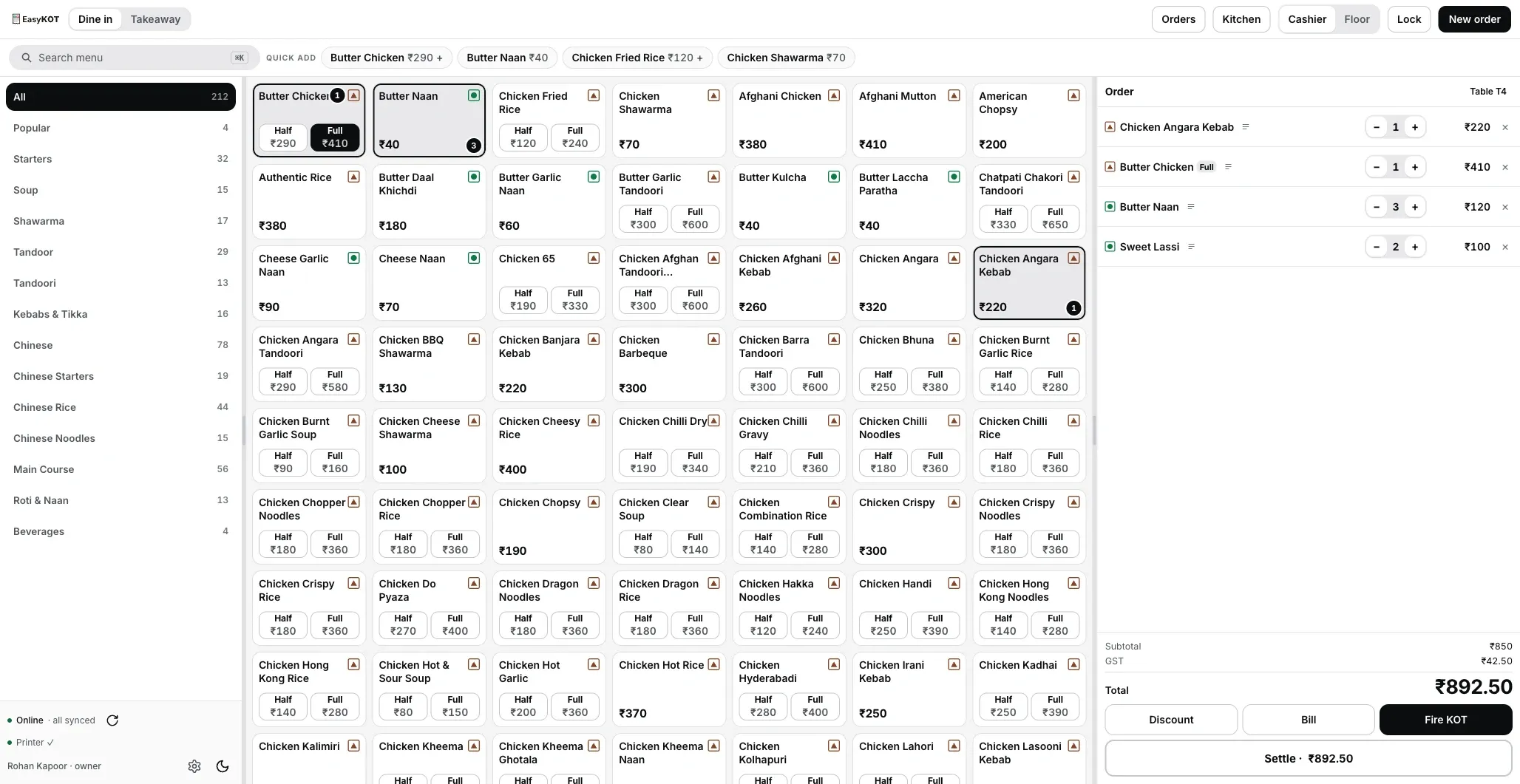
Asli billing screen: left mein categories, beech mein menu, right mein cart. Desktop App se capture kiya hai, drawing nahi. Zoom ke liye click kare.
Order se bill tak, bina ruke.
- Table khole, ya parcel. Dine-in table par chalta hai, total saath-saath badhta rehta hai. Takeaway ek tap. Dish search kare ya tile dabaye, Half ya Full chune aur note daale, jaise "kam teekha" ya "Jain".
- KOT bheje. KOT (kitchen order ticket) woh slip hai jo kitchen ko batati hai kis table ke liye kya banana hai. Fire KOT button se kitchen printer (ya kitchen screen) pe wahi jaata hai jo abhi bheja. Table ne baad mein aur manga? Agle KOT pe sirf nayi dishes jaati hain, koi dish do baar nahi banti.
- Galti theek kare, hisaab saaf rakhe. Kitchen gayi line ki quantity kam ho sakti hai: teen paani mein se ek wapas aaya, bill do ka. Poori dish hatani hai toh reason dena padta hai. Neeche poora scene likha hai.
- Fatafat settle. Cash, UPI, card ya Part pay. Paise kam aaye toh Discount ya Loss mein daale, zyada aaye toh change screen pe dikhta hai. Settle hote hi cash drawer khulta hai aur GST bill payment mode ke saath print hota hai. Settle aur change ki guide.
Billing machine, desktop POS ya apna laptop?
Restaurant billing ke teen raaste hain. Ek all-in-one billing machine, jo printer ke saath aati hai. Ek desktop POS, jiska licence ek baar khareedna padta hai. Ya aapka apna laptop, us pe EasyKOT. Kisi bhi machine ya POS wale se baat karne se pehle yeh table dekhe. EasyKOT wala column wahi hai jo aaj app mein hai.
| All-in-one billing machine | Licence wala desktop POS | Aapke laptop pe EasyKOT | |
|---|---|---|---|
| Shuru mein kharcha | Machine khareedni padti hai | Licence, upar se PC | Aaj ₹0. 3 mahine baad ₹299 + GST har mahina |
| Internet gaya toh | Chalti hai | Chalta hai | Order, KOT, print, settle, sab chalta hai |
| Doosra counter | Doosri machine | Aksar doosra licence | Doosra laptop, same Wi-Fi, alag charge nahi |
| Waiter ka phone, kitchen screen | Model pe depend karta hai | Aksar alag paid module | Included: Android pe captain app, kitchen mein tablet |
| Ghar se sales dekhna | Model pe depend karta hai | Kabhi kabhi cloud add-on | app.easykot.com pe dashboard |
| Printer | Machine ka apna | Jo POS support kare | Compatible 58 ya 80 mm ESC/POS model aur supported interface; test slip aur test bill se verify kare |
Machine aur licence wale column mein hamne kisi ka naam ya daam nahi likha, har model alag hota hai. Poochne layak sawaal wahi hain jo table ki rows mein hain. EasyKOT ka poora daam pricing page pe ek line mein hai.
Aapki settings se bill, pehle CA se review.
- Aapki configured details se bill: GSTIN, bill series, CGST aur SGST alag line pe, round-off.
- Composition scheme? Bill BILL OF SUPPLY banta hai, tax line ke bina, composition declaration ke saath.
- Naya store GST off se shuru. Store ka GST mode aur item tax treatment CA se confirm karke hi Settings mein set karo. GST 18% (where applicable) hotel location se akela decide nahi hota; specified-premises rules aur declarations bhi matter karte hain. Rates aapki marzi se interchange nahi hote. Item alag bechne aur restaurant service ke saath dene pe tax treatment alag ho sakta hai. Live sales se pehle sample bill CA ko dikhao.
- Day close pe har Desktop App ka hisaab: pehla aur aakhri bill number, kitne bane, kitne cancel, aur beech se koi number gayab ho toh woh bhi screen pe.
- Bill reprint pe DUPLICATE aur copy number chhapta hai, bill number wahi. Original ek hi rehta hai.
Pehla bill step by step: pehla GST bill kaise banaye · restaurant ke GST bill ke rules · cash shift khole aur drawer count kare
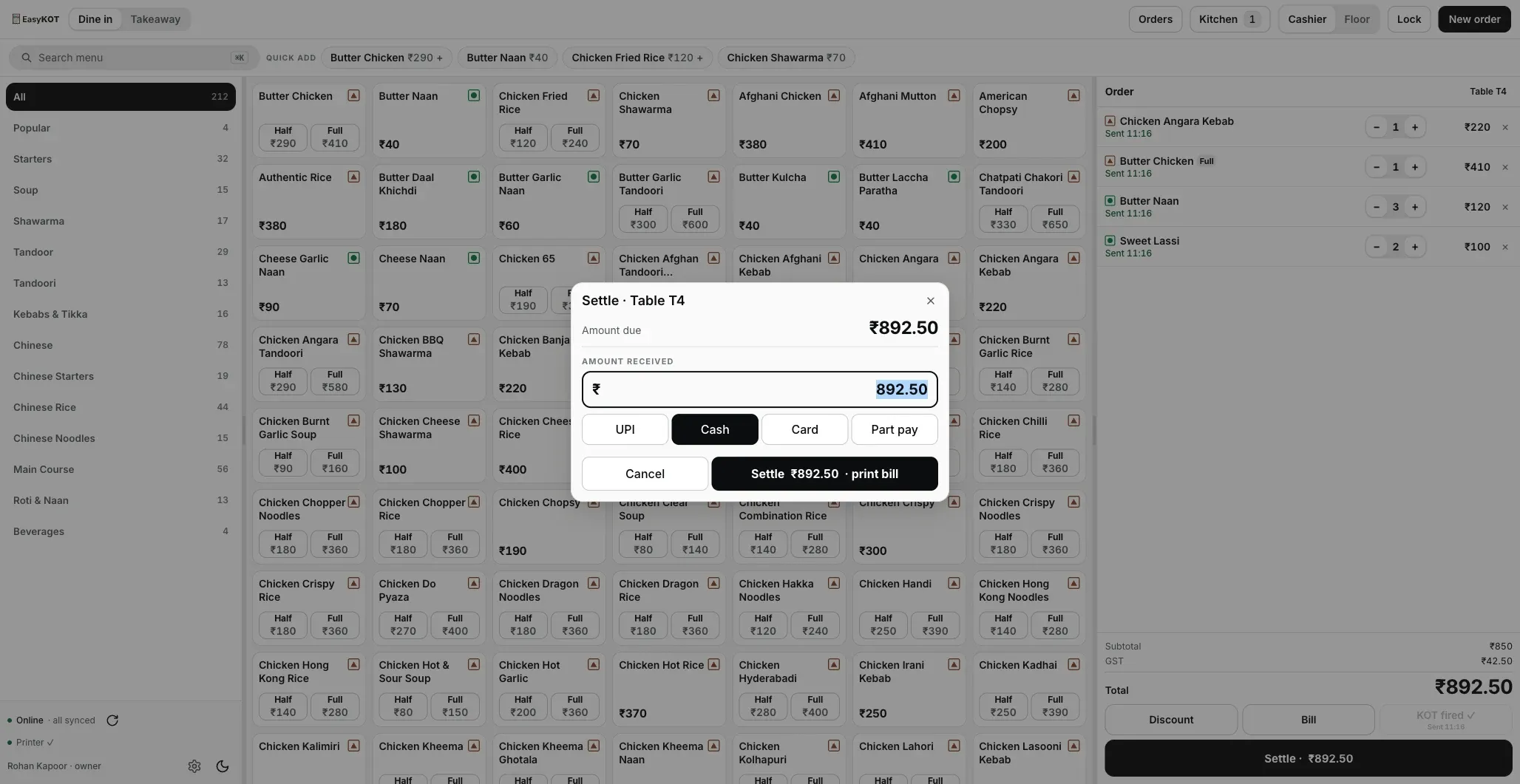
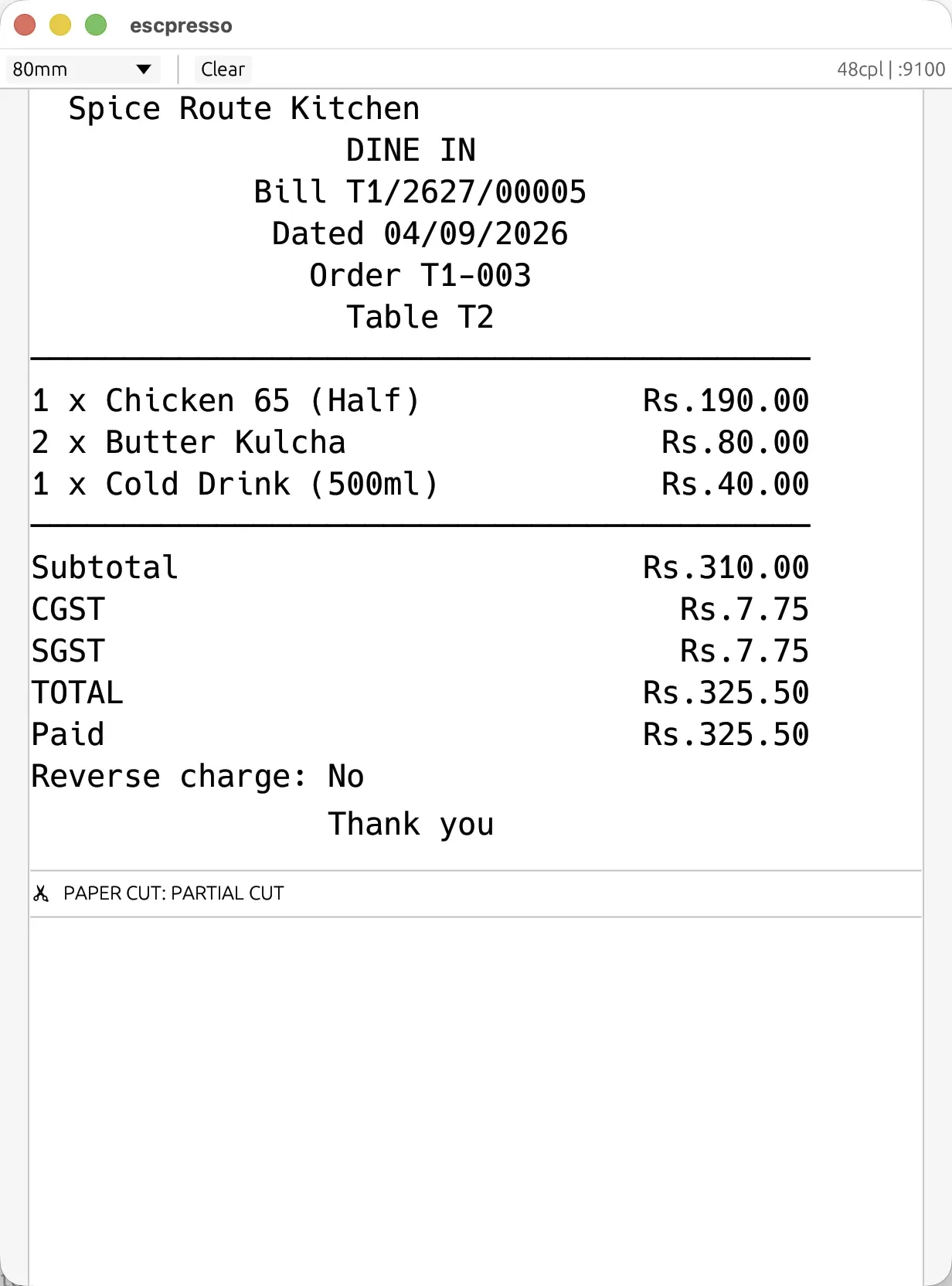
Paper pe bill aisa aata hai: Desktop App jo bytes printer ko bhejta hai, wahi ek virtual ESC/POS printer pe. Mockup nahi.
Khaana wapas aaya? Hisaab phir bhi saaf.
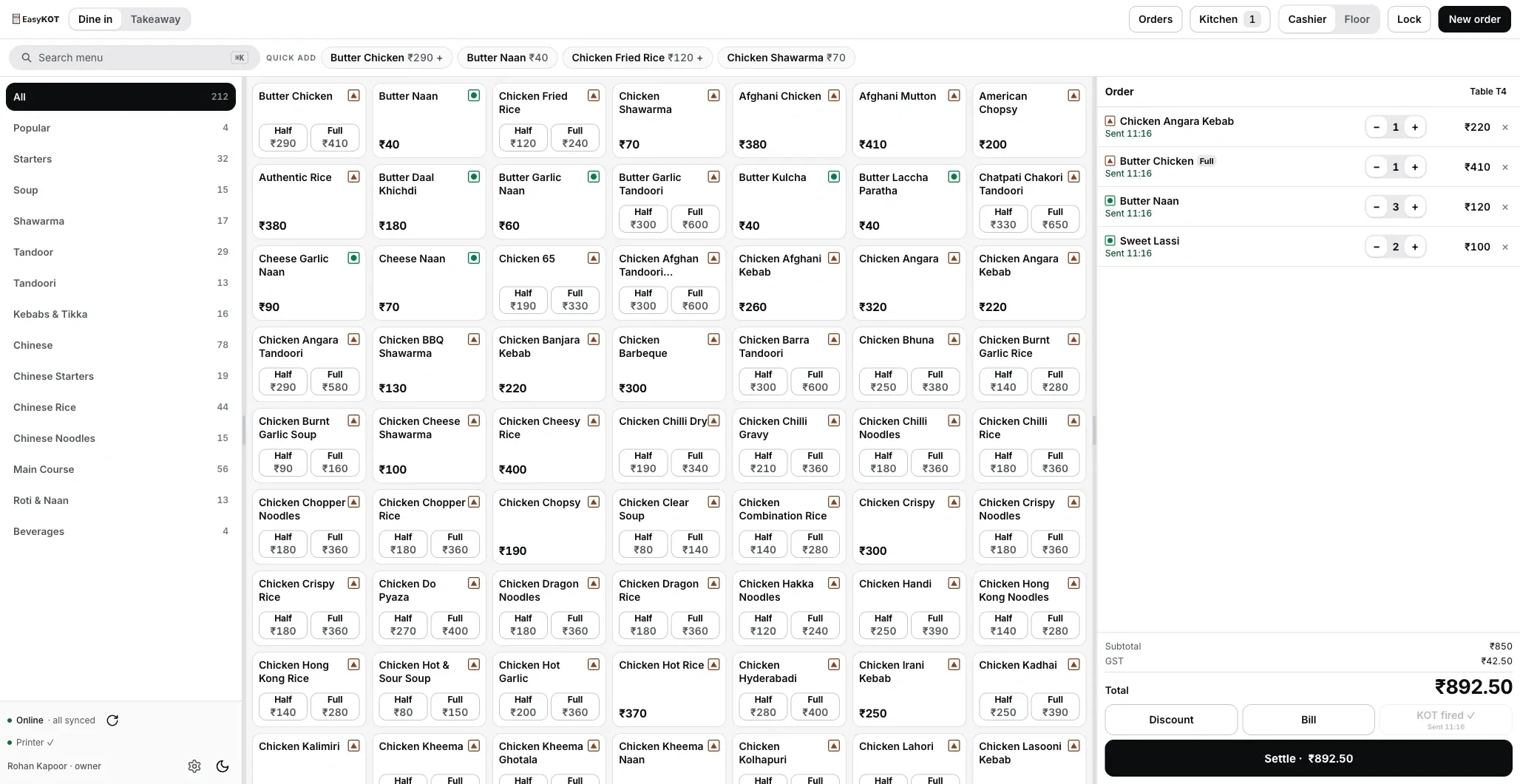
- Kitchen gayi line lock. Har line pe likha aata hai "Sent" aur kab gayi, aur button ban jaata hai Reprint KOT: ek tap pe wahi round dobara chhapta hai, upar REPRINT likha hua, taaki kitchen do baar na banaye.
- Round 2 ka KOT sirf round 2. Nayi dishes daale aur phir bheje; KOT par bas woh jaati hain.
- Quantity kam karna free hai. Bill khula hai tab tak kitchen gayi line ki quantity kabhi bhi ghata sakte hain.
- Poori dish hatani hai toh reason. Chaar mein se ek chune: Customer changed their mind, Kitchen cannot make it, Rung on the wrong table ya Wrong item rung. Owner, manager ya cashier, jo bhi login hai, reason chune aur Void line dabaye. PIN kisi ko nahi lagta, aur void usi ke naam pe record hota hai.
- Captain app pe waiter ek baar confirm karta hai, PIN nahi. Reason apne aap likh jaata hai.
- Record rehta hai. Hatayi hui line cart pe cancelled dikhti hai, kab bheji thi woh time bhi. Reason aur kisne approve kiya, order ke saath save. Kitchen screen se dish khud hat jaati hai. Kitchen printer pe cancel slip nahi jaati, toh kitchen ko jaake bolna padta hai.
- Poora order cancel bhi hota hai. Order panel ke neeche, Settle ke bagal wala Cancel order dabao, reason pe click karo ya apne words likho, dialog mein table aur bill check karo, phir Cancel order dabao. PIN nahi lagta. Bill pe paisa record ho gaya toh key grey ho jaati hai. Orders list mein cancelled bill reason aur naam ke saath dikhta hai.
Void, discount aur refund ka poora tareeka: discount, void aur refund ki guide. Waiter table pe order captain app se bhi le sakte hain.
Internet gaya toh kya chalega, kya rukega?
Seedha jawaab: counter pe kuch nahi rukta. Desktop App ka database laptop pe hi hai, internet sirf dashboard tak sales pahunchane ke liye chahiye. Rush mein jo lafde hote hain, unka scene yeh hai:
| Kya hua | EasyKOT kya karta hai |
|---|---|
| Internet chala gaya | Order, KOT, print, settle sab chalta rehta hai. Internet aate hi sales khud upload. Bas 30 din mein ek baar judna zaroori hai, 20ve din se yaad dilata hai. |
| Printer ka paper khatam | Sale save ho chuki. Print queue mein rukta hai aur khud dobara try karta hai: 1, 2, 5, 15, 30, 60 second, phir har minute — 5 minute tak. Phir bhi nahi hua toh ruk jaata hai aur aapko bulata hai. |
| Guest ne dish wapas bheji | Quantity kam kare, ya dish reason ke saath hataaye. Desktop App par koi bhi login ho, PIN nahi lagta; waiter captain app pe ek baar confirm karta hai. |
| Table ne doosra round manga | Agle KOT pe sirf nayi dishes. Pehli wali dobara nahi banti. |
| Guest ne bill se kam diya | Settle par fark Discount ya Loss mein daale. Ya Part pay chune; baaki bill khula rehta hai. |
| UPI aaya ya nahi? | Desktop App mein payment gateway nahi hai. Apne QR wale phone ya soundbox pe paisa check kare, phir UPI mark kare. |
| Customer ko bill dobara chahiye | Reprint pe DUPLICATE aur copy number, bill number wahi. Kisne manga, woh bhi record. |
| Doosra Desktop App khulna hai | Doosra laptop same Wi-Fi pe single-use code se judta hai (code 5 minute chalta hai). Apni bill series, same dashboard. |
Aur detail mein: internet jaaye toh billing kaise chalti hai, aur offline simulator jahan internet katne ka scene live dikhta hai.
Desktop App supported laptop par chalega.
- Sasta 1366×768 laptop chalega. Desktop App ki screen usi size ke hisaab se banayi hai.
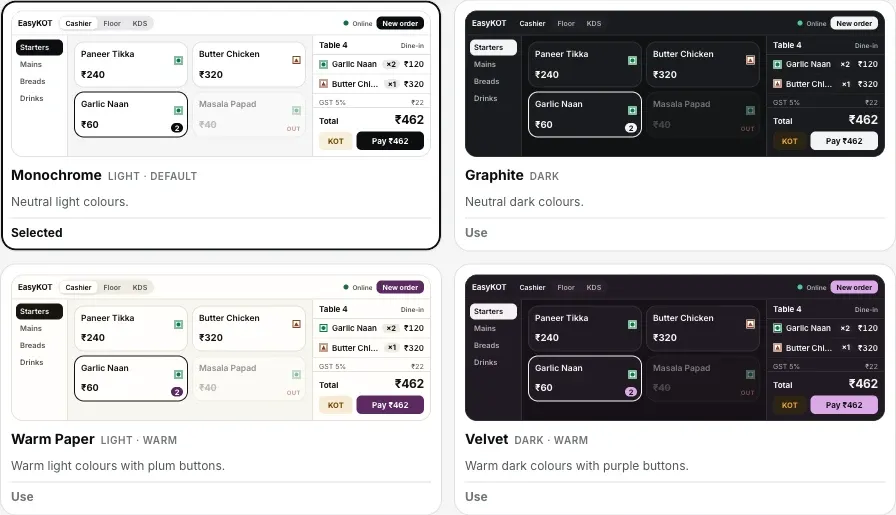
- 6 theme, 4 text size, har Desktop App ka apna. Din mein Monochrome, dim counter pe Midnight. Purane staff ke liye compact, naye ke liye spacious.
- Compatible ESC/POS model aur interface. 58 ya 80 mm printer ke liye supported LAN, Wi-Fi, USB ya serial path chune. Test slip aur sample bill se connection, width, layout aur total verify kare. Printer connect kare · printer print nahi kar raha?
- Laptop hi nahi? Android phone counter ban sakta hai.
- Menu tap karne ko ready: PDF ya photo se AI import, menu management se, har Desktop App pe sync.
Seedhe jawaab.
Offline mein billing sach mein chalti hai, ya sirf dekh sakte ho?
Bill pe business aur GST ki kya details aati hain?
Naya store banaya, GST pehle se on hai kya?
Payment kaise hota hai?
Bill pe customer ka naam aur number aa sakta hai?
Kaunsa computer chahiye?
Do Desktop Apps ek saath billing kar sakte hain?
Rush ke beech printer ruk gaya toh?
Poora daam ek line mein: ₹299/month ya ₹2,990/year, plus 18% GST, sab included.
3 mahine try kare, phir plan chune.
Restaurant ka kaam hum samajhte hain, kyunki shuruaat bhi wahin se hui. 3 mahine free try kare, bina card details. Hamari kahani padhe.