Discount, void, refund — sab record pe, koi chori-chhipe nahi.
Restaurant money doesn't leak at the settle. It leaks in the exceptions: the quiet discount, the dish that came off the bill after the kitchen cooked it, the refund nobody remembers. The EasyKOT Desktop App gives staff all three keys, and puts a name, a reason and a record on every press.
Chaar money keys, chaar alag rules.
Discount — quick keys, subtotal pe
Cart pe Discount dabao. Quick keys ek tap mein subtotal ka 5, 10, 15 ya 20 percent kaat deti hain, ya flat rupee amount type karo. Desktop App 0.1.20 ki sheet saaf bolti hai: 'Comes off the subtotal before GST is calculated.' Matlab ₹200 ke check pe ₹10 discount, 5% GST, toh taxable ₹190, GST ₹9.50 aur bill ₹199.50. Discount dobara kholo toh saved amount field mein pehle se hoga, aur quick key use ki thi toh woh highlight rahegi. Doosri value chuno toh purani replace ho jaati hai, ₹0 type karo toh discount hat jaata hai. Yeh comp nahi hai, kitchen ka cost kahin write-off nahi hota. Manager aur cashier seedha apply karte hain; captain ke phone pe wahi key manager ka PIN wahin maangti hai, aur approval pe manager ka naam rehta hai.
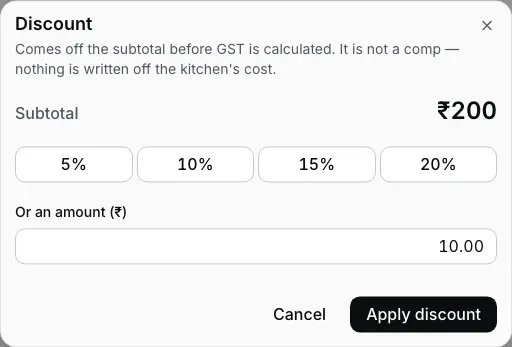
Step 1: quick keys or a flat amount, off the subtotal. Reopen it and the ₹10 is still there to change or clear.
Fired dish ka void — reason bhi, naam bhi
Kitchen ne jo dish bana di, woh chupchaap gayab nahi hoti. Fired line void karte waqt reason poochta hai (customer changed their mind, kitchen cannot make it, rung on the wrong table, wrong item rung) aur jo sign in hai uske naam pe record hota hai. Desktop App screen pe khud bolta hai: void matlab food write-off, cost store ka, aur jo reason chuna wahi write-off report mein dikhta hai. Void hui line check pe strike-through dikhti rehti hai, jab tak koi kitchen ko bata na de.
Poora order cancel — reason har baar, PIN nahi
Cancel order order panel ke neeche hai, Settle ke left mein: chhoti key, red outline, Settle jaisa black fill nahi. Woh ek hi cheez poochta hai: kyun. Reason pe click karo (Customer left, Customer changed their mind, Ordered by mistake, Duplicate order, Wrong table, Item not available), ya apne words mein likho aur Cancel order dabao. Phir dialog table, bill aur reason dikhakar ek baar aur poochta hai: Cancel order dabao toh bill band, Keep order dabao toh wapas reason chuno. Manager PIN nahi lagta: jo sign in hai wahi cancel karta hai, aur Orders list mein bill cancelled dikhta hai, reason aur naam ke saath. Kitchen ne khana bana diya ho toh dialog reasons ke upar bata deta hai; kitchen ko jaake bolo. Bill pe ek rupee bhi record ho gaya toh key grey ho jaati hai: balance settle karo ya refund karo. Yahi key Orders mein empty check ki detail pe bhi hai (jis check pe food hai woh Cashier mein khulta hai, key wahin hai). Captain ke phone pe bhi yahi key hai, aur woh bhi aise hi poochta hai. Kuch delete nahi hota; cancelled check din ki history mein rehta hai.
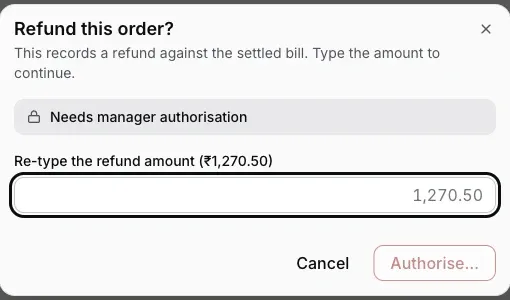
Step 3: re-type the amount, sign with a PIN. Money out is never one tap.
Settled bill ka refund — amount dobara type karo
Refund Orders screen pe milta hai: settled order kholo aur Refund dabao. Desktop App exact refund amount dobara type karwata hai (jaan-boojh ke rakha speed bump, kyunki business se paisa bahar jaana kabhi ek galat tap se nahi hona chahiye), phir har baar manager ya owner ka PIN leta hai, owner khud ho tab bhi (cashier ka apna PIN kaafi nahi). Refund ledger mein original bill ke against record hota hai, aur internet band ho tab bhi chalta hai.
Who holds which key is the roles system doing its job: the staff PINs & roles guide has the full table of who acts alone and who needs a manager beside them.
Straight answers.
Poore check ki jagah sirf ek dish pe discount de sakte hain?
Complimentary (comp) dish de sakte hain kya?
Why does voiding cooked food need a reason?
Can I refund part of a bill?
Does a reprinted bill look like the original?
Do these controls work when the internet is down?
The rest of the money path.
Settling & payments
Change math, short payments, part pay: what happens at the moment money actually moves.
See the settle guide →Staff PINs & roles
The role table behind every approval prompt on this page.
Set up staff →Closing the day
Write-offs at scale: the 'No payment recorded' bucket and the GST document register.
Close the day →Every guide in this cluster is listed on the guides hub.
3 mahine try kare, phir plan chune.
Restaurant ka kaam hum samajhte hain, kyunki shuruaat bhi wahin se hui. 3 mahine free try kare, bina card details. Hamari kahani padhe.