Menu management, AI import ke saath: poora menu, minutes mein.
Menu ka PDF, printed card ki photo ya Excel sheet upload kare. AI dishes, category, Half/Full price aur veg/non-veg ka draft grid banata hai. Har row check karke approve kare; approve hone se pehle menu save nahi hota. Uske baad category, portion, add-on aur stock-out ek jagah manage kare; GST settings CA se confirm kare.
PDF · photo · CSV/Excel · 245 Indian dishes ki library · approve kiye bina kuch save nahi
Menu daale, grid check kare.
- 1 · Jo hai woh upload kare: menu ka PDF, har page ki photo, ya purane system ka CSV/Excel, jaise bhi columns mein nikla ho. Import with AI se shuru kare.
- 2 · AI padh ke review grid banata hai: Dish, Category, Portion, Price aur Veg / Non-veg, har dish aur size ki ek row.
- 3 · Review karke approve kare. Naam theek kare, price sudhaare aur extra row hataaye. Aapke approve karne tak kuch live nahi hota.
Menu ka har price, bilkul wahi. Pilot restaurant ka 7.3 MB menu PDF 16 Sep 2026 ko import karke check kiya. Kareeb 2 minute mein review ready tha, aur 317 mein se 317 prices PDF se match hue. Photo blurry ho toh save karne se pehle review grid mein details check kare.
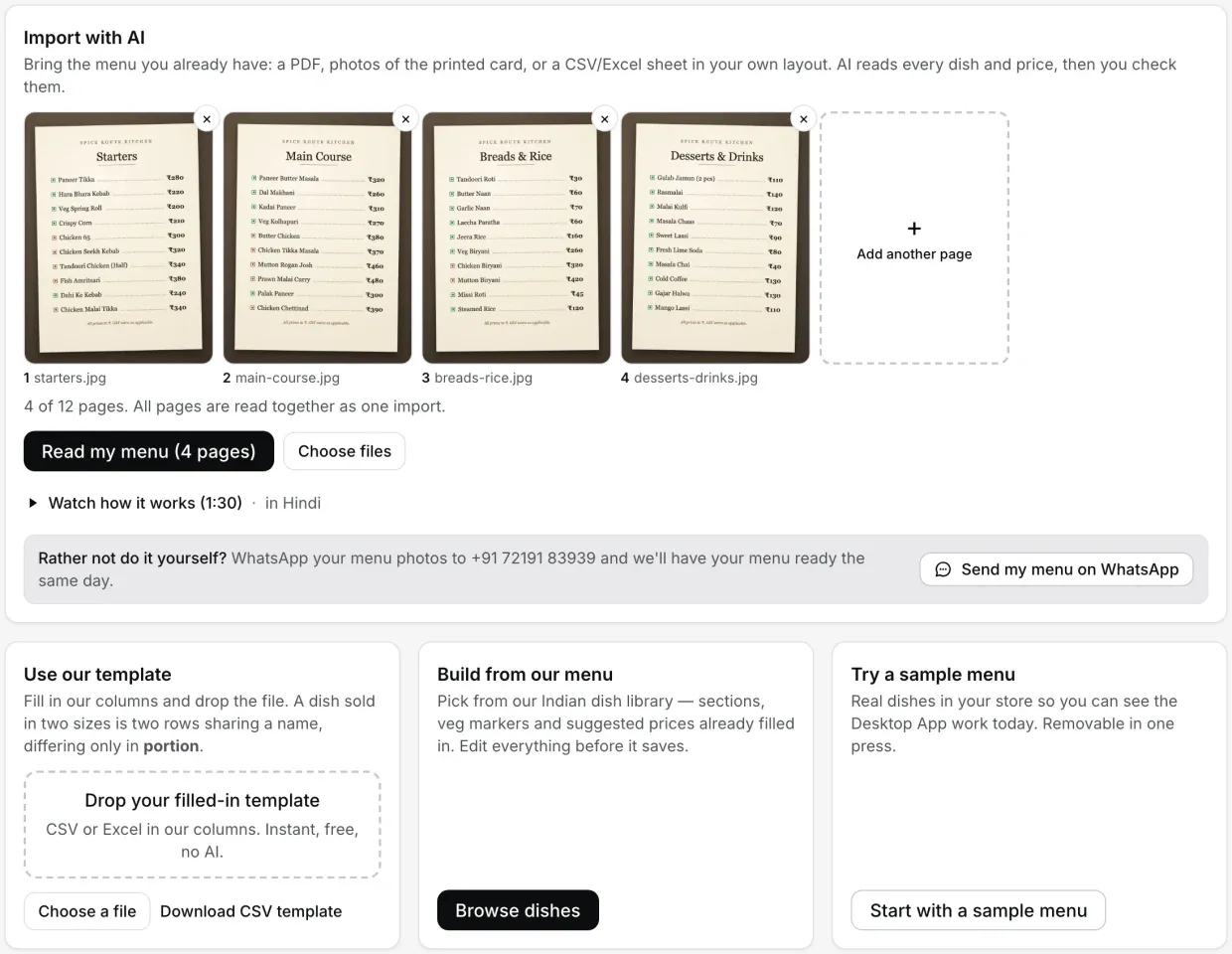
Aapka menu PDF, photo ya Excel mein hai?
Card par chaar button hain. Apne menu ki haalat dekhe aur sahi option chune:
| Aapka menu abhi | Kaunsa button | AI? | Kitna time |
|---|---|---|---|
| Printed card, PDF ya photos | Import with AI | Haan | Pilot ke 7.3 MB PDF pe around 2 minute, phir aapka check |
| Excel ya CSV, apne layout mein | Import with AI | Haan | AI padhega, phir aapka check |
| Excel ya CSV, hamare template ke columns mein | Use our template | Nahi | Turant |
| Kuch likha hua nahi | Build from our menu (245 dishes) | Nahi | Jitna time dishes chunne aur price lagane mein |
| Bas EasyKOT Desktop App chala ke dekhna hai | Start with a sample menu | Nahi | Turant, ek press mein hat bhi jaata hai |
Step by step screenshots ke saath: AI se menu import. Haath se banana hai toh menu by hand guide.
Ek baar badle, har jagah badal jaata hai.
- Har screen pe live. Approve kiya menu Desktop App pe aur har captain phone pe aa jaata hai. KOT pe dish ka naam aur portion wahin se jaata hai.
- Change khud sync hota hai. Dashboard mein price badle, Desktop App aur captain phones sync se utha lete hain. Abhi ke abhi chahiye toh Desktop App pe Online ke side wala refresh icon (label: “Sync menu now”) dabaye.
- Stock-out ek tap mein. Menu & stock mein har dish ka ek switch hai. Band kare toh dashboard mein “Stock out” dikhta hai, Desktop App pe tile grey hoke “Out of stock” ban jaati hai, aur Desktop App ya captain phone se order nahi hoti jab tak switch wapas on na ho. Poori category ka bhi apna switch hai.
- Order aapka, alphabet ka nahi. Categories panel mein “Reorder” se category upar-neeche kare, sub-category apne parent ke neeche hi rehti hai, aur Desktop App pe list usi order mein aati hai. Dish editor mein portion sizes bhi aise hi upar-neeche hote hain, aur naya order har dish pe lagta hai.
- Jo zyada bikta hai, use pin kare. Dish ke side ka pin use Desktop App ke “Pinned” shelf aur “Quick add” strip pe le aata hai.
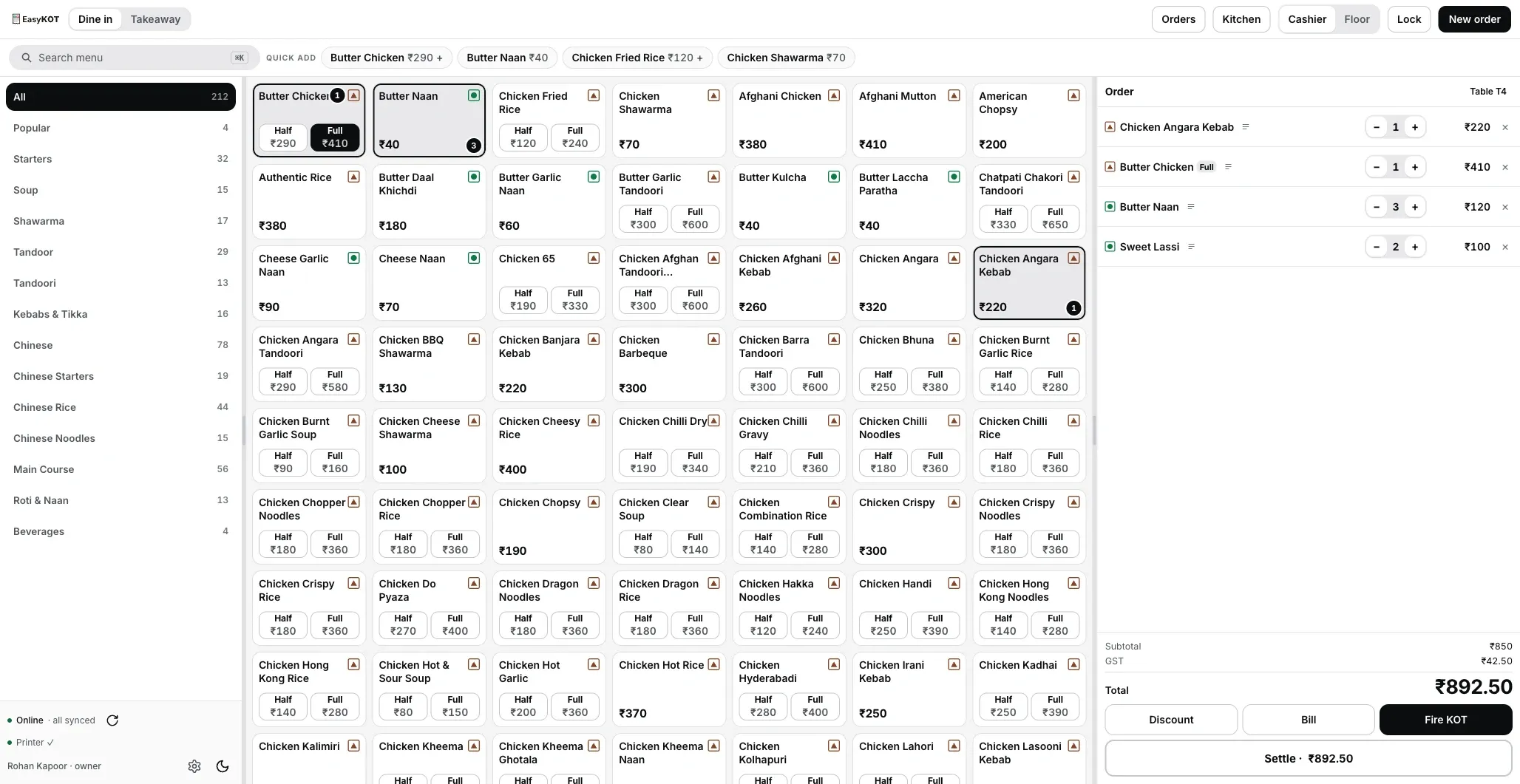
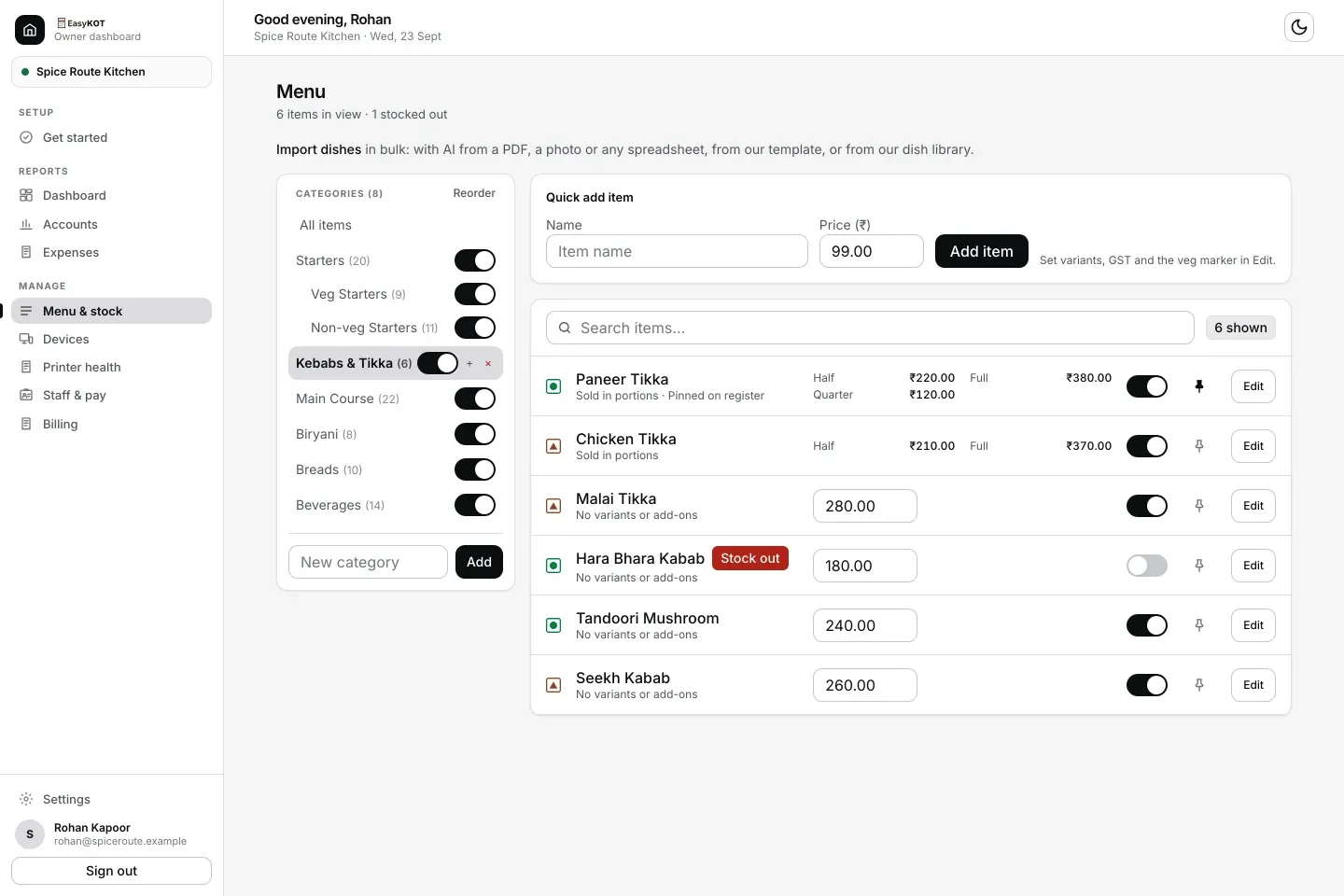
Owner dashboard ka Menu & stock, 23 Sep 2026 ki photo. Har dish ka switch stock-out ka switch hai: Hara Bhara Kabab off hai, isliye uspe Stock out ka badge hai. Categories panel ke upar Reorder se categories ko us order mein lagaye jisme Desktop App par dikhni chahiye.
Ek dish, andar se.
- Veg, Non-veg ya Egg. Yeh mark Desktop App ki har tile aur order line pe, captain ke menu pe aur dashboard mein dikhta hai. Printed KOT aur bill sirf text hain: thermal printer ek hi colour chhaapta hai, green aur red dono same grey ho jaate.
- Tax se pehle ka price, side mein GST slab, aur neeche GST milake final price, toh customer kitna dega yeh calculator pe nahi nikalna padta. Slab woh ek rate hai jo aapne Settings mein poore store ke liye chuna. “No GST” bhi CA se confirm karke hi set karo. Item alag bechne aur restaurant service ke saath dene pe tax treatment alag ho sakta hai. Naya store “Not GST-registered” se shuru hota hai: jab tak GST on nahi karte, bill pe tax line nahi aati. Pehla GST bill guide.
- Portion poore menu ke liye ek baar. Half aur Full ek baar banaaye; har dish bas apna price bharti hai. Quarter chahiye toh kisi bhi dish par “+ Add size” mein likhe. Baaki dishes pehle jaisa hi bechti rahengi jab tak unka Quarter price nahi daale.
- “Cost to make”, agar chahe. Ek plate aapko kitne mein padti hai, woh bhare toh “Menu performance” report dish-wise profit dikhati hai. Khaali chhoda toh woh dish margin analysis se bahar rehti hai.
- Variants aur add-on groups un dishes ke liye jinme choice ya paid extra hota hai. Baaki dishes pe kuch extra nahi.
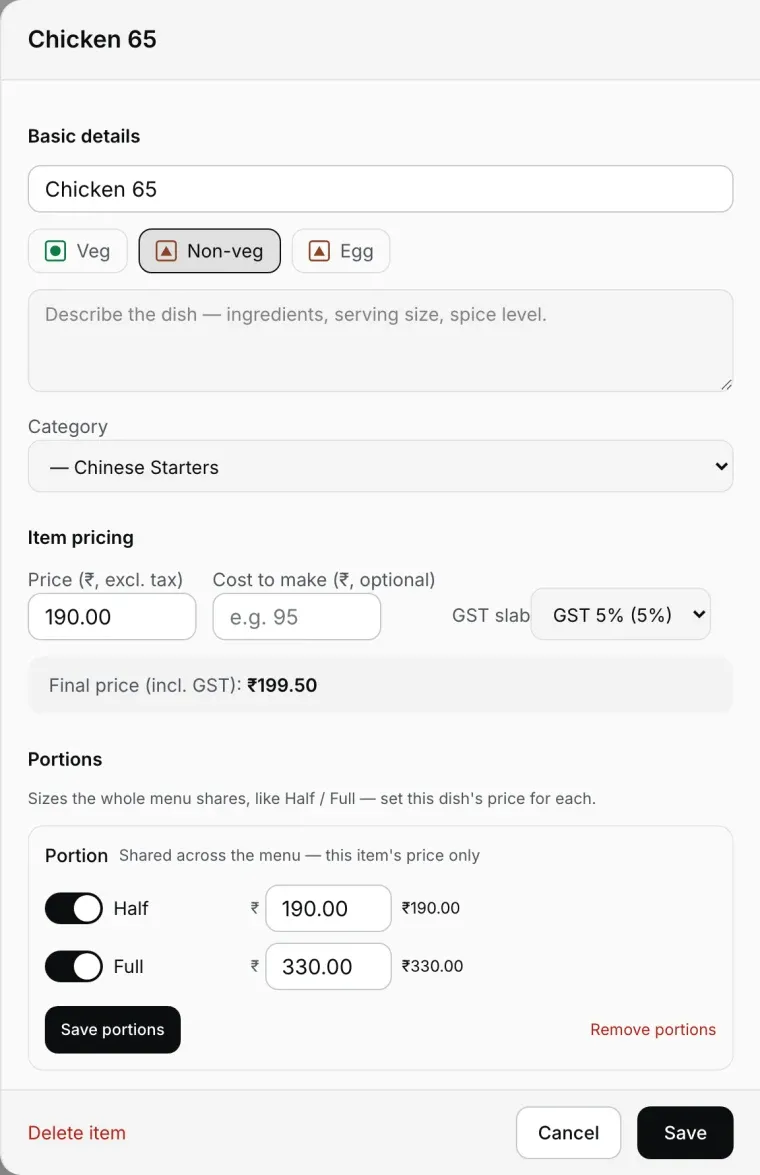
Dish editor: veg mark, GST slab aur Half/Full price ek hi screen pe.
Import se pehle: menu card ki checklist
Yeh 8 cheezein pehle decide kare, toh review grid par kaam aadha ho jaata hai. Print karke menu card ke saath rakhe.
| Decide kare | Kyun zaroori hai | EasyKOT mein kahan |
|---|---|---|
| Portion ke naam (Half/Full, Quarter) | Poore menu ke liye ek baar, har dish bas price bharti hai | Dish editor, Portions |
| Kaunsi dish Veg, Non-veg, Egg | Har tile aur captain ke menu pe dikhta hai | Review grid, phir dish editor |
| CA-confirmed GST status aur rate | Store settings CA ki advice pe set karo | Dashboard Settings |
| Item tax treatment | “No GST” CA se confirm karke hi set karo | Dish editor |
| Categories ka order, kaun sub-category | Desktop App pe list isi order mein | Menu & stock, Reorder |
| Jin dishes mein choice ya paid extra hai | Variants aur add-on groups | Dish editor |
| Ek plate ka cost (optional) | Menu performance mein dish-wise profit | Dish editor, Cost to make |
| Sabse zyada bikne wali 5-10 dishes | Pin kare; Pinned shelf aur Quick add par aayengi | Menu & stock, pin |
Settings ka poora tour: owner dashboard settings.
Seedhe jawaab.
Menu kis cheez se import kar sakte hain?
AI import kitna sahi padhta hai?
Price badla toh Desktop App pe kaise pahunchega?
Dish khatam ho gayi toh out of stock kaise kare?
Veg / non-veg ka mark KOT aur bill pe print hota hai?
Categories ka order apne hisaab se laga sakte hain?
Naya store shuru se GST lagata hai?
Menu setup mein sach mein kitna time lagta hai?
Menu setup ka step 2 hai: signup se pehle bill tak ka poora walkthrough.
3 mahine try kare, phir plan chune.
Restaurant ka kaam hum samajhte hain, kyunki shuruaat bhi wahin se hui. 3 mahine free try kare, bina card details. Hamari kahani padhe.