Discounts, voids, refunds — all on the record, nothing quiet.
Restaurant money doesn't leak at the settle. It leaks in the exceptions: the quiet discount, the dish that came off the bill after the kitchen cooked it, the refund nobody remembers. The EasyKOT Desktop App gives staff all three keys, and puts a name, a reason and a record on every press.
Four money keys, four different rules.
Discount — quick keys, off the subtotal
Press Discount on the cart. Quick keys take 5, 10, 15 or 20 percent of the subtotal in one tap, or type a flat rupee amount. The sheet on Desktop App 0.1.20 says exactly what it does: 'Comes off the subtotal before GST is calculated.' So ₹10 off a ₹200 check at 5% GST leaves ₹190 taxable, ₹9.50 of GST and a ₹199.50 bill. Open Discount again and the saved amount is already in the field, with its quick key highlighted if you used one; pick another value and it replaces the old one, or type ₹0 to remove the discount. It is not a comp, and nothing is written off the kitchen's cost. Managers and cashiers apply it directly; on a captain's phone the same key asks a manager to type their PIN right there, and the approval carries the manager's name.
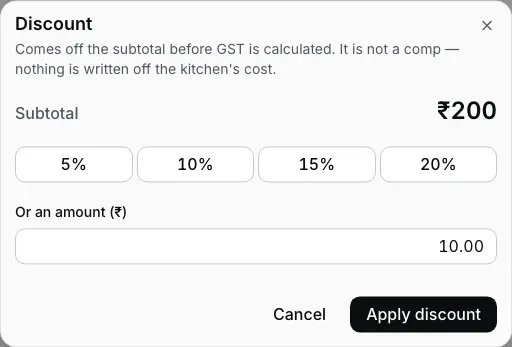
Step 1: quick keys or a flat amount, off the subtotal. Reopen it and the ₹10 is still there to change or clear.
Void a fired dish — a reason, and a name
A dish the kitchen already cooked doesn't just vanish. Voiding a fired line asks for the reason (customer changed their mind, kitchen cannot make it, rung on the wrong table, wrong item rung) and records it against whoever is signed in. The Desktop App's own words on the screen: voiding writes the food off, the store eats the cost, and the reason you pick is what the write-off report shows. The voided line stays visible on the check, struck through, until somebody tells the kitchen.
Cancel the whole order — a comment every time, no PIN
Cancel order sits at the bottom of the order panel, to the left of Settle: a smaller key with a red outline, never the black Settle fill. It asks one thing: why. Pick a reason (Customer left, Customer changed their mind, Ordered by mistake, Duplicate order, Wrong table, Item not available), or write your own words and press Cancel order. The dialog then shows the table, the bill and that reason and asks once more: Cancel order closes the bill, Keep order goes back to choose again. No manager PIN: whoever is signed in cancels, and the Orders list shows the bill as cancelled with the reason and their name. If the kitchen already made the food, the dialog says so above the reasons; tell the kitchen. Once any money is recorded on the bill the key is greyed out: settle the balance or refund instead. The same key sits on an empty check's detail in Orders (a check with food on it opens in Cashier, where the key is). The captain's phone has the same key and asks the same way. Nothing is deleted; the cancelled check stays in the day's history.
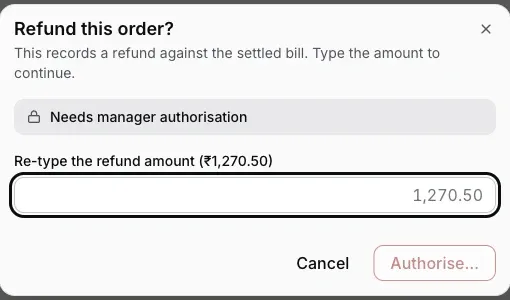
Step 3: re-type the amount, sign with a PIN. Money out is never one tap.
Refund a settled bill — re-type the amount to mean it
Refunds live on the Orders screen: open the settled order and press Refund. The Desktop App asks you to type the exact refund amount back at it (a deliberate speed bump, because money leaving the business should never be one accidental tap) and then takes a manager's or owner's PIN, every time, even from an owner (a cashier's own PIN is not enough). The refund lands in the ledger against the original bill, and it works with the internet down.
Who holds which key is the roles system doing its job: the staff PINs & roles guide has the full table of who acts alone and who needs a manager beside them.
Straight answers.
Can I discount a single dish instead of the whole check?
Can I comp a dish?
Why does voiding cooked food need a reason?
Can I refund part of a bill?
Does a reprinted bill look like the original?
Do these controls work when the internet is down?
The rest of the money path.
Settling & payments
Change math, short payments, part pay: what happens at the moment money actually moves.
See the settle guide →Staff PINs & roles
The role table behind every approval prompt on this page.
Set up staff →Closing the day
Write-offs at scale: the 'No payment recorded' bucket and the GST document register.
Close the day →Every guide in this cluster is listed on the guides hub.
Run it 3 months, then pay for it.
Three months free, full product, no card. Made in India, for the counter: built inside a running restaurant.