Restaurant billing software that keeps working without internet.
EasyKOT Desktop App bills for dine-in, takeaway and counter sales on a supported Windows 10/11 or macOS 13.3+ computer: punch the order, fire the KOT to the kitchen, settle by cash, UPI or card, and print a GST tax invoice, all from one screen, with or without internet. ₹299/month after 3 free months.
Works offline · compatible, tested ESC/POS printer · no fee per Desktop App · cancel anytime
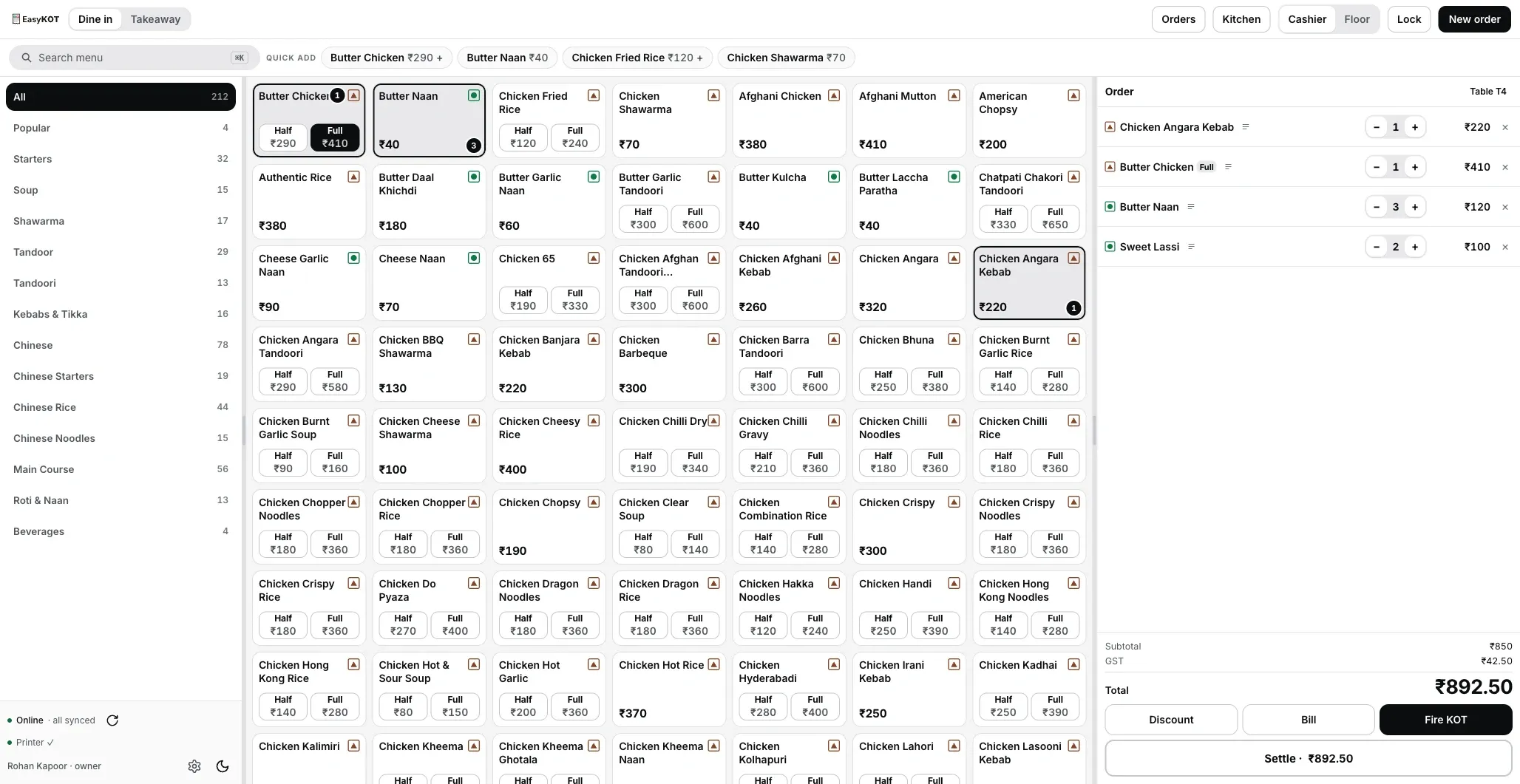
The real billing screen: categories left, menu centre, cart right. Captured from the Desktop App, not drawn. Click to zoom.
Order to bill, without a pause.
- Open a table or a parcel. Dine-in runs on tables with running totals; takeaway is one tap. Search or tap the tile, pick Half/Full, add a note like "less spicy" or "Jain".
- Fire the KOT. A KOT (kitchen order ticket) is the slip that tells the kitchen what to cook for which table. The Fire KOT key sends the kitchen printer (or the kitchen display) exactly what you rang. Order more later: the next KOT carries only the new items, so nothing cooks twice.
- Correct honestly. A fired line's quantity can go down: the table that returned one water is billed for two. Removing a dish the kitchen already has takes a reason, and the rules for who approves it are below.
- Settle in seconds. Cash, UPI, card or Part pay. Short? Book the gap as a Discount or a Loss. Over? The change due is on screen. The cash drawer opens on a settle, and the GST bill prints with the payment mode on it. Settling and change, step by step.
Billing machine, desktop POS or your laptop?
There are three ways to bill a restaurant: an all-in-one billing machine with its own printer, a desktop POS you license once, or the laptop you already own running EasyKOT. Take this table to any vendor. The EasyKOT column is what the app does today.
| All-in-one billing machine | Licensed desktop POS | EasyKOT on your laptop | |
|---|---|---|---|
| Up-front cost | The machine | A licence, plus a PC | ₹0 today; ₹299 + GST a month after 3 months |
| When the internet drops | Keeps billing | Keeps billing | Keeps billing: order, KOT, print, settle |
| A second counter | Another machine | Often another licence | Another laptop on the same Wi-Fi, no fee per Desktop App |
| Waiter phones, kitchen screen | Depends on the model | Often paid modules | Included: captain app on Android, a tablet in the kitchen |
| Sales from home | Depends on the model | Sometimes a cloud add-on | Owner dashboard at app.easykot.com |
| Printer | Built in | Whatever the POS supports | A compatible 58 or 80 mm ESC/POS model and supported interface, verified with a test slip and test bill |
The machine and licence columns name no product and no price, because every model differs; the rows are the questions worth asking. EasyKOT's full price is on the pricing page.
Bills from your settings, reviewed by your CA.
- Bills from your configured details: GSTIN, bill series, CGST/SGST on separate lines, round-off.
- On the composition scheme? The bill prints as a BILL OF SUPPLY, with no tax line and the composition declaration.
- GST starts off. A new store rings dishes at menu price with no tax line. Confirm your store's GST mode and item tax treatment with your accountant before configuring them. GST 18% (where applicable) depends on specified-premises rules and applicable declarations, not hotel location alone. Rates are not freely interchangeable. Tax treatment may differ when an item is sold separately versus supplied as part of restaurant service. Review a sample bill before live sales.
- Every Desktop App's series at day close: first and last bill number, issued, cancelled, and any number missing from the series, on screen.
- Reprint any bill: stamped DUPLICATE with a copy number and the same bill number, so the original stays the only original.
Step by step: your first GST bill · what a restaurant GST bill must show · open a cash shift and count the drawer
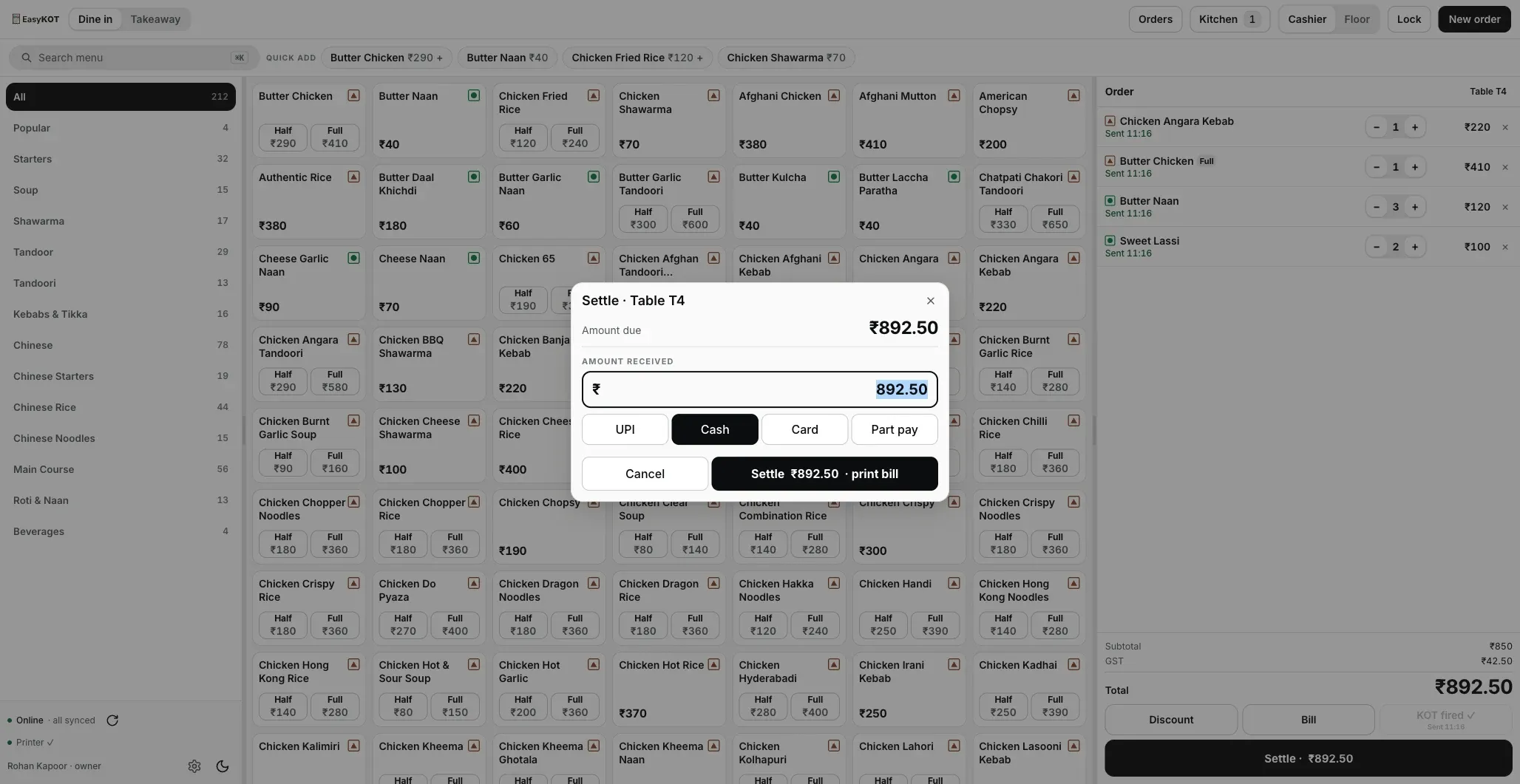
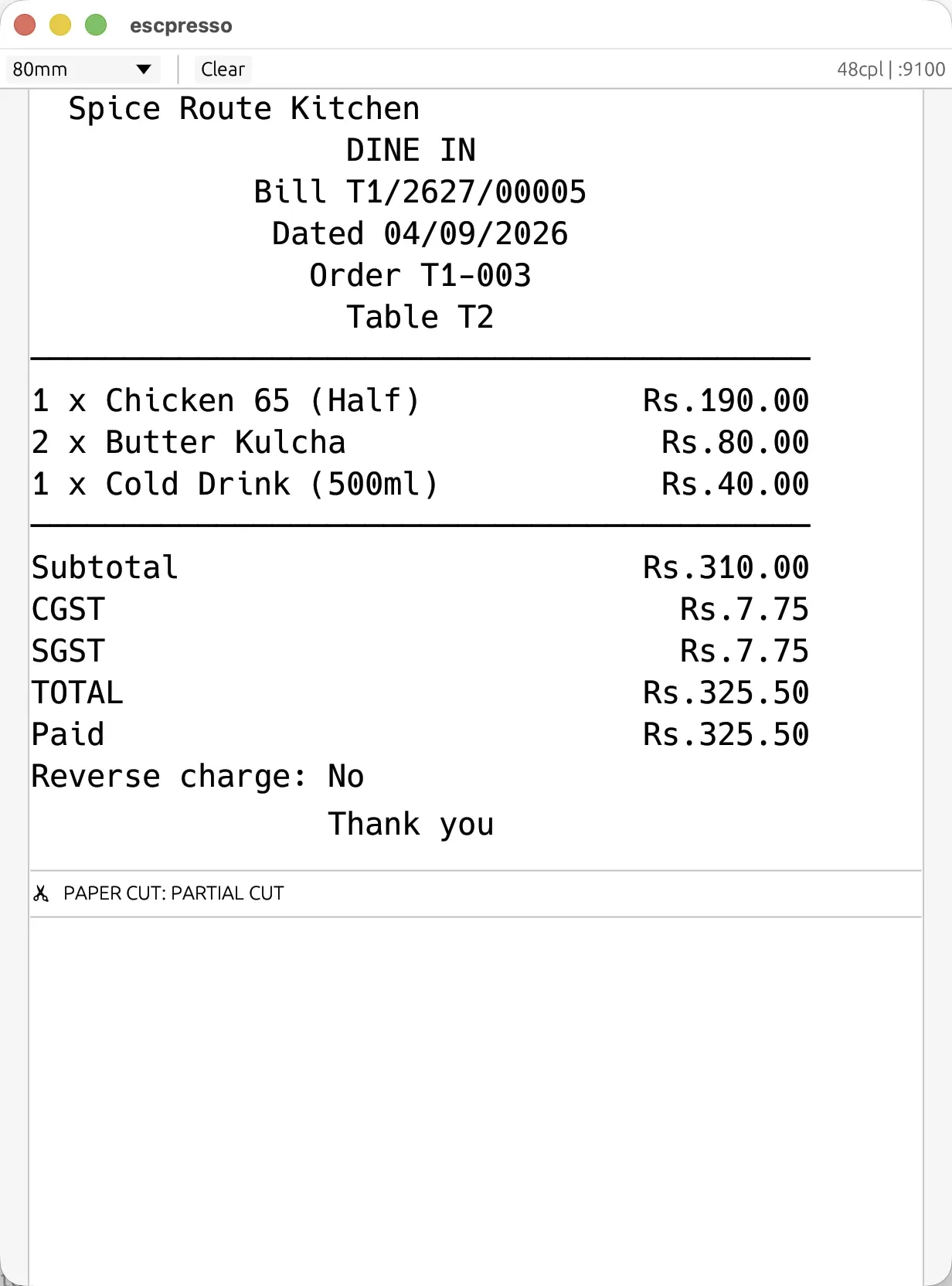
What the bill actually prints as: rendered by a virtual ESC/POS printer from the exact bytes the Desktop App sends, not a mockup.
Sent back food, handled honestly.
- Fired lines lock. Each line says Sent with the time it went, and the key reads Reprint KOT: one tap prints that round again with REPRINT under the number, so the kitchen knows it is a copy.
- Round two prints only round two. Add dishes and fire again: the new KOT carries just the additions.
- Lowering a quantity is free. While the check is open, a fired line's quantity can go down at any time.
- Removing a cooked dish takes a reason, one of four: Customer changed their mind, Kitchen cannot make it, Rung on the wrong table or Wrong item rung. Whoever is signed in to the Desktop App (owner, manager or cashier) picks the reason and presses Void line, no PIN, and the void is recorded under their name.
- On the captain app, a waiter confirms once, with no PIN; the reason is recorded for them.
- Nothing disappears. The removed line stays on the cart marked cancelled, with the time it was sent; the reason and who approved it are saved on the order. A kitchen screen drops the dish by itself. A kitchen printer gets no cancel slip, so someone walks over and tells the kitchen.
- The whole order can be cancelled too. Cancel order sits beside Settle at the bottom of the order panel: pick a reason or write your own, check the table and bill the dialog reads back, and press Cancel order, with no PIN. Once money is recorded on the bill the key is greyed out. The Orders list shows the cancelled bill with the reason and who cancelled.
The full procedure: discounts, voids and refunds. Waiters can also send orders in from the captain app.
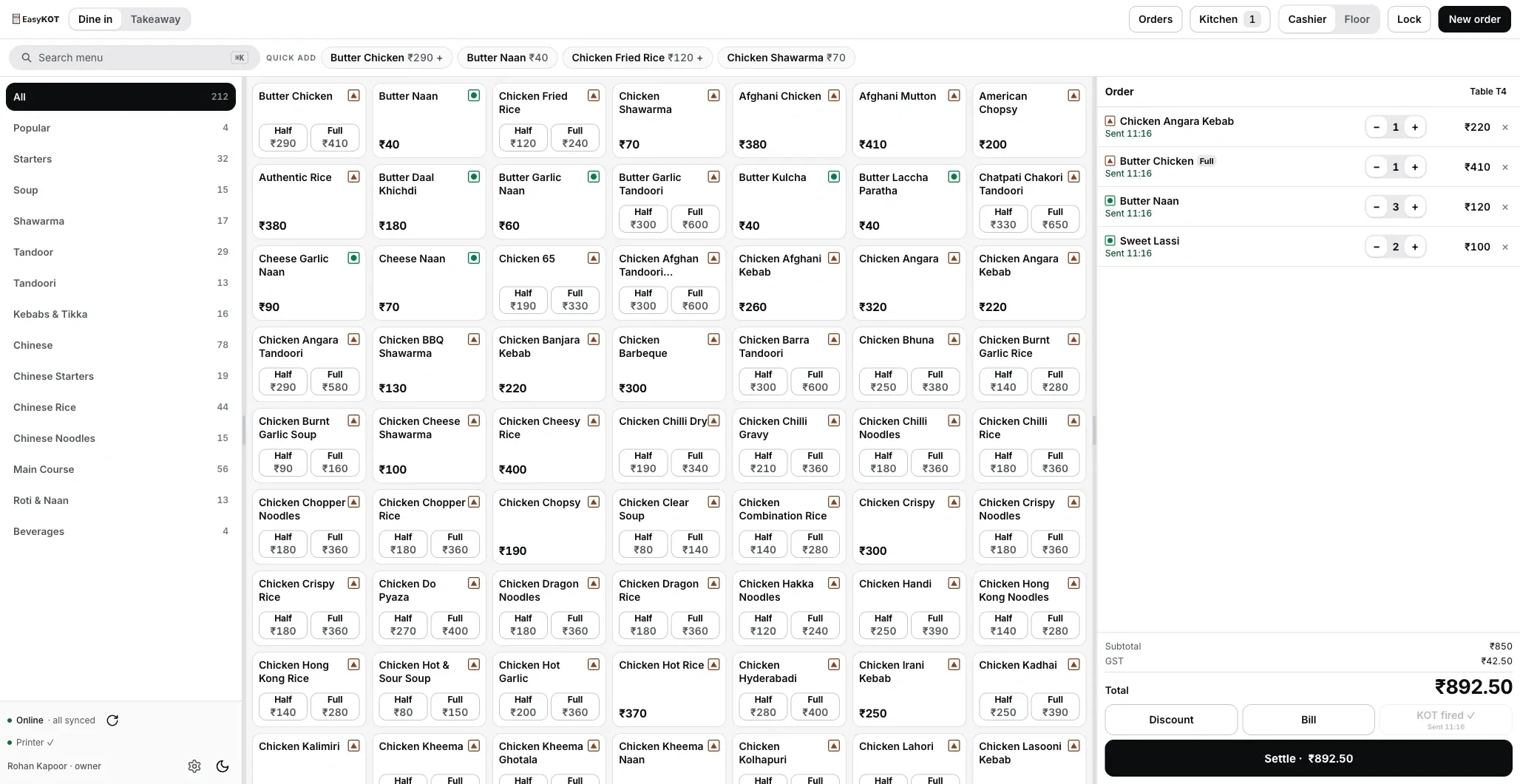
What works when the internet goes.
Short answer: nothing at the counter stops. The Desktop App's database lives on the laptop, and the internet is only needed to carry sales to the dashboard. Here is what happens on the nights that go wrong:
| What happens | What EasyKOT does |
|---|---|
| The internet drops | Order, KOT, print and settle carry on. Sales upload on their own when it is back. The one limit: the Desktop App must go online once every 30 days, and it reminds you from day 20. |
| The printer runs out of paper | The sale is already saved. The print waits in a queue and retries after 1, 2, 5, 15, 30 and 60 seconds, then every minute — for 5 minutes. Still unprinted after that, it stops and asks you. |
| A guest sends a dish back | Lower the quantity, or remove it with a reason. Nobody using the Desktop App needs a PIN; a waiter on the captain app confirms once. |
| The table orders a second round | The next KOT carries only the new dishes. |
| A guest pays less than the bill | Book the gap as a Discount or a Loss at settle, or use Part pay and the rest stays open. |
| Did the UPI come in? | The Desktop App has no payment gateway. Check the money on your own QR's phone or soundbox, then mark it UPI. |
| A guest wants the bill again | The reprint says DUPLICATE with a copy number and the same bill number, and who asked for it is recorded. |
| A second Desktop App opens | Another laptop on the same Wi-Fi joins with a single-use code that lasts 5 minutes. Its own bill series, the same dashboard. |
More: what happens when the internet goes down mid-rush, or watch the cut live in the offline simulator.
The Desktop App runs on a supported computer.
- Budget laptops welcome. The Desktop App is laid out for 1366×768 screens, the size most counter laptops have.
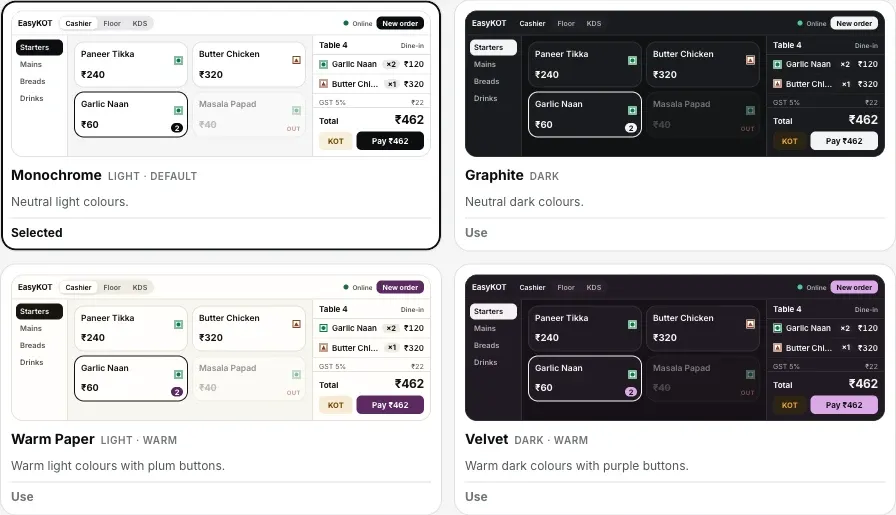
- Six themes, four text sizes, set per Desktop App. Monochrome for daylight, Midnight for a dim counter; compact for pros, spacious for new hires.
- A compatible ESC/POS model and interface. Choose a supported LAN, Wi-Fi, USB or serial path for the 58 mm or 80 mm printer. Verify its connection, width, layout and total with a test slip and sample bill. Connect a thermal printer · printer not printing?
- No laptop at all? An Android phone can run the counter.
- Your menu, ready to tap: imported by AI from a PDF or photo on the menu management side, synced to every Desktop App.
Straight answers.
Is the billing really usable offline, or just 'view-only'?
What business and GST details can bills show?
Is GST switched on when I sign up?
How do payments work?
Can I put the customer's name and number on the bill?
What computer do I need?
Can two Desktop Apps bill at the same time?
What happens if the printer stops mid-rush?
Full pricing is one line: ₹299/month or ₹2,990/year, plus 18% GST, everything included.
Run it 3 months, then pay for it.
Three months free, full product, no card. Made in India, for the counter: built inside a running restaurant.