Close the day clean — no check left hanging.
Day close brings together three separate checks: old open orders, the optional cash-box count and today's bill series. An open check is an unpaid or unfinished order. If a check closes automatically, that still does not prove payment was collected.
Nobody pressed the button? At the cutoff, an eligible synced bill can appear as 'Paid · Auto closed' for sales reporting. This does not create a payment, cash entry or loss. The offline EasyKOT Desktop App keeps billing as before.
Yesterday's leftovers to a clean slate — three steps.
Open Day close from the Orders screen
In the Desktop App, open Orders and press 'Day close' in the header. That offline routine still sorts leftover checks, shows the GST bill series and opens the Cash box. An owner can also open Orders → Day close in the web dashboard to review one business date's bills, actual collections and the current cash shift, then count the drawer or skip the count.

Step 1: Day close lives on the Orders screen, one key, always there.
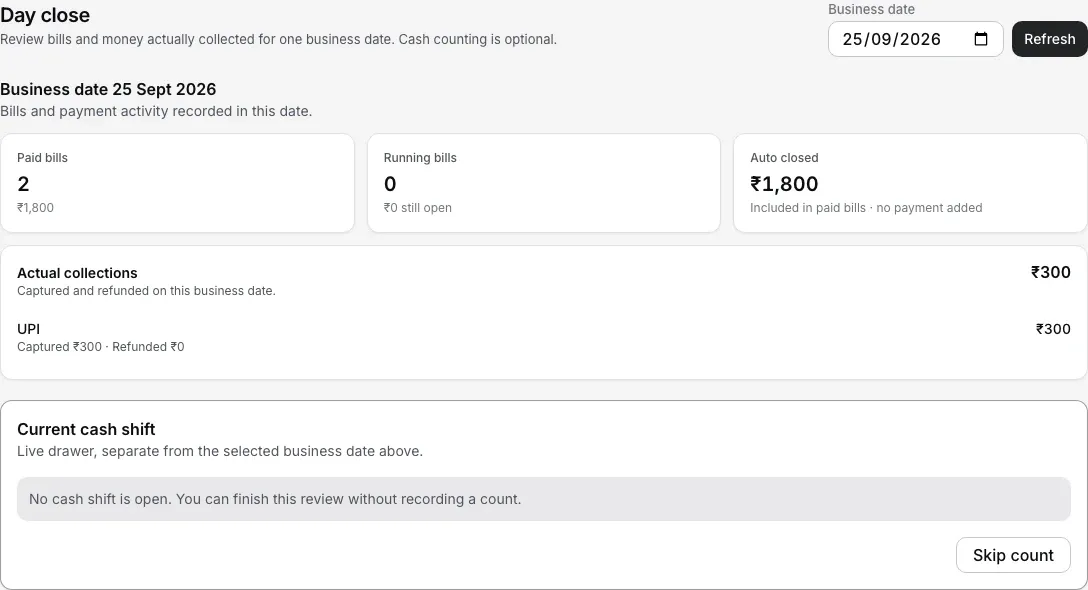
The dashboard keeps bill sales, money actually collected and the current cash shift separate. Counting is optional.
Sort the leftovers — the sheet has already grouped them
Every stale open check lands in one of three buckets. 'Nothing rung' is the mis-taps: tables opened, nothing ordered; one tap discards them all, no PIN needed. 'No payment recorded' is rung food where the till never saw a payment. Most of these are the last tables of the night, so the sheet asks one question: 'Did the money for these checks come in?' All the checks start ticked; untick any that need a different answer, then pick one. 'Yes, add the payment' records Cash, UPI or Card as a real payment dated today. 'Yes, but skip the details' leaves them as Paid · Auto closed and stops asking. 'No, the guest did not pay' writes the food off with a typed reason and a manager or owner PIN, so written-off food is still a signed decision. 'Money already taken' gets no bulk key on purpose: money is involved, so each one is settled or refunded individually.
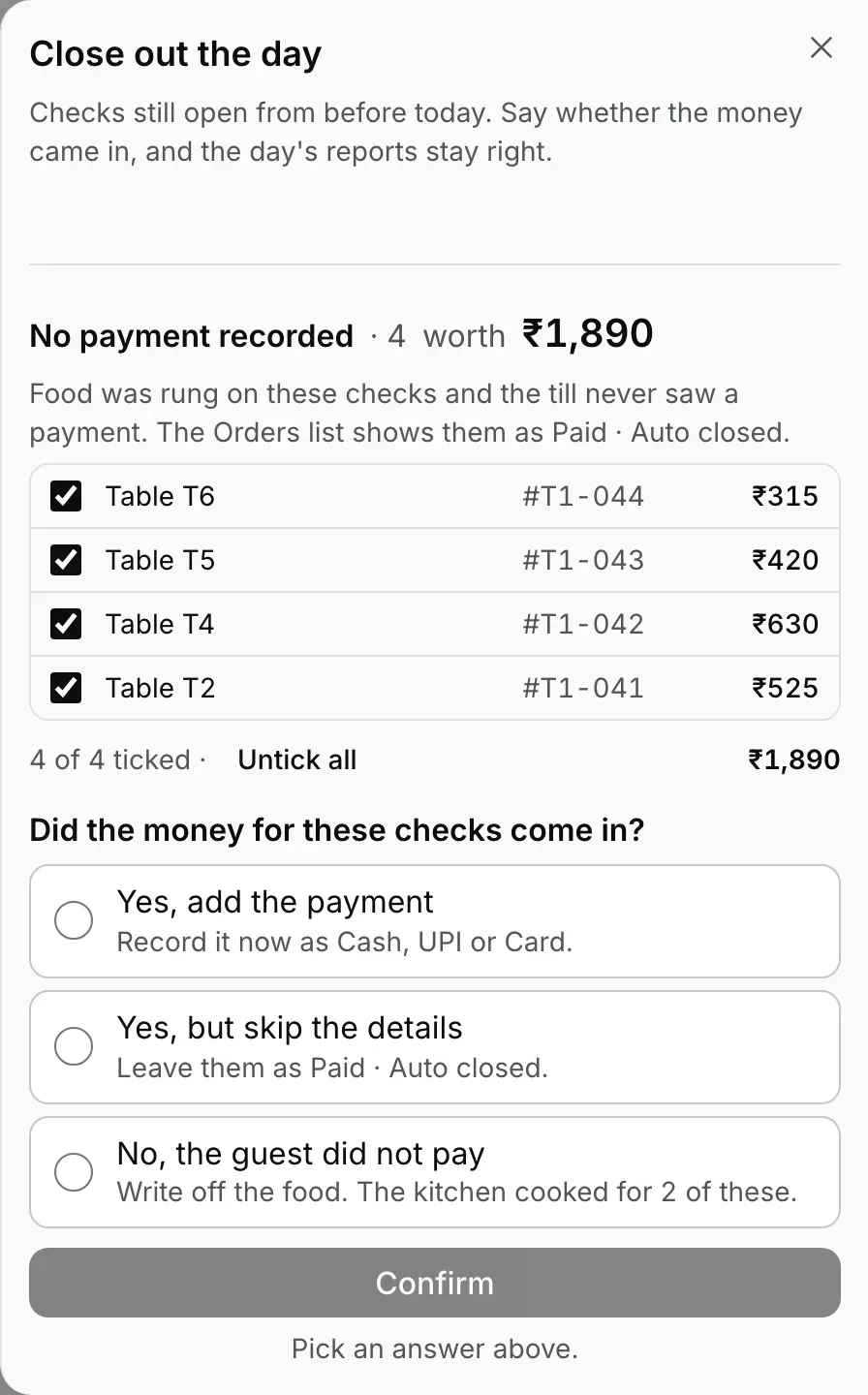
Step 2: four leftovers with food, all ticked, waiting for one answer. Sample store, sample amounts.
Read 'Bills issued today' before you leave
The same sheet shows the day's invoice series, 'Bills issued today', one row per Desktop App in the shape GSTR-1 asks for: the number range, how many were issued, how many cancelled, the net. Thirty seconds here is what makes the accountant's month painless: a gap you can explain today is an afternoon you don't lose at audit.
The question in depth. Each of the three answers with its screen, a mixed night in passes, what happens if yesterday’s drawer was already counted, and how to change your mind later: the old unpaid checks guide.
Three buckets, three rules — on purpose.
- Empty checks cost nothing, so they cost nothing to clear. A mis-tap has no food and no money on it: "Discard N empty checks" is one tap, no PIN, no reason. Friction here would just teach staff to leave them.
- Written-off food is a signed decision. A check that really went unpaid is a loss: maybe a walkout, maybe a comp nobody recorded. Most 'No payment recorded' checks are the opposite, the last tables of the night whose money did come in, so the sheet asks first and writes nothing until you answer. Only 'No, the guest did not pay' is a write-off: the Desktop App takes a typed reason and a manager or owner PIN, takes the sale off that day's sales, and keeps both. That is stricter than a fired-line void during service, which takes a reason and the name of whoever is signed in: a whole check written off is a bigger loss than one plate.
- Money never gets a bulk key. A check that took a payment and stayed open is an inconsistency worth thirty seconds of attention each: settle it properly or refund it properly. The owner dashboard can settle an issued bill by recording only the new amount actually received and showing the remaining Sales loss before confirmation. An auto-closed remainder is never presented as cash due.
- The trading day is yours. "Stale" means opened before your day's start (4:00 AM by default, adjustable in the dashboard) with nothing done on it since, so the 1 AM biryani order is tonight's sale everywhere: on this sheet, on the KOT counter, and on the report your accountant reads.
Opening float, cash in/out and the closing count, step by step.
Running the whole shop from a phone? The phone adds the actual cash-box routine: opening float, cash in and out, the count, and the variance at close. A full day on one phone walks it end to end.
Straight answers.
Does Day close record my cash or takings?
What's the difference between discarding and writing off?
When does the day actually end — midnight or morning?
What about counting the cash box — float, paid-outs, variance?
Do I have to run Day close every night?
The rest of the routine.
Old unpaid checks
The three answers side by side, a mixed night in passes, and the drawer that was already counted.
Answer the question →Your first GST bill
Where those invoice numbers come from: the series, the late minting, and why gaps matter.
See the billing walkthrough →Staff PINs & roles
The manager PIN that signs a write-off, and everything else each role can and cannot do.
Set up staff →Billing with the internet down
See what the configured Desktop App can finish offline and what still needs the local network.
See the outage walkthrough →Every guide in this cluster is listed on the guides hub.
Run it 3 months, then pay for it.
Three months free, full product, no card. Made in India, for the counter: built inside a running restaurant.