Day close kaise kare: bache hue orders aur cash check kare.
Day close teen alag cheezein dikhata hai: purane khule orders, optional cash-box count aur aaj ki bill series. Khula order matlab unpaid ya abhi tak close na hua check. Koi order apne aap hat gaya ho, phir bhi usse payment collect hua maana nahi jaata.
Kisi ne button nahi dabaya? Cutoff par synced aur eligible bill sales reporting mein 'Paid · Auto closed' dikh sakta hai. Isse naya payment, cash ya loss record nahi hota. Offline EasyKOT Desktop App pehle ki tarah billing karta rehta hai.
Khule orders, cash box aur bill series: teen checks.
Orders screen se Day close khole
Desktop App par Orders khole aur header mein 'Day close' dabaye. Internet band ho tab bhi yeh routine purane khule orders ko alag karta hai, GST bill series dikhata hai aur Cash box kholta hai. Owner web dashboard mein Orders → Day close se ek business date ke bills, actual collections aur current cash shift review kar sakta hai; drawer count karna optional hai.

Step 1: Orders screen par Day close button hamesha milta hai.
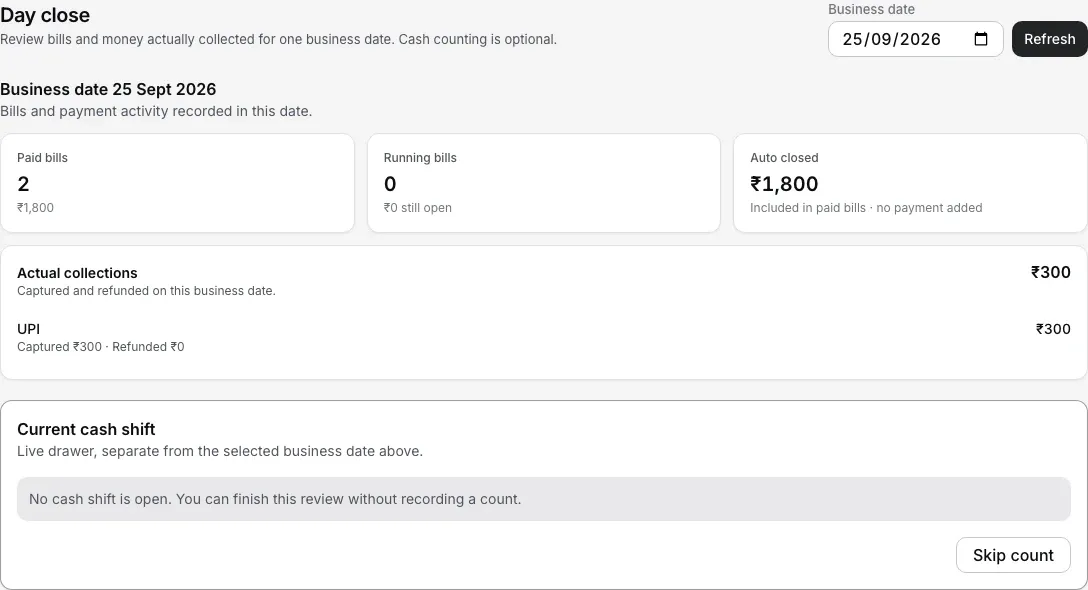
Dashboard bill sales, actual collection aur current cash shift ko alag rakhta hai. Cash count optional hai.
Bache hue orders ko unke bucket ke hisaab se handle kare
Har purana khula order teen buckets mein se ek mein aata hai. 'Nothing rung' mein table khula tha par item add nahi hua; in empty checks ko ek tap mein bina PIN discard kar sakte hain. 'No payment recorded' mein food rung hua par till ne payment dekha hi nahi. Zyadatar yeh raat ke last tables hote hain jinka paisa aa chuka hai, isliye sheet ek hi sawaal poochti hai: 'Did the money for these checks come in?' Saare checks pehle se tick hote hain, jo alag hai woh untick kare, phir jawaab chune. 'Yes, add the payment' Cash, UPI ya Card ka asli payment aaj ki date mein record karta hai. 'Yes, but skip the details' check ko Paid · Auto closed hi rehne deta hai aur dobara nahi poochta. 'No, the guest did not pay' mein food typed reason aur manager ya owner PIN ke saath write off hota hai. 'Money already taken' ke liye bulk button nahi hai: paise ka record hai, isliye har order ko alag settle ya refund kare.
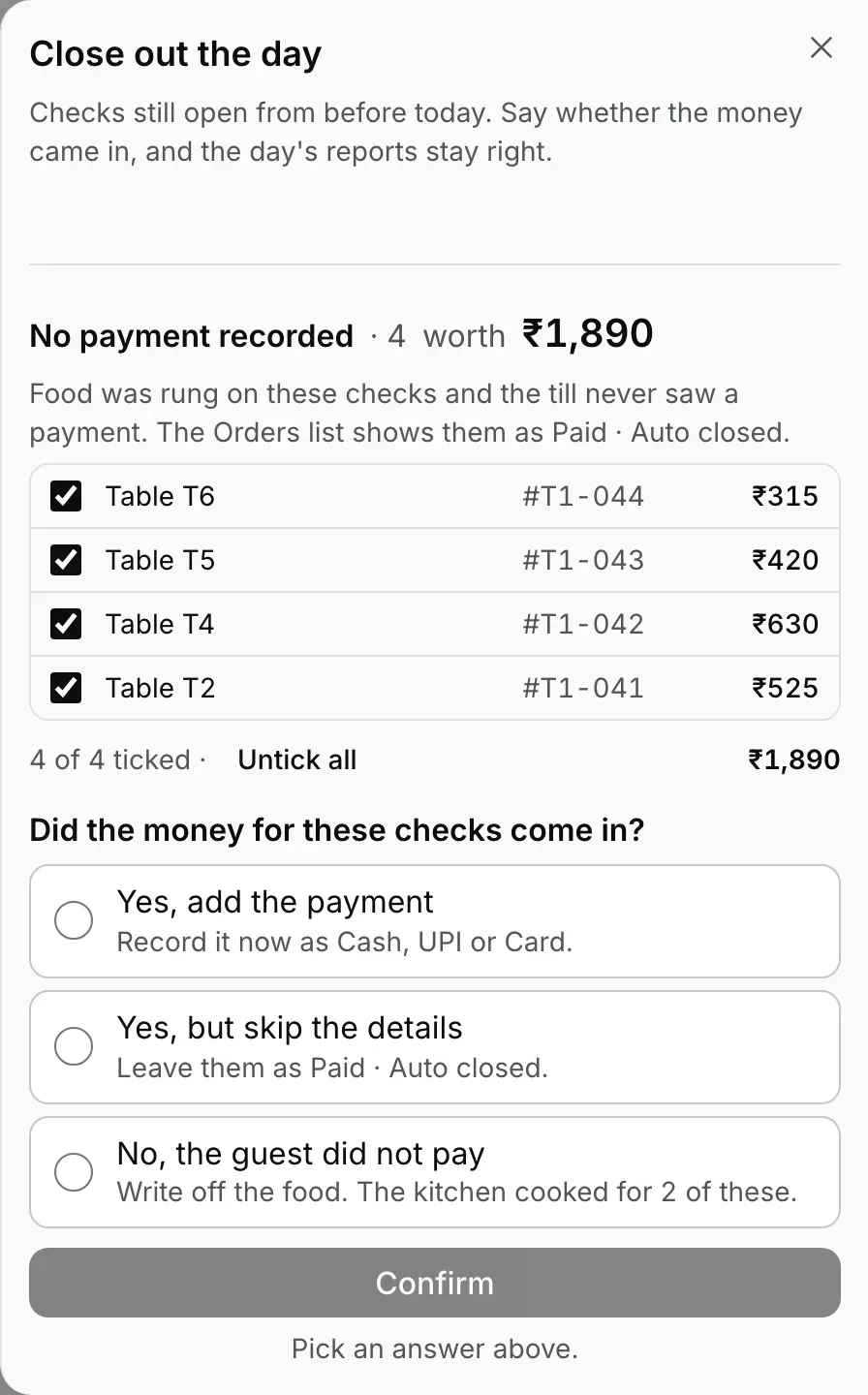
Step 2: food wale chaar leftovers, sab ticked, ek jawaab ka intezaar. Sample store, sample amounts.
Jaane se pehle 'Bills issued today' dekhe
Isi sheet mein har Desktop App ki invoice series alag row mein dikhti hai: number range, kitne bills issue hue, kitne cancel hue aur net count. Koi gap ho toh usi din reason check kare; month-end par accountant ko series samjhana aasaan rahega.
Yeh sawaal detail mein. Teeno jawaab apne screen ke saath, mixed raat passes mein, kal ka drawer pehle count ho gaya ho toh kya hota hai, aur baad mein mann badle toh kya kare: purane unpaid checks ki guide.
Teen buckets hain, isliye teen alag rules hain.
- Empty check mein food ya paise ka record nahi hota. Galti se khule empty tables ko 'Discard N empty checks' se ek tap mein hata sakte hain; PIN ya reason nahi chahiye.
- Food write off karna signed decision hai. Jo check sach mein unpaid gaya woh loss hai: guest bina pay kiye chala gaya, ya comp record nahi hua. Par 'No payment recorded' ke zyadatar checks raat ke last tables hote hain jinka paisa aa chuka hai, isliye sheet pehle poochti hai aur jawaab ke bina kuch likhti nahi. Sirf 'No, the guest did not pay' write off hai: Desktop App typed reason aur manager ya owner PIN leta hai, sale us din ke sales se hata deta hai aur dono save karta hai. Yeh service ke dauran ek fired item ko void karne se zyada sakht hai; item void mein reason aur signed-in staff ka naam record hota hai, jabki poora check write off bada loss hai.
- Paise wale orders ke liye bulk button nahi hai. Payment lene ke baad bhi khula check ho toh har order alag dekhe: sahi tarah settle ya refund kare. Owner dashboard issued bill settle karte waqt sirf naya mila amount record karta hai aur confirm karne se pehle bacha Sales loss dikhata hai. Auto-closed remainder ko cash due nahi dikhaya jaata.
- Trading day aapke restaurant ke time ke hisaab se chalta hai. 'Stale' woh check hai jo aapke day-start se pehle khula aur uske baad us par kuch nahi hua. Day-start default mein 4:00 AM hai aur dashboard mein badal sakta hai. Isliye raat 1 baje ka biryani order is sheet, KOT counter aur reports mein isi service ka sale rehta hai.
Opening float, cash in/out aur closing count ke saare steps.
Poora counter phone par chala rahe hain? Phone mein opening float, cash-in, paid-out, closing count aur variance ka Cash box bhi hai. Ek phone par poora din chalane ki guide mein poora flow dekhe.
Seedhe jawaab.
Kya Day close cash ya collection record karta hai?
Discard aur write off mein kya farq hai?
Din kab khatam hota hai — raat 12 baje ya subah?
Cash box mein float, paid-out aur variance kaise check kare?
Kya har raat Day close chalana zaroori hai?
Baaki routine bhi samjhe.
Purane unpaid checks
Teen jawaab ek table mein, mixed raat passes mein, aur pehle count ho chuka drawer.
Sawaal ka jawaab de →Pehla GST bill
Invoice number, series, late minting aur series gap kyun matter karta hai.
Billing walkthrough dekhe →Staff PIN aur roles
Write off sign karne wala manager PIN aur har role ki permissions samjhe.
Staff setup kare →Internet band ho tab billing
Pehle se configured Desktop App offline kya kar sakta hai aur local network kahan chahiye, dekhe.
Offline guide dekhe →Is topic ki baaki guides guides hub par milengi.
3 mahine try kare, phir plan chune.
Restaurant ka kaam hum samajhte hain, kyunki shuruaat bhi wahin se hui. 3 mahine free try kare, bina card details. Hamari kahani padhe.