Kitchen KOT printer set kare: bill aur KOT ka route alag rakhe.
Settings → Printers & KDS mein dono printer add kare. Counter wale printer ka Role Receipt aur kitchen wale ka Kitchen (KOT) rakhe. Sirf ek printer hai toh Both chune. Network printer ke liye printer ka address (IP) aur uske model ka port confirm kare, phir dono par Test print nikale.
Do printers · ek Desktop App · Kitchen printer set na ho toh KOT receipt printer par fallback hota hai
Bill printer aur KOT printer ke kaam alag hain.
- KOT cooking instruction hai; bill payment record. Kitchen ticket par table, round, dish, portion aur note hota hai, price nahi.
- Dono alag jagah padhe jaate hain. Ek printer ho toh har KOT koi uthakar kitchen tak le jaata hai. Rush mein isi walk se delay ya missed slip ho sakti hai.
- Paper width alag ho sakti hai. Har printer ki width alag set hoti hai, isliye kitchen 80mm aur counter 58mm use kar sakte hain.
- Ek printer se shuru kar sakte hain. Role Both rakhe; baad mein doosra printer add karke roles alag kare. Pehla printer connect kare.
Kitchen printer add kare.
Kitchen printer ko restaurant ke network se jode
Printer aur EasyKOT Desktop App ek hi Wi-Fi ya network switch par hone chahiye. Printer ko fixed IP de ya router mein address reserve kare, taaki power cut ke baad address na badle.
Settings → Printers & KDS mein Set up a new printer dabaye
Desktop App ke status rail ka gear Settings kholta hai. Set up a new printer brand, scan aur finish ka flow dikhata hai. Printer pehle se network par hai toh Detect printers bhi chala sakte hain.
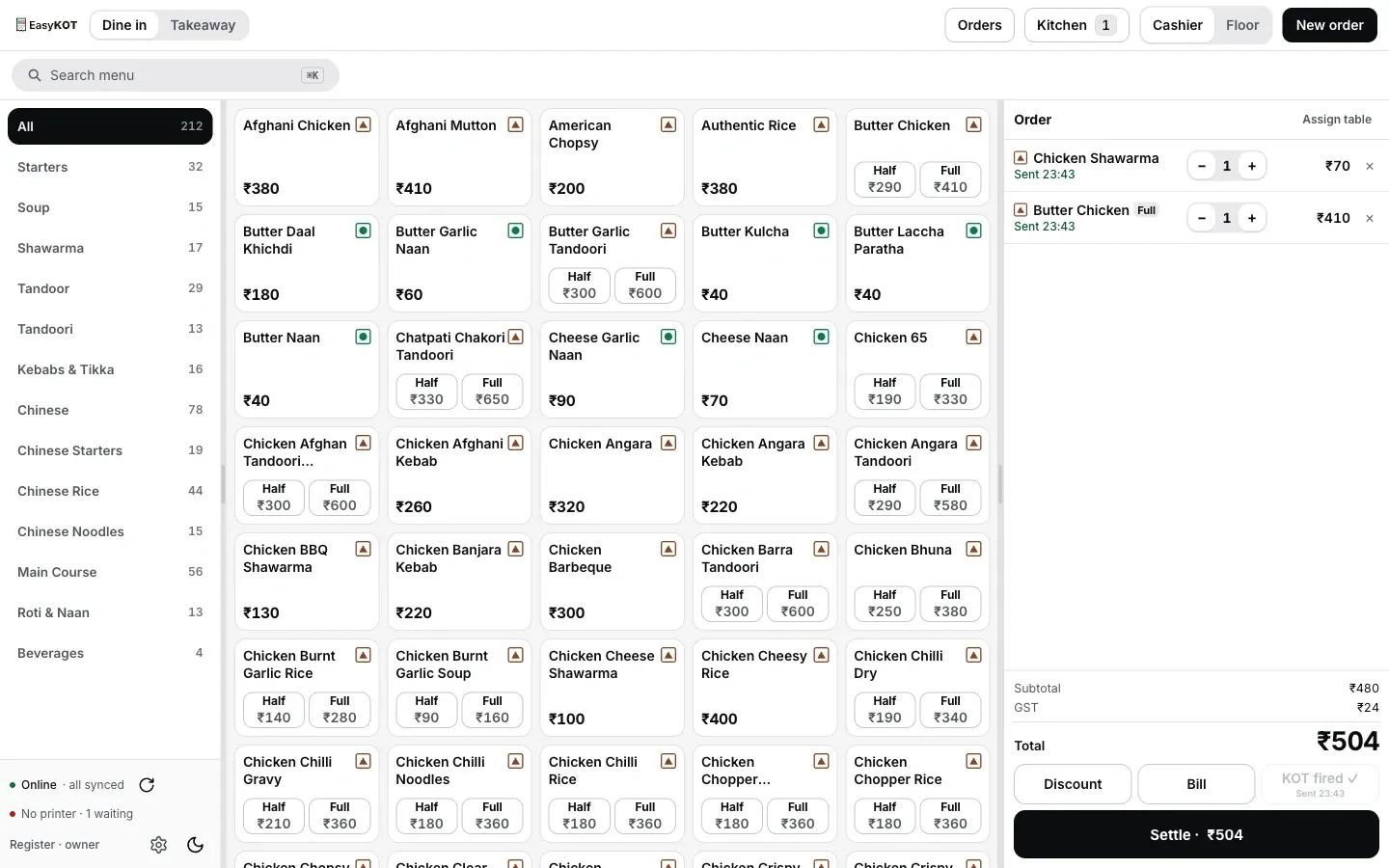
Kitchen ko bheja gaya round: paper tak pahunchne se pehle Desktop App par fired KOT aisa dikhta hai.
Printer chune, ya Add manually se details daale
Detect network, USB ports aur paired Bluetooth devices scan karta hai. Printer na mile toh Add manually → Network (Wi-Fi / Ethernet) chune. Printer host / IP daale. Network printers mein aam taur par port 9100 hota hai, lekin apne model ki settings ya manual se port confirm kare.
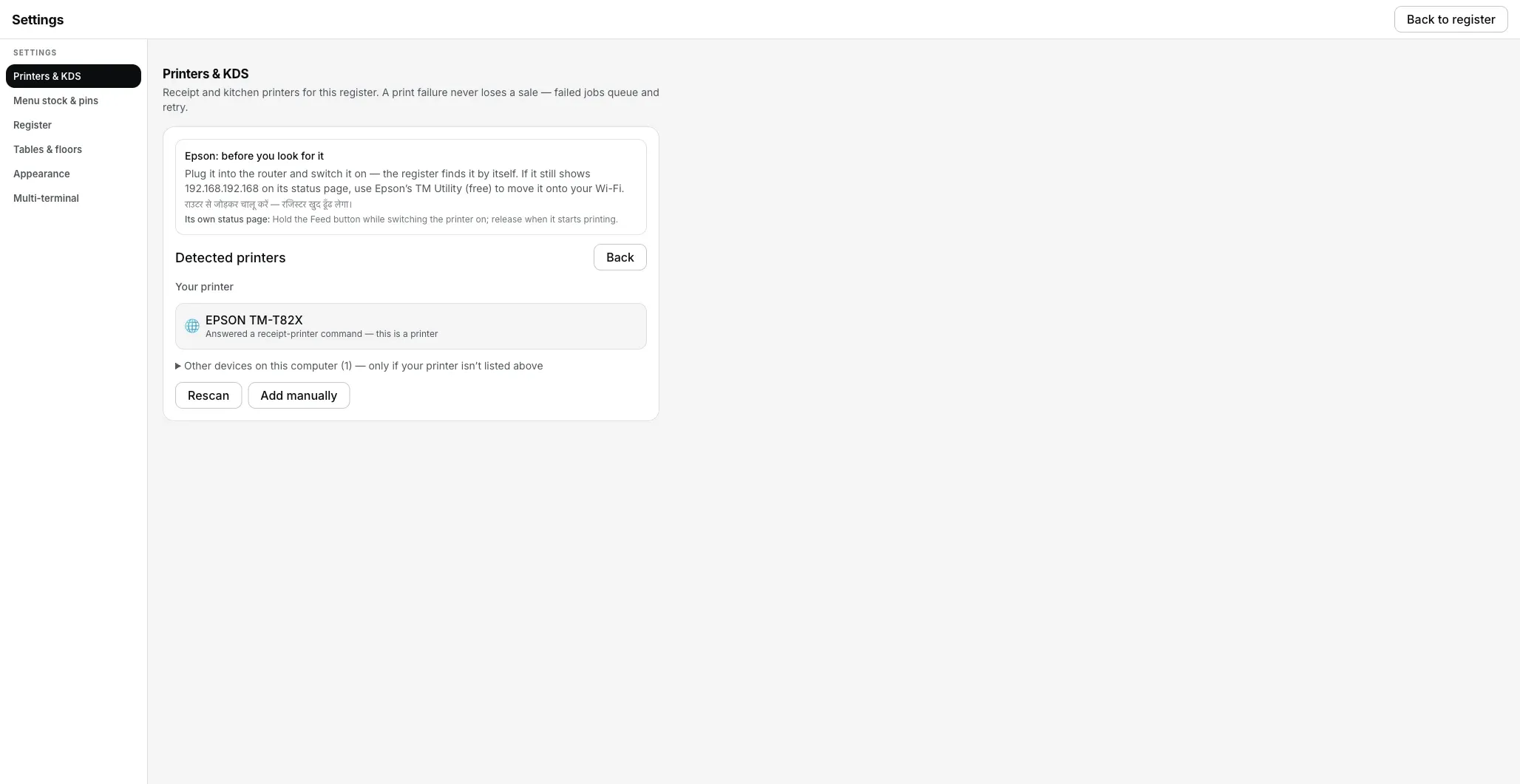
Settings → Printers & KDS → Detect printers: restaurant network par kitchen printer mil gaya.
Role Kitchen (KOT) chune aur paper size set kare
Role mein Both, Receipt ya Kitchen (KOT) milta hai. Kitchen (KOT) chune, taaki kitchen ticket yahan aur customer bill counter printer par jaaye. Har printer ka paper size alag set hota hai. 80mm, 58mm ya 80mm wide (48 characters) chune bina Save printer aur Print test page active nahi honge.
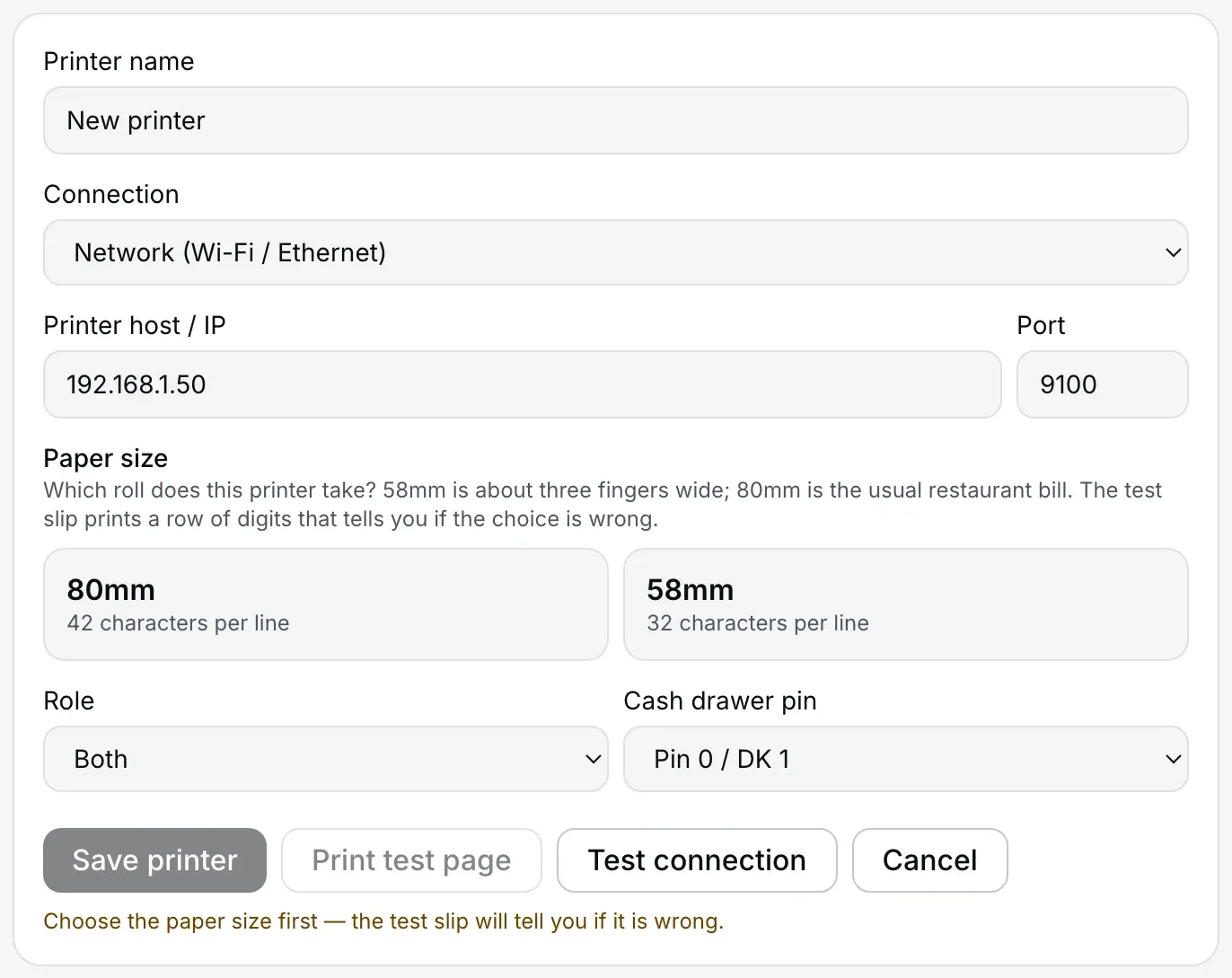
Settings → Printers & KDS → Add manually: host, confirmed port, paper size, Role aur cash drawer pin ek form mein.
Stations pehle set kare, phir isi form mein Kitchen station picker dikhega: ek printer Tandoor se bind kare aur doosre ko Whole kitchen default rakhe. Kitchen stations setup mein admin aur Desktop App dono steps dekhe. Station optional hai; upar ka basic setup uske bina bhi chalta hai.
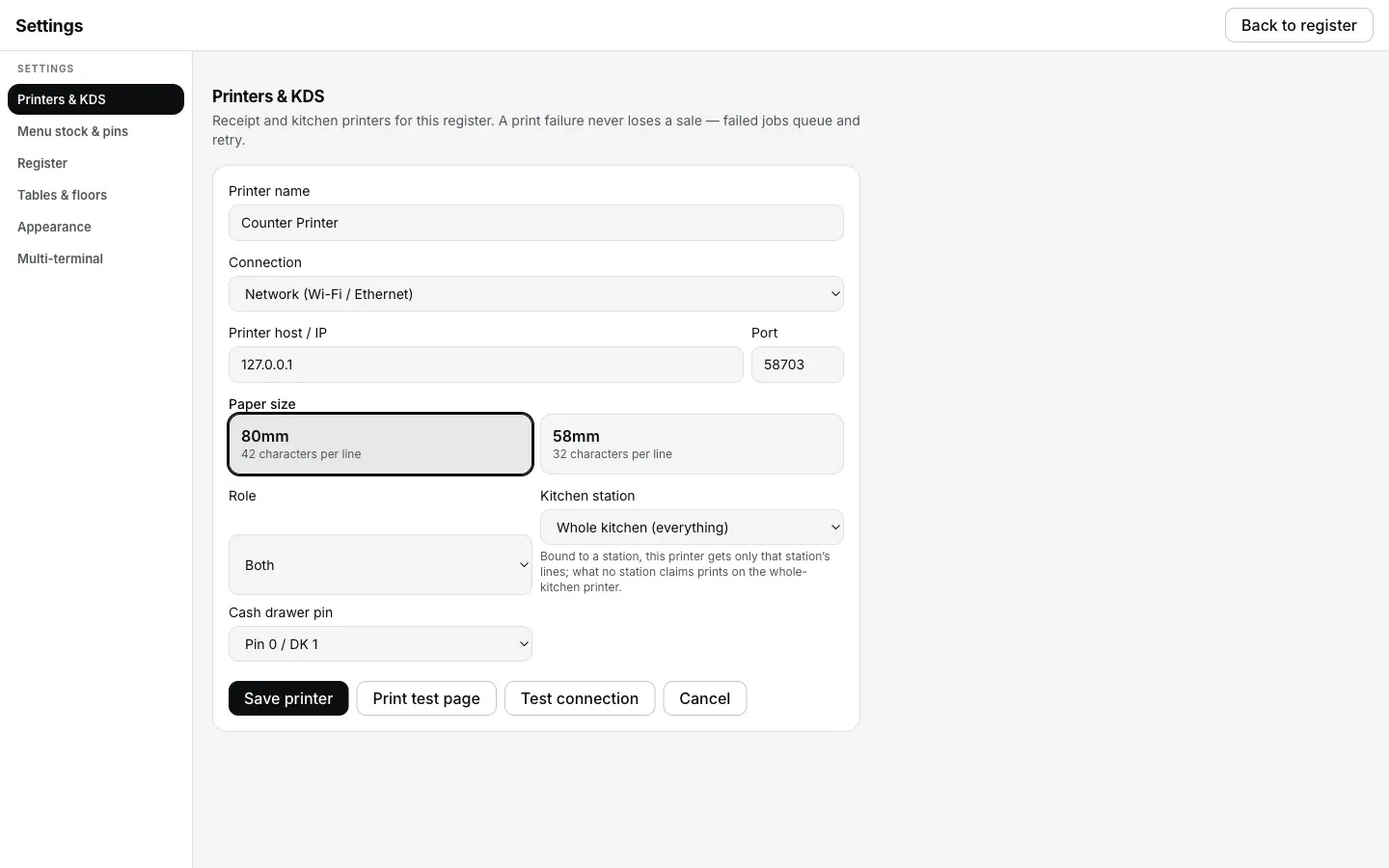
Kitchen stations banne ke baad isi edit form mein Role ke neeche Kitchen station field dikhta hai.
Print test page dabaye, slip dekhe, phir Save printer kare
Test slip kitchen mein jaakar dekhe. Digits doosri line mein wrap hon toh 58mm setting try kare; right side zyada khaali ho toh 80mm check kare. Counter printer aur kitchen printer dono ka test alag nikale.
3 mahine free · aaj ₹0, bina card details · phir ek outlet ke liye ₹299/month ya ₹2,990/year, plus 18% GST
Default mein teen roles; zaroorat ho toh har printer ko ek station de.
Default routing simple hai: printer ka Role Both, Receipt ya Kitchen (KOT) hota hai. Zyada split chahiye toh Kitchen (KOT) printer ko station se bind kare.
- Receipt customer bills, bill reprints aur cash-drawer kick leta hai.
- Kitchen (KOT) Desktop App aur phone se fired kitchen tickets leta hai, jab tak printer kisi station se bind na ho. Phone se KOT bhejne ka flow dekhe.
- Both bills aur KOT dono leta hai. Ek-printer setup mein yahi chune.
- Kitchen printer set nahi hai? KOT receipt printer par fallback hota hai. Slip galat roll par aaye toh kitchen tak bhej sakte hain; kahin na aaye toh dish miss hogi.
- Do Kitchen printers, par station binding nahi? Pehle save hua printer sab KOT leta hai. Plain Kitchen (KOT) jobs dono printers par copy nahi hote, taaki dish do baar na bane.
Drinks bar printer par aur food kitchen mein bheje. Kitchen (KOT) printer ko ek station se bind kar sakte hain. Owner dashboard mein menu categories se stations banaye: Bar station mein Beverages chune, toh same fired round ke drinks bar roll par aur starters Tandoor printer par jaayenge. Kisi station ne line claim na ki ho toh woh Whole kitchen printer par jaayegi. Kitchen stations setup mein owner dashboard aur Desktop App ke steps saath mein hain.
Kitchen screen bhi wahi station split dikha sakti hai. Old monitor par desktop kitchen station ya paired Android device par Chef view use kare. Categories configure kare; local router/LAN aur devices powered rehne chahiye. Kitchen display ka setup dekhe. Paper routing saath mein chalta reh sakta hai.
KOT par kya print hota hai.
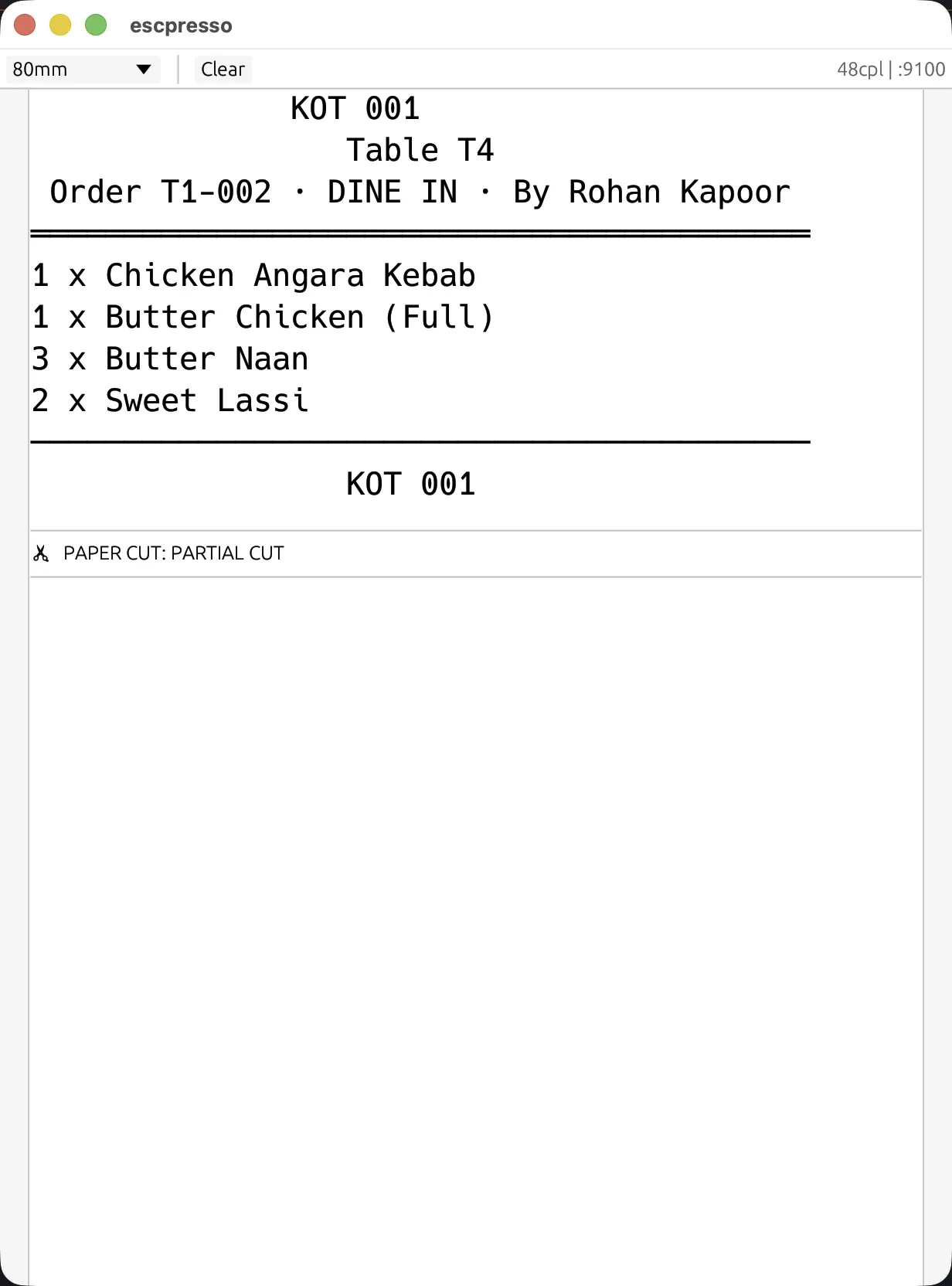
Desktop App ke bheje exact bytes ka virtual ESC/POS render: table ya order handle, dish aur quantity; prices nahi.
- Table aur kisne bheja. Pass ko plate ka destination aur floor ko staff ka naam milta hai.
- Dish, portion aur quantity. Half aur Full alag print hote hain, taaki kitchen portion guess na kare.
- Add-ons aur cooking note bold mein. "No onions", "mild" ya "Jain" table par type hota hai aur cook ke KOT par print hota hai.
- Veg aur non-veg marks. Menu se KOT paper tak aate hain.
- Station name, agar printer bind hai. "KOT 118 · Tandoor" same fired round ka KOT number use karta hai; station apna naya number nahi banata.
- Prices nahi. KOT cooking instruction hai; prices customer bill par rehte hain.
- Bill par amount "Rs." mein print hota hai. Thermal printer character set mein ₹ sign na ho sakta hai, isliye screen ₹480.00 aur paper Rs. 480.00 dikha sakta hai.
Doosre round mein sirf naye items print hote hain.
Table 4 ne do starters mangaye aur bees minute baad biryani add ki. Doosre KOT par sirf biryani, round number aur pehle bheje item count aata hai. Purane starters dobara print nahi hote.
- Fire ek baar record hota hai. Ticket acknowledgement order ledger mein rehta hai, isliye table doosre Desktop App ko dene par purane KOT dobara print nahi hote.
- Fired line ki quantity kam ho sakti hai; badhane par nayi line banti hai. Teen waters mein ek hata de toh do bill honge; manager PIN nahi chahiye. Chautha water add karne par nayi line next KOT mein jaayegi.
Fired dish hataaye toh kitchen ko bhi bataye.
KOT par ja chuki dish hataane ke liye staff ek baar confirm karta hai aur reason deta hai; manager PIN nahi chahiye. Record mein acting staff ka naam rehta hai. Cancelled line Desktop App history mein struck-through rehti hai. KOT reprint par bill jaisa DUPLICATE stamp nahi hota, isliye kitchen ko clearly bataye.
Drawer printer mein lagta hai, laptop mein nahi.
Cash drawer RJ-11 style cable se receipt printer ke DK port mein lagta hai. Desktop App printer ko kick command bhejta hai. Isliye EasyKOT mein alag drawer device add nahi hota; sirf pin setting hoti hai.
- Cash drawer pin: Pin 0 / DK 1 ya Pin 1 / DK 2. Drawer aur cable ke hisaab se pin badal sakti hai. Pehli pin par response na ho toh doosri select karke test sale settle kare.
- Har settle par drawer kick hota hai. Cash, UPI ya split tender ho, change aur float ke liye drawer command bheja jaata hai.
- Drawer na khule toh sale phir bhi settled rehti hai. Zaroorat ho toh Orders se bill reprint kare.

Bill ke same tape par drawer kick: command receipt printer se jaata hai, alag device se nahi.
KOT kitchen screen par dikhaye.
Desktop kitchen station ko old monitor par chalaye, ya paired Android device par Chef view khole. Tickets, timers aur Bump action dikhte hain. Setup ke liye pairing/configuration, powered devices aur local router/LAN chahiye.
- Screen aur paper saath chal sakte hain. Pass par display aur Tandoor corner par printer rakh sakte hain.
- Desktop station ko Desktop App host karta hai. Android Chef view paired device par chalta hai. Phone-only service flow apne compatible printer par KOT print kar sakta hai.
- Kitchen display ka guide dekhe: station setup, Bump aur settle-clear behavior samjhe.
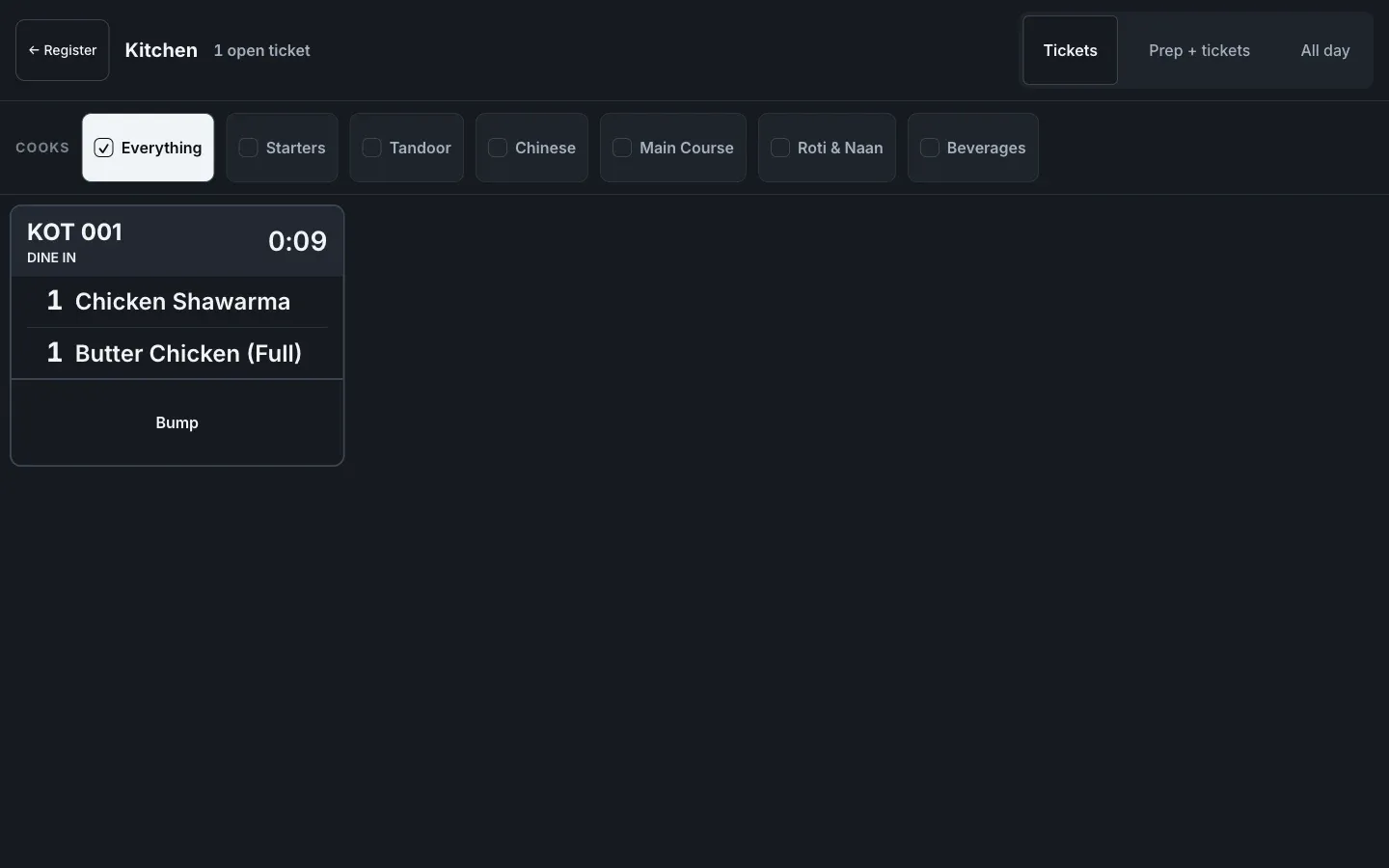
Wahi fired round paper ke badle kitchen screen par.
Doosra printer kharidne se pehle screen flow dekhe. Live demo browser mein real Desktop App chalata hai: test order banakar KOT fire kare. KOT aur matching bill side by side dikhenge. Demo ko laptop-size screen chahiye. Sample KOT normal print dialog mein khulta hai; automatic printing aur paper nikla ya nahi, browser nahi jaan sakta.
KOT print na ho, tab bhi order save rehta hai.
- Ticket queue se pehle order save hota hai. Ledger pehle write hota hai, print job baad mein.
- Definite failure 5 minute retry hota hai: 1, 2, 5, 15, 30 aur 60 second, phir har minute. Printer us window mein wapas aaye toh queue khud nikalti hai; uske baad Print ya Discard chune. Bytes printer tak pahunchne ka doubt ho toh job turant park hota hai aur It printed ya Print again (marked duplicate) poochta hai; har reconnect par blind retry nahi hota.
- Desktop App status dikhata hai. Status rail par No printer · N waiting aur Settings → Reliability mein N failed, Reprint last receipt aur Reprint last KOT milte hain. Kitchen printer row par Check printer chalaye. Connect guide mein poora diagnostic dekhe.
- Bill reprint par DUPLICATE aata hai. Invoice number aur date wahi rehte hain. KOT reprint wahi kitchen ticket hai aur DUPLICATE stamp nahi aata, isliye kitchen ko bataye.
Specific symptom fix karna hai? Printer not printing ke checks dekhe. Ismein blank slip, garbage characters aur missing KOT cover hain. Ya dekhe ki hardware issue ke beech billing kaise save rehti hai.
Seedhe jawaab.
Kya ek printer se bill aur KOT dono nikal sakte hain?
Drinks bar printer aur food kitchen printer par jaa sakta hai?
Rush mein kitchen printer ka paper khatam ho gaya toh?
KOT dobara print kar sakte hain?
Cash drawer ko laptop mein alag cable lagti hai?
UPI settle par drawer nahi khula. Kya check kare?
KOT printer aur bill printer alag hone chahiye?
Agla step: pehla printer connect kare · kitchen stations set kare · kitchen display dekhe · saari EasyKOT guides
3 mahine try kare, phir plan chune.
Restaurant ka kaam hum samajhte hain, kyunki shuruaat bhi wahin se hui. 3 mahine free try kare, bina card details. Hamari kahani padhe.