Last night's tables are still in the list. Say whether the money came in.
You open the Desktop App in the morning and four tables from last night are still sitting under From earlier days. The cash was in the drawer when you locked up and the UPI alerts came on the phone, but the till never recorded a payment on those checks, so the report shows less than the money you counted. Day close has one question for them: did the money come in? Three answers, and the sheet states what each one does to Sales, the tender totals and the cash box, with the real amount, before it writes anything.
Why a check can be old and paid at the same time: at your day's cutoff (4:00 AM unless you changed it in the dashboard) the server closes every check that still has food on it and marks it Paid · Auto closed, with no payment recorded. Most of these are the last tables of the night whose money did come in. The Orders list keeps showing them that way until you answer.
Three answers, three different effects.
Read this table once and the sheet never surprises you. The same facts appear in the sheet's own panel, with the real rupee amount, the moment you pick an answer.
| Yes, add the payment | Yes, but skip the details | No, the guest did not pay | |
|---|---|---|---|
| What it means | The money came in and you know how: Cash, UPI or Card. | The money came in, but you do not want to say how, or you are not sure. | Nobody paid. A walkout, or a comp nobody recorded. |
| Sales | The amount moves out of its old day and into today’s sales. | Stays on its own day, as it is now. | The amount comes off that day’s sales. This cannot be undone. |
| Cash, UPI and Card totals | Today’s total for that tender goes up by the amount. | Not counted. The report shows it as No payment recorded. | No change. |
| Cash box | Cash with a shift open: today’s box expects that much more. UPI, Card, or no shift open: no change. | No change. | No change. |
| Bill and drawer | No bill prints and the drawer stays shut. | Nothing prints. | Nothing prints. |
| What it asks for | The tender. Nothing else. | Nothing. | A typed reason, then a manager or owner PIN. |
| Who can press it | A cashier, manager or owner. | Anyone who can open Day close. | A manager or owner. A cashier sees it disabled. |
| Later | A real payment. To take it back, refund the bill from Orders (manager PIN). | Still in the Earlier tab; settle it there when you know the tender. Comes back to this sheet if the check gets new food or a part payment. | Final. The dialog says so before you confirm. |
From the morning banner to All decided.
Read the video transcript
This is the recorded narration. Screen labels and steps reflect the video as published.
At the end of the night, the last tables eat and leave, and no payment gets noted in EasyKOT. At day end, those bills auto close. So they show up here as Paid · Auto closed. The banner counts them: 4 checks from before today. Tap Close them out.
This is Close out the day. Scroll down to No payment recorded. All 4 checks are ticked, worth ₹1,890. There is one question: Did the money for these checks come in? And three answers. Yes, add the payment. Yes, but skip the details. Or No, the guest did not pay. Pick one, and a panel shows what it does to your reports, before anything is saved.
Not all four have the same answer, so untick Table T6 and Table T5 for now. Now it says 2 of 4 ticked, ₹1,155.
For Tables T4 and T2, the money did come in. So tap Yes, add the payment. Now read the panel. Sales: ₹1,155 moves out of its old day and into today's sales. UPI is picked, so today's UPI total goes up by that much. Tap Cash. Today's Cash total goes up instead, and today's cash box expects ₹1,155 more. So if yesterday's drawer was already counted, today's count will read short by this much. Tap UPI, and the Cash box says No change. These two were paid in cash, so go back to Cash. No bill prints and the drawer stays shut, because the guest has already left. Tap Add ₹1,155 as Cash · 2 checks.
2 payments added. The other two checks are still here. So a mixed night is just a few passes like this: tick, answer, repeat. Table T5 was paid too, but you do not know how. So untick Table T6. And tap Yes, but skip the details. The sale stays on its own day. It is not counted in your Cash and UPI totals, and the report shows it as No payment recorded. The cash box does not change. You can still add the payment later, from the Earlier tab. Tap Keep 1 check as auto closed.
One check is left, Table T6. This guest really did not pay. So tap No, the guest did not pay. ₹315 comes off that day's sales, and this cannot be undone. That is why it needs a typed reason and a manager's PIN. Tap Write off 1 check. Type the reason, then tap Write them off. Now a manager types their PIN and taps Authorise.
All decided. Every check from before today now has an answer. Close the sheet, and the Orders screen is clear.
Need help with EasyKOT? WhatsApp +91 72191 83939, or go to easykot.com.
Every screen below is captured from the running Desktop App on a sample store, Spice Route Kitchen. The tables and amounts are sample data.
Open Orders. The banner has already counted them.
Open Orders on the Desktop App. When checks are left from before today, a banner at the top counts them and says how many were auto closed as paid at day end, with a 'Close them out' key on the right. The same checks sit under 'From earlier days' just below: table, bill number, a Paid · Auto closed badge, the date and the amount, with the section's total on the right. Day close in the header opens the same sheet; the key on the banner only saves you a scroll. The sheet is titled 'Close out the day' and opens with the Cash box line, then Nothing rung, then the section this guide is about.
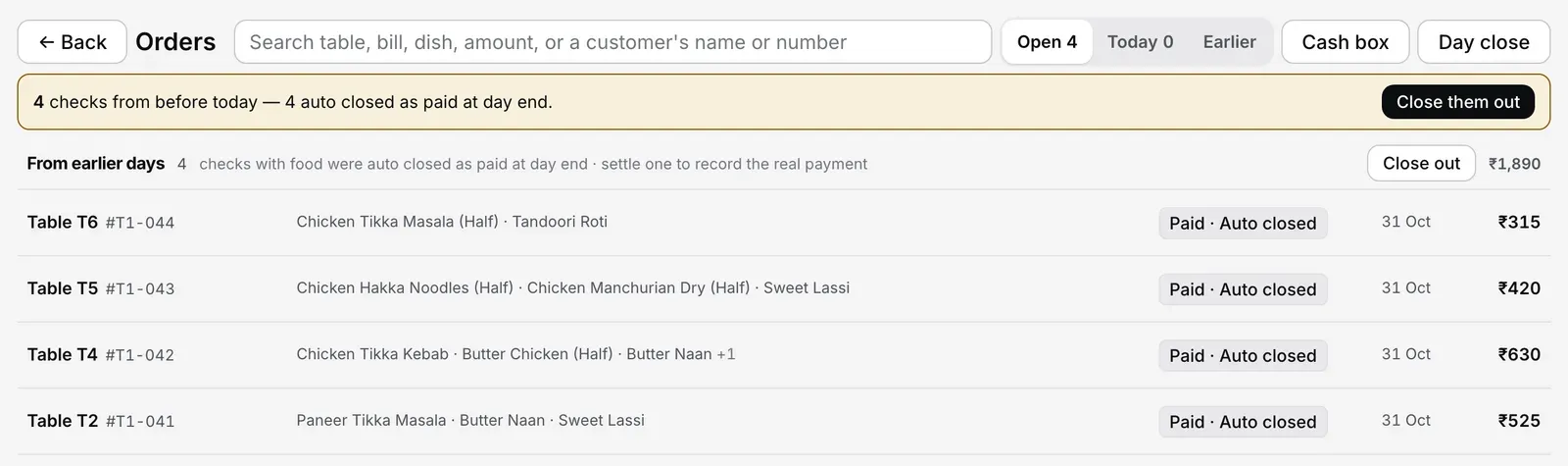
Step 1: the banner has counted the leftovers. Sample store, sample amounts.
Read the list under No payment recorded, and tick.
Scroll to 'No payment recorded'. The heading counts the checks and adds them up. Under it, one row per check: a tick box, the table, the bill number and the amount. Every row starts ticked. The line under the list says how many are ticked and what they total, with 'Untick all' or 'Tick all' beside it. Untick any check that needs a different answer from the rest; it stays in the list for the next pass. Then comes the question, 'Did the money for these checks come in?', and three answers under it. Nothing is chosen for you. The key at the bottom stays grey and reads 'Pick an answer above.' until you choose, or 'Tick at least one check.' if you unticked them all.
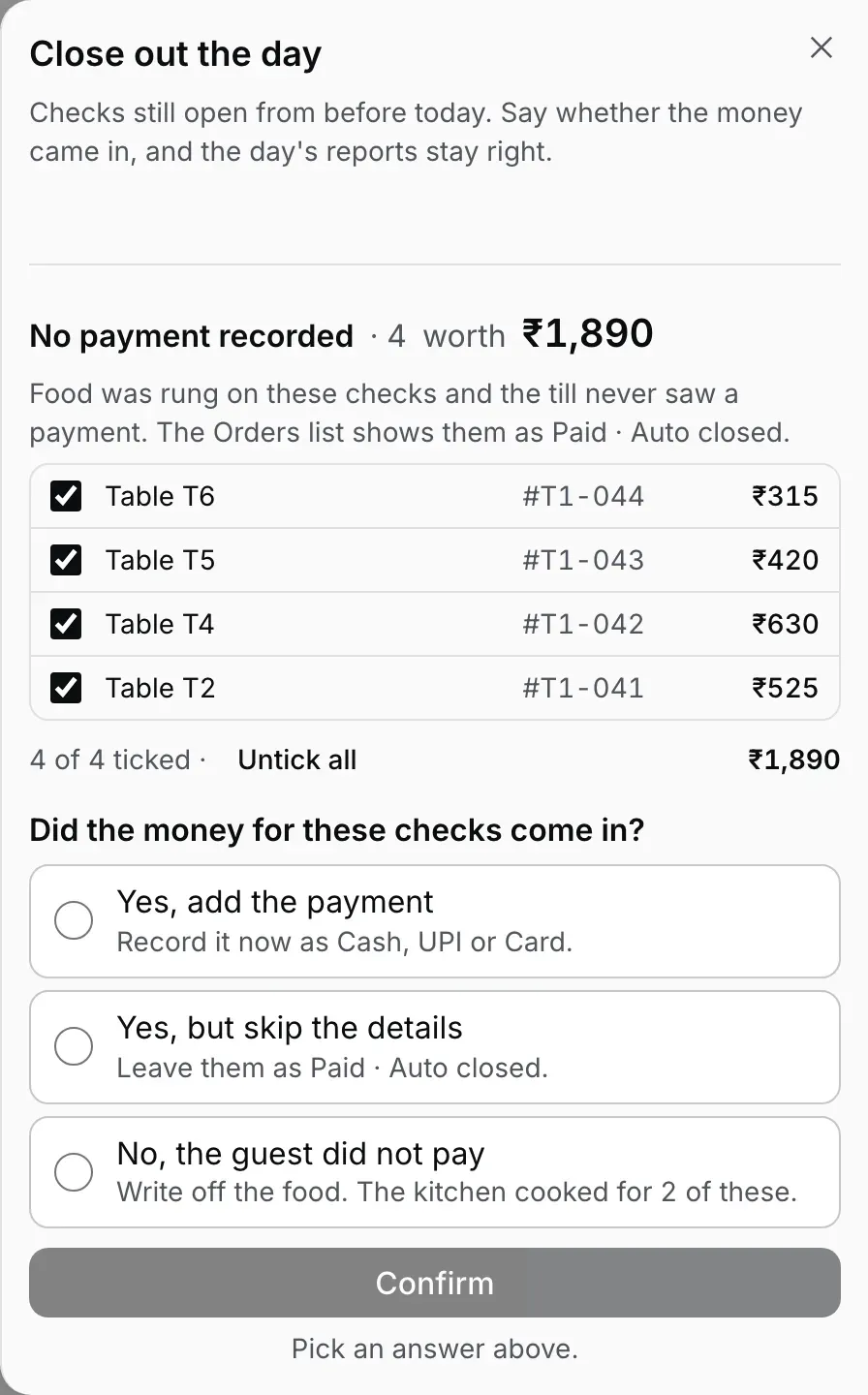
Step 2: everything ticked, nothing answered. The key stays grey until you choose.
The money came in: Yes, add the payment.
Pick 'Yes, add the payment' and a 'Paid by' row appears with UPI, Cash and Card; UPI is selected first. Below it a panel states what will happen to the ticked checks, with the real amount. For two checks worth ₹1,155 paid in cash it reads: Sales, ₹1,155 moves out of its old day and into today's sales; Cash and UPI totals, today's Cash total goes up by ₹1,155; Cash box, today's cash box expects ₹1,155 more, and if yesterday's drawer was already counted, today's count will read short by this much. Switch to UPI and the cash box line becomes 'No change.', because UPI never touches the drawer. The key names the amount, the tender and the count, Add ₹1,155 as Cash · 2 checks in this example. Press it: the rows fade out of the list, a toast says how many payments were added, and the sheet is ready for the checks that are left. 'No bill prints and the drawer stays shut: the guest has already left.'
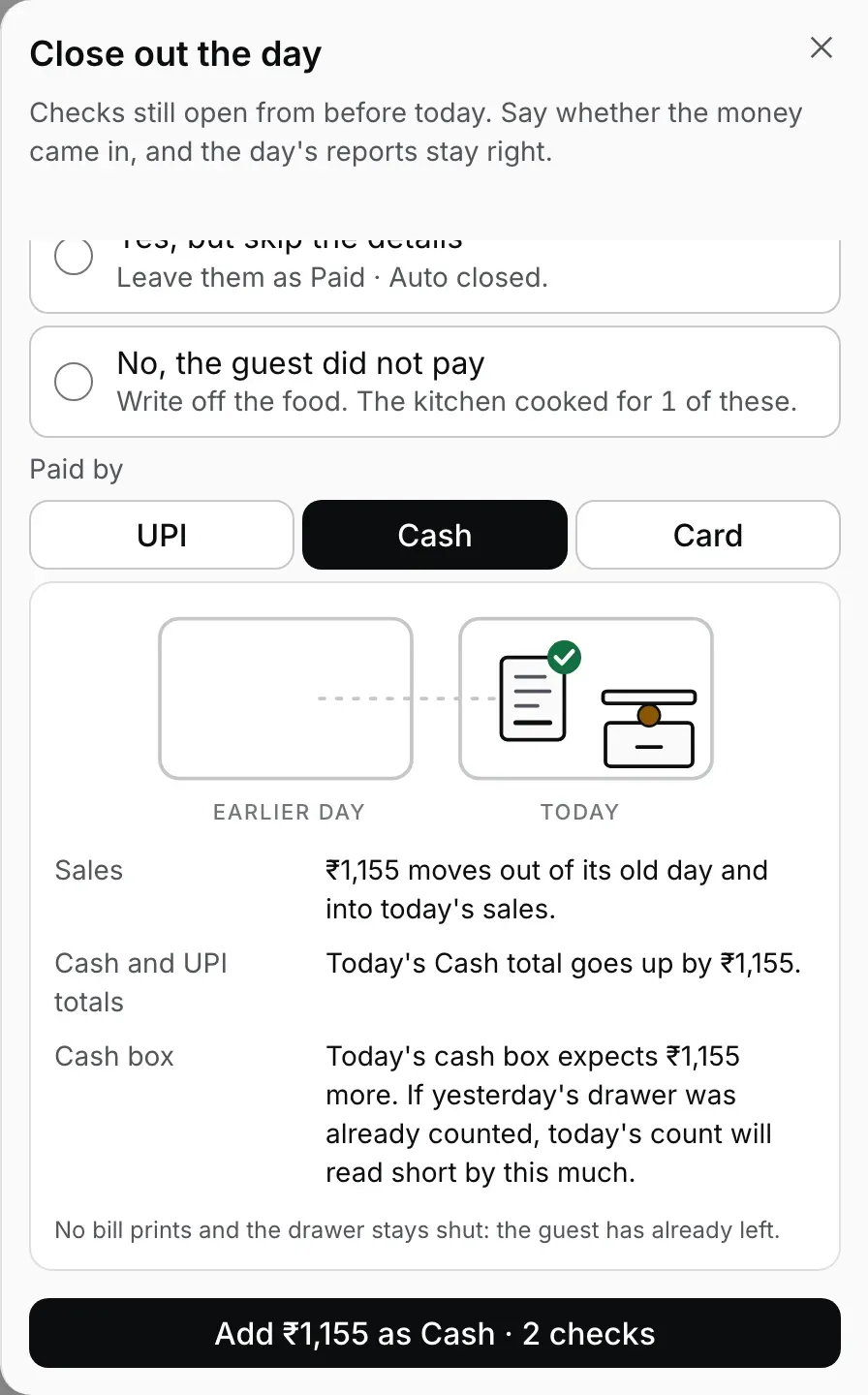
Step 3, cash: the panel names the amount and warns about a drawer counted yesterday.
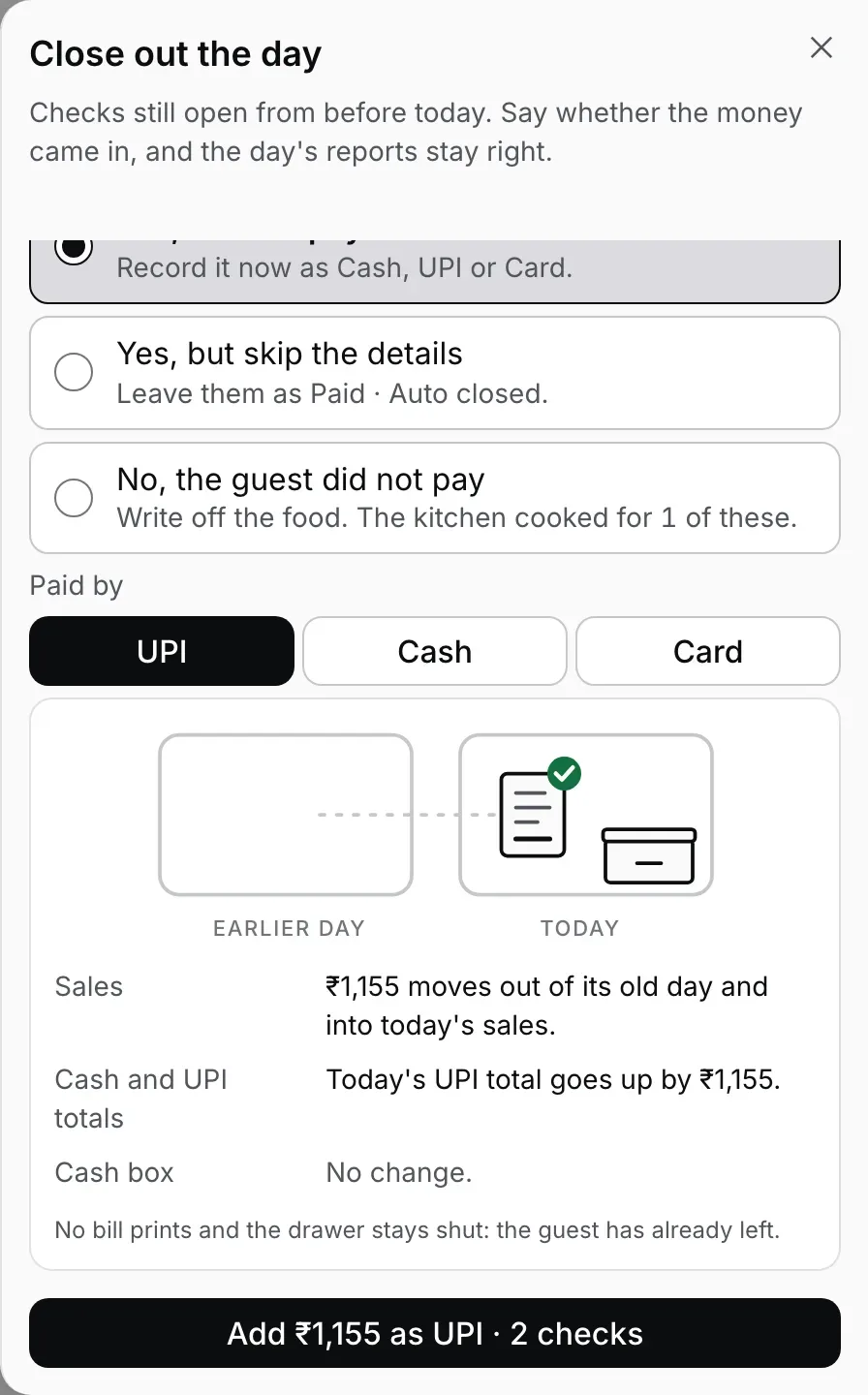
Step 3, UPI: same sale, same total, the cash box untouched.
The money came in, but skip the details.
When you know the table paid but nobody remembers how, or you would rather find out tomorrow, pick 'Yes, but skip the details'. The panel is short: Sales, 'Stays on its own day, as it is now.'; Cash and UPI totals, 'Not counted. The report shows it as No payment recorded.'; Cash box, 'No change.' The key reads Keep 1 check as auto closed. The check leaves this list and the sheet stops asking about it, but nothing about the sale changes and the door stays open: 'You can still add the payment later, from the Earlier tab.' Open Orders, press 'Earlier', find the bill and settle it with the right tender when you know it.
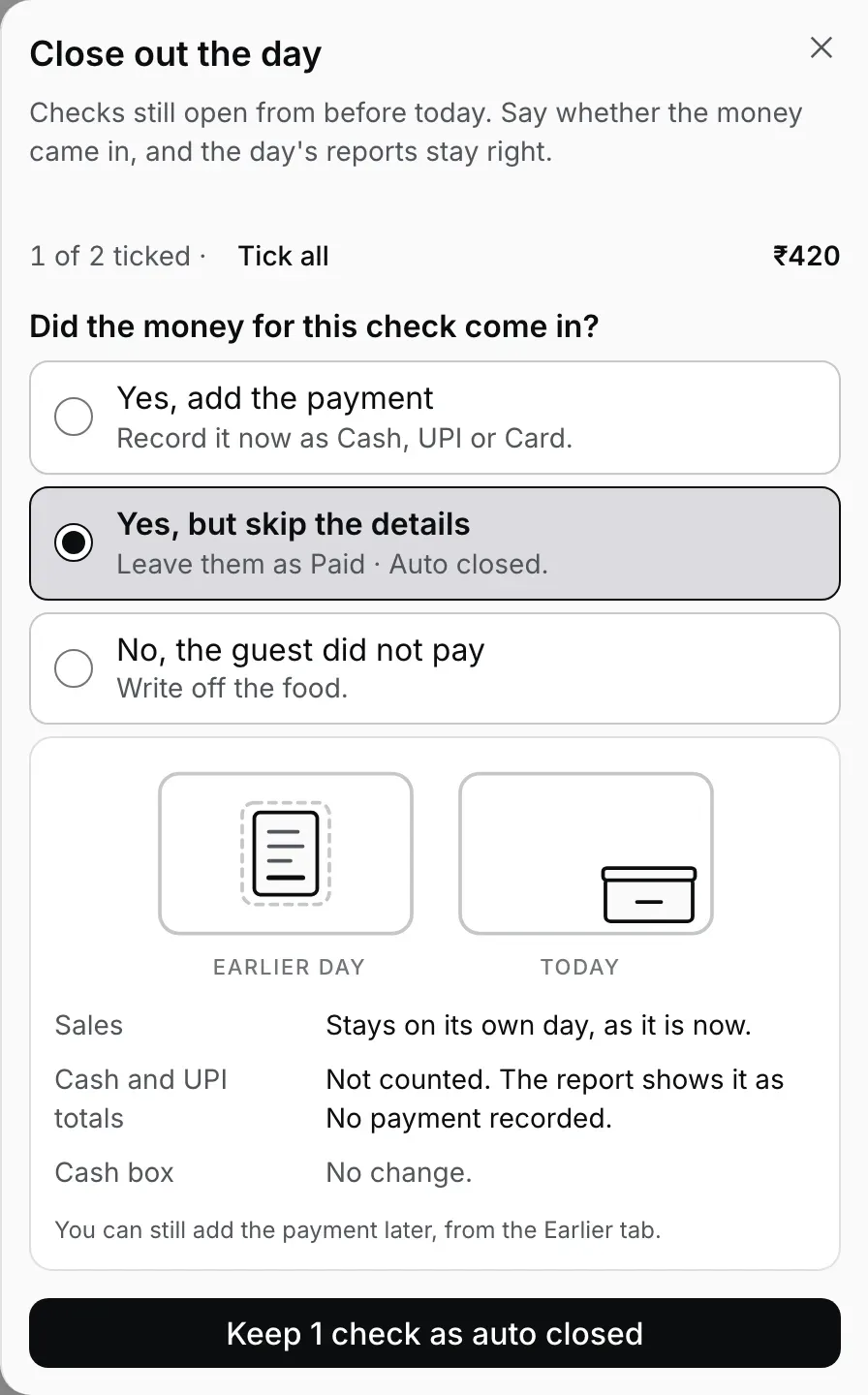
Step 4: one check kept as auto closed. Nothing moves, and Earlier still has it.
The guest did not pay: write it off, with a reason and a PIN.
Pick 'No, the guest did not pay'. The answer's own line tells you how many of the ticked checks the kitchen actually cooked for, so you know what was lost. The panel says it plainly: Sales, ₹315 comes off that day's sales and this cannot be undone; Cash and UPI totals, no change; Cash box, no change; and under them, 'Needs a typed reason and a manager's PIN.' The key turns red and reads Write off 1 check · ₹315. It opens a dialog that repeats the amount and asks 'Why are these being written off?'; 'Write them off' stays off until you type a reason, and that reason is the line the owner reads next month. Then the manager PIN prompt. It names the approval as a comp, says the guest is not charged for food already made and the store absorbs the cost as waste, and shows the count and the amount above the keypad. A manager or owner types their PIN. A cashier never gets this far: for them the answer is disabled with the note 'A manager has to sign for writing off food. Ask one to close these out.'
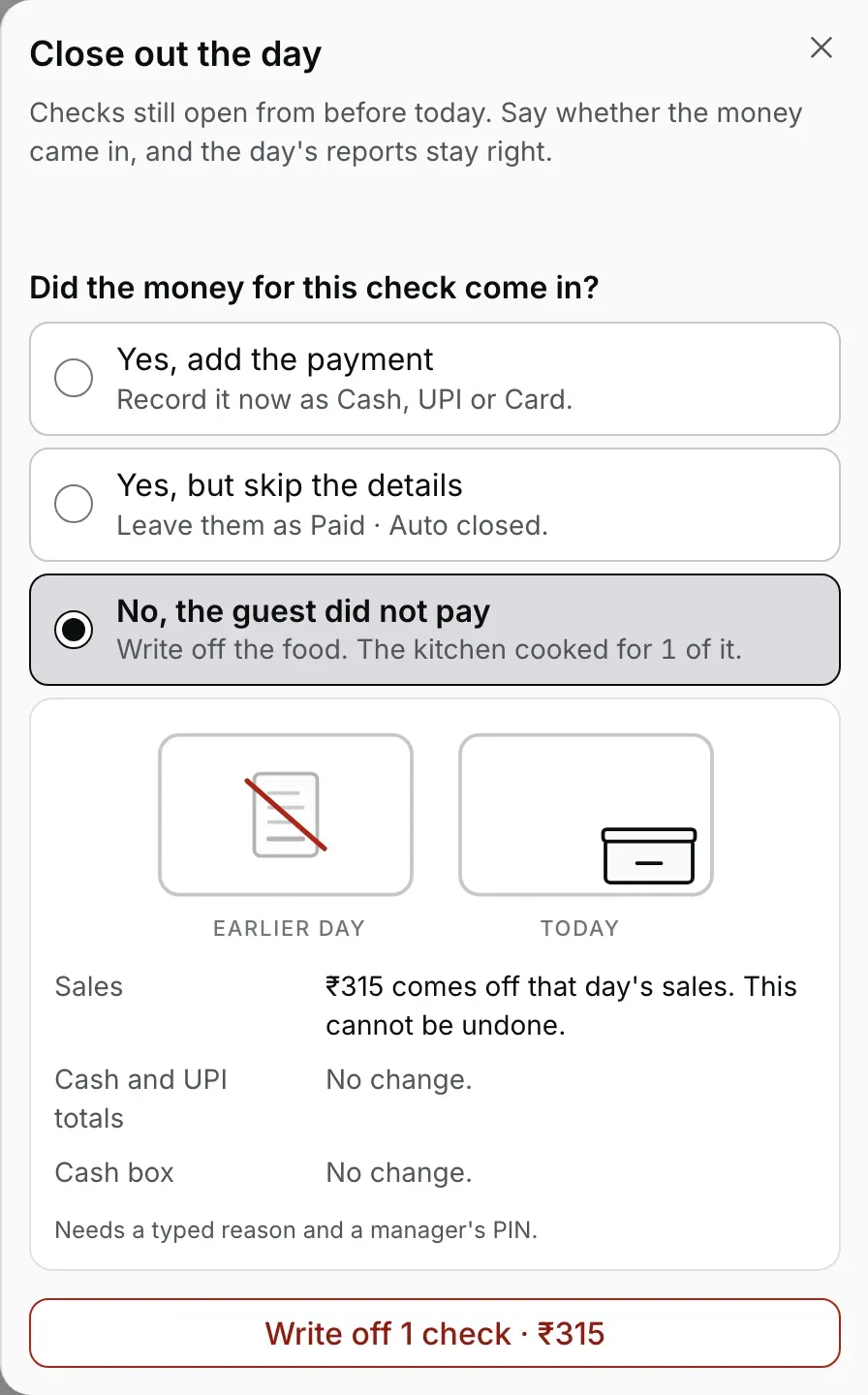
Step 5: the only answer that reduces sales, and the key is red for it.
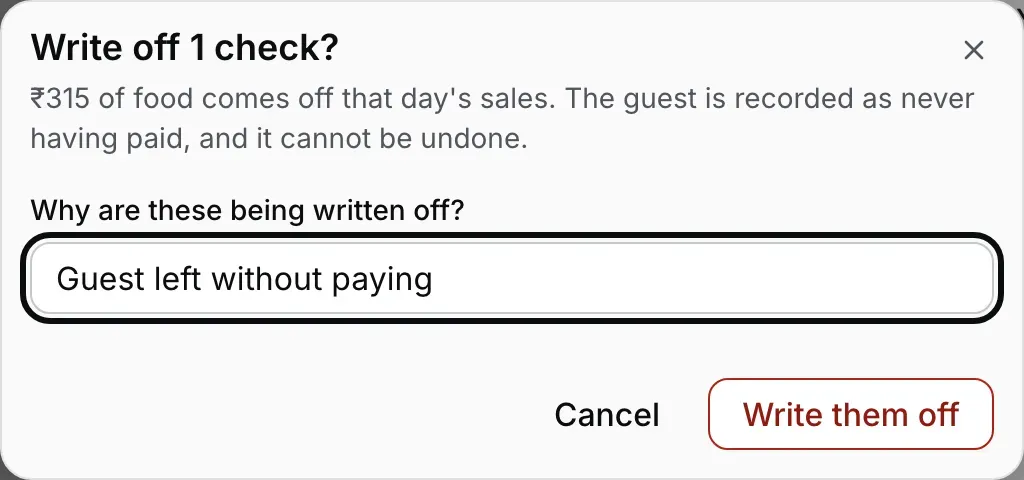
Step 5: the reason is typed, not picked from a list.
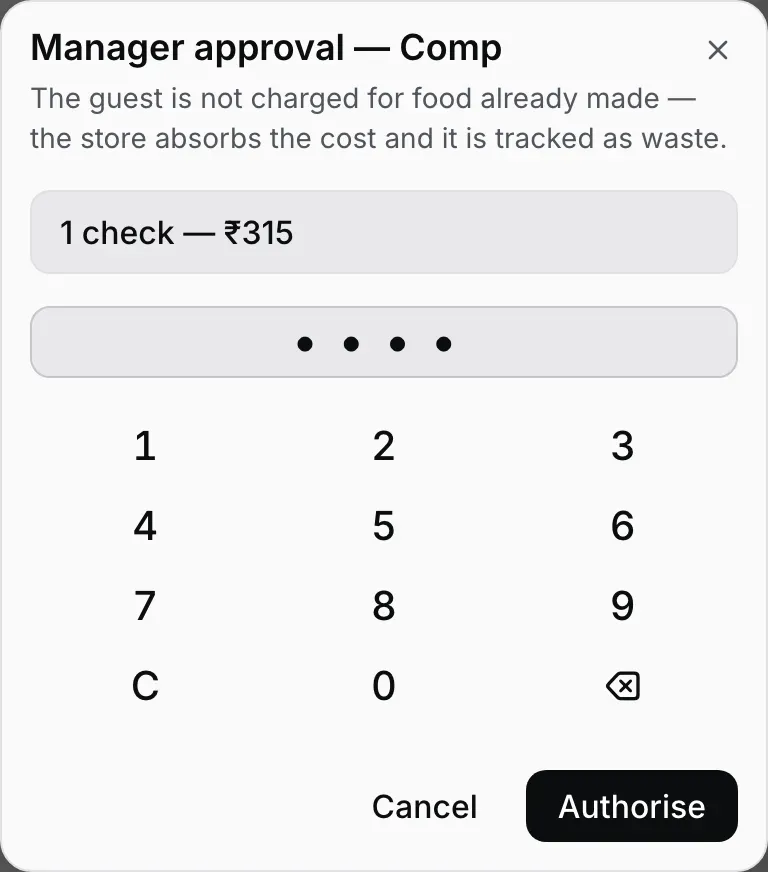
Step 5: a manager or owner signs with their PIN. A cashier cannot reach this screen.
All decided.
When the last check has an answer, the section shows 'All decided.' and 'Every check from before today now has an answer.' Above it, if a cash shift is open, the Cash box line is still waiting: 'Count & close the cash box' is the next key, and the cash shift guide takes it from there. Close the sheet and the Orders list is clear; the banner is gone. Open it the next morning and only new leftovers appear.
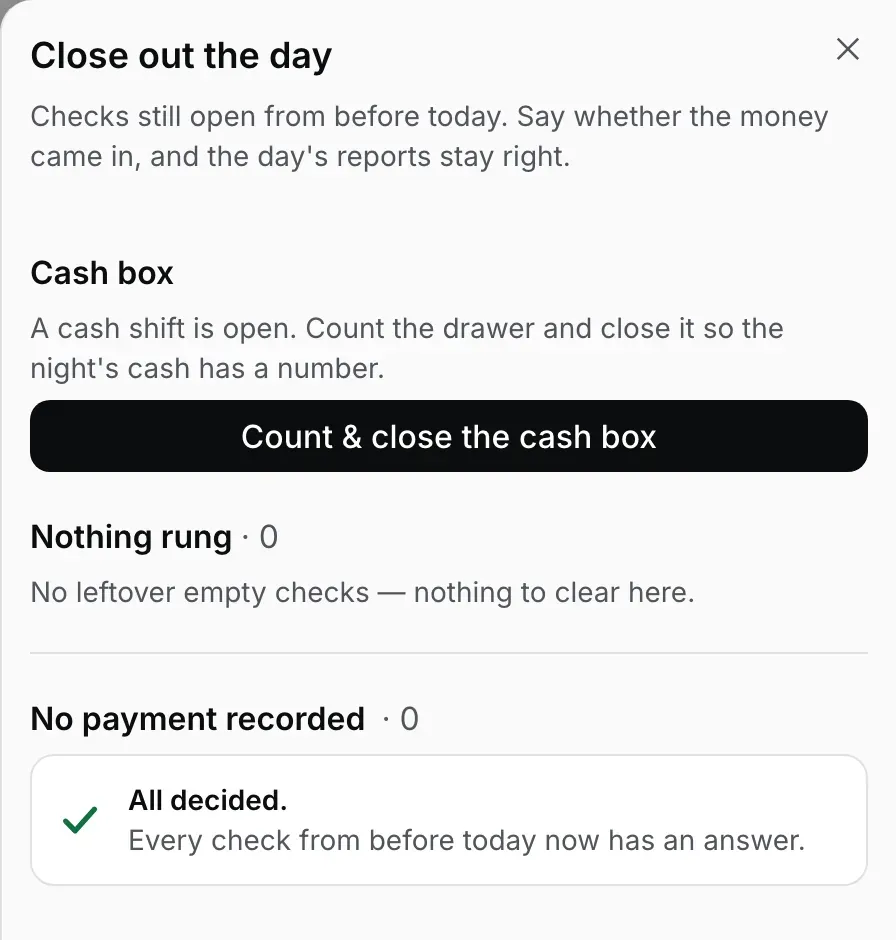
Step 6: All decided. The cash box is the one line that does not close itself.
Match the answer to what actually happened.
- The money is in the drawer or on the UPI app, and you know which. Add the payment with that tender. This is the right answer for most of the list: the last tables of the night, paid, never settled on the till.
- The money came, but nobody remembers how. Skip the details tonight and settle it from the Earlier tab when the cashier remembers. Do not guess a tender: a cash guess for a UPI payment turns up as a cash variance at the next count, and the reverse hides cash that is really there.
- The table walked out, or the food was a comp nobody recorded. Write it off, with the real reason typed in. This is the only answer that reduces sales, which is why it is the only one that asks for a PIN.
- You are not sure the money came at all. Skip the details. It costs nothing, changes nothing and can be settled later. The question comes back on its own only if that check gets new food after you skipped it. A part payment moves it to Money already taken instead.
- Money was already taken on the check. It is not in this list. A check with a payment on it appears under Money already taken with no bulk key: open it and settle the balance, or refund what was paid.
Four checks, three stories, three passes.
Take the sample night in the pictures. T2 (₹525) and T4 (₹630) paid cash before they left. T5 (₹420) paid, but the waiter is not sure whether it was cash or UPI. T6 (₹315) walked out. Four checks, three different answers, so the sheet is used in passes rather than one tap.
Pass one: untick T5 and T6, leaving T2 and T4 ticked for ₹1,155. Pick 'Yes, add the payment', Cash, and press Add ₹1,155 as Cash · 2 checks. The two rows leave. The sheet re-ticks whatever is left and clears the answer, so you start the next pass clean. Pass two: untick T6, pick 'Yes, but skip the details' for T5, press Keep 1 check as auto closed. Pass three: T6 is alone and ticked, pick 'No, the guest did not pay', type the reason, hand the keypad to a manager. 'All decided.'
A night where everyone paid cash is a single pass: leave everything ticked, add the payment, done. A night where you would rather sort it out tomorrow is also a single pass: skip the details for all of them, and settle each from the Earlier tab as the stories come in.
If yesterday's drawer was already counted.
Add a cash payment for last night's table and today's cash box expects that cash. The rupees themselves were in last night's drawer, not today's. If last night's shift was counted and closed before you answered, that count read over by the amount (cash present without a recorded sale) and today's count will read short by the same amount once you add it. The sheet says exactly this on its Cash box line the moment you select Cash.
The clean order is leftovers first, then the count: answer the question before you press 'Count & close the cash box', and the cash and the sale land in the same shift. If the drawer was already counted, add the payment anyway (the sale and the Cash total are right either way) and expect today's count to read short by that much; the two variances cancel, and the reason is on this page.
With no cash shift open at all, the line reads 'No change: no cash shift is open.' The payment still moves the sale and today's Cash total; there is simply no drawer count for it to appear in. UPI and Card never touch the cash box.
Opening float, cash in/out and the closing count, step by step.
Changing your mind afterwards.
- You skipped the details and now know the tender. Open Orders, press 'Earlier', find the bill on its day, settle it as usual. The payment is recorded on the day you settle, and the dashboard's Day close for that date shows the payment instead of No payment recorded.
- You skipped it and the check got new food or money. It comes back to the sheet by itself, because a skip covers the check as it was when you answered, not whatever happens to it after. New food brings the question back; a part payment puts the check under Money already taken.
- You added the payment with the wrong tender, or on the wrong check. It is a real payment now and the bill is settled, so it cannot take a second payment, and a settled bill has no way to change its method. A refund from Orders, which asks for a manager's PIN, takes that money back out of today's total, but the bill stays settled. If the amount was right and only the method was wrong, leave the bill and note it for your accounts. The discounts, voids and refunds guide walks through a refund.
- You wrote it off and the guest came back to pay. The write-off cannot be undone; the dialog said so before the PIN. Ring the food again on a new check and settle it; the written-off check stays on record with its reason.
- The amount changed under you. If you are adding the payment and another till has just added food to that check, the Desktop App refuses that one check with 'This check changed after you read it. Check the amount and answer again.' and finishes the others. The row shows its new amount; read it and answer again. If another till took a part payment on it, that check is refused whichever answer you gave, and it moves to Money already taken. It cannot be ticked there: open it and settle the balance, or refund what was paid.
Cashier or manager.
Adding the payment needs the same permission as settling a bill, so a cashier, manager or owner can do it. Without that permission the answer is disabled with 'Only a cashier or manager can add a payment. Ask one to close these out.' Skipping the details has no gate: it writes nothing about money.
Writing off needs the permission that voids fired food, which cashiers do not have. For them the third answer is disabled with 'A manager has to sign for writing off food. Ask one to close these out.' A manager or owner picks it and signs with their own PIN at the prompt. Who holds which permission is in the staff PINs and roles guide.
Straight answers.
Why does the Orders list say Paid when nobody paid?
Does adding the payment print a bill or open the drawer?
Which day does the sale land on?
I added cash, but yesterday's drawer was already counted. Is the count wrong now?
Can a cashier write off a check?
What if the check changed while the sheet was open?
Do I have to decide tonight?
Where do these answers show up for the owner?
The rest of the routine.
Day close, the whole routine
Empty checks, the GST bill series and the cash box line, around the question this guide answers.
Read the day-close guide →Cash shift
Opening float, cash in and out, and the count that reads short when a payment lands in the wrong shift.
Open and close the cash shift →Owner reports & daily summary
Where an added payment, a skipped check and a write-off each show up the next morning.
See the reports →Every guide in this cluster is listed on the guides hub.
Run it 3 months, then pay for it.
Three months free, full product, no card. Made in India, for the counter: built inside a running restaurant.