Printer ek ticket print karke ruk jaata hai?
Pehla KOT theek nikla, uske baad kuch nahi. Wajah teen mein se ek hai: printer so gaya, uska buffer full hai, ya paper chup-chaap khatam ho gaya. Printer ke paas bhaagne se pehle Settings → Printers & KDS ka print queue dekho. Wahan har ticket ke saamne likha hai ki woh kis cheez ka wait kar raha hai.
Printer chale ya na chale, sale save ho chuki hai. Desktop App bill pehle apne andar save karta hai, print uske baad. Har symptom ki poori table mein baaki saare cases hain.
Pehle ticket ke baad printer ko kuch hua, aur baaki tickets queue mein ruke hain.
- Printer so gaya. Battery wale aur Wi-Fi wale printer thodi der khaali rehne pe apna Wi-Fi band kar dete hain. Shaant ghante ka pehla ticket unhe jagata hai aur khud fail ho jaata hai, agla chal jaata hai. Do rush ke beech mein yahi sabse common wajah hai.
- Buffer full hai. Printer ne jitna data liya, utna print nahi kiya, toh woh aur lena band kar deta hai. Aksar paper chalte hi yeh apne aap clear ho jaata hai. Lekin jo printer slip ke beech mein atak gaya, woh band-chalu kiye bina full hi rehta hai.
- Paper chup-chaap khatam ho gaya. Jo printer apna paper sensor report karta hai, uspe EasyKOT Desktop App “Paper out” dikhata hai aur printing rok deta hai. Jo printer kuch report nahi karta, uska roll bas khatam ho jaata hai aur Desktop App ko pata hi nahi chalta: printer job leta rehta hai aur khaali head garam karta rehta hai.
Pehle yeh karo.
Pehle print queue padho
Settings → Printers & KDS mein har adhoora job dikhta hai: kya hai, kis printer ke liye hai, aur uska state. State in mein se ek hota hai: Waiting, Printing…, Retrying in 15s (attempt 3), Not printed — waiting for your choice, Not printed — stopped trying, ya Needs you — may have printed. Isi line se pata chalta hai ki printer Desktop App ko mana kar raha hai ya jawaab hi nahi de raha. Dono alag problem hain.
Printer ki row pe uska status padho
Usi screen pe printer ki health words mein likhi hoti hai. “Paper out”, “Cover open” aur “Cutter jammed” teeno printing rok dete hain, aur teeno ka fix seedha hai. “Can't verify — will still try to print” ka matlab hai yeh printer status ka jawaab hi nahi deta, toh kitchen jaake paper dekhna hi padega.
Printer band karke chalu karo
Switch off karo, 5 second ruko, phir on karo. Isse full buffer clear hota hai, atka hua cutter chhoot jaata hai aur soya hua Wi-Fi jaag jaata hai. Teen mein se do wajah ek hi step mein khatam, isliye yeh doosra step hai.
Queue ko khaali hone do, jaldi ho toh dhakka do
Printer jawaab dene lage toh pichhle 5 minute mein maange tickets line se khud print hote hain. Purane tickets mein se jo abhi chahiye, unpe Print dabao; baaki Discard karo. Agle try ka wait nahi karna? Queue row pe Retry now dabao, ticket turant jaayega. Send to <another printer> se ticket kisi chalte printer pe chala jaata hai.
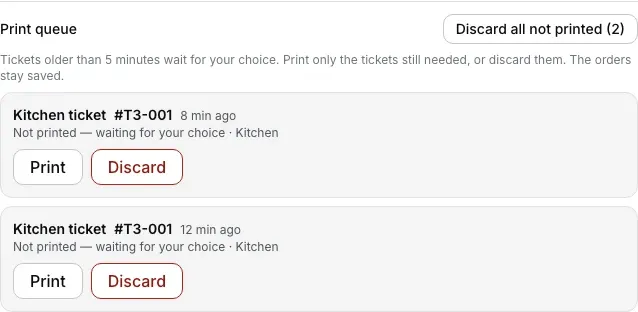
Print queue har ruke ticket ka naam aur umar dikhata hai. Purane ticket par Print dabao, ya paper nahi chahiye toh Discard; order saved rehta hai.
Printer ki row kya bolti hai.
Settings → Printers & KDS mein har printer ki apni row hoti hai. Us row pe status green dot se nahi, seedhe words mein likha aata hai. Is problem ke exact words yeh hain.
- Jab tak problem hai: Aksar “Connected” ya “Can't verify — will still try to print” dikhta hai, aur neeche queue mein tickets jama hote rehte hain. Jo printer connection le leta hai par kuch karta nahi, woh bahar se theek hi lagta hai. Agar printer khud apni problem batata hai toh specific word aata hai: “Paper out”, “Cover open”, “Cutter jammed”, “Printer paused” ya “Printer cooling down”.
- Fix hone ke baad: “Connected”. Pichhle 5 minute mein maange tickets khud print hote hain; purane tickets aapki choice ka wait karte hain.
“Printer cooling down” koi fault nahi hai, aapko kuch nahi karna. Lamba print chalne ke baad thermal head khud ko bachane ke liye thoda rukta hai, phir chalu ho jaata hai. Desktop App yeh seedha likh deta hai, taaki aap laal status dekh ke khali-pili tension na lo.
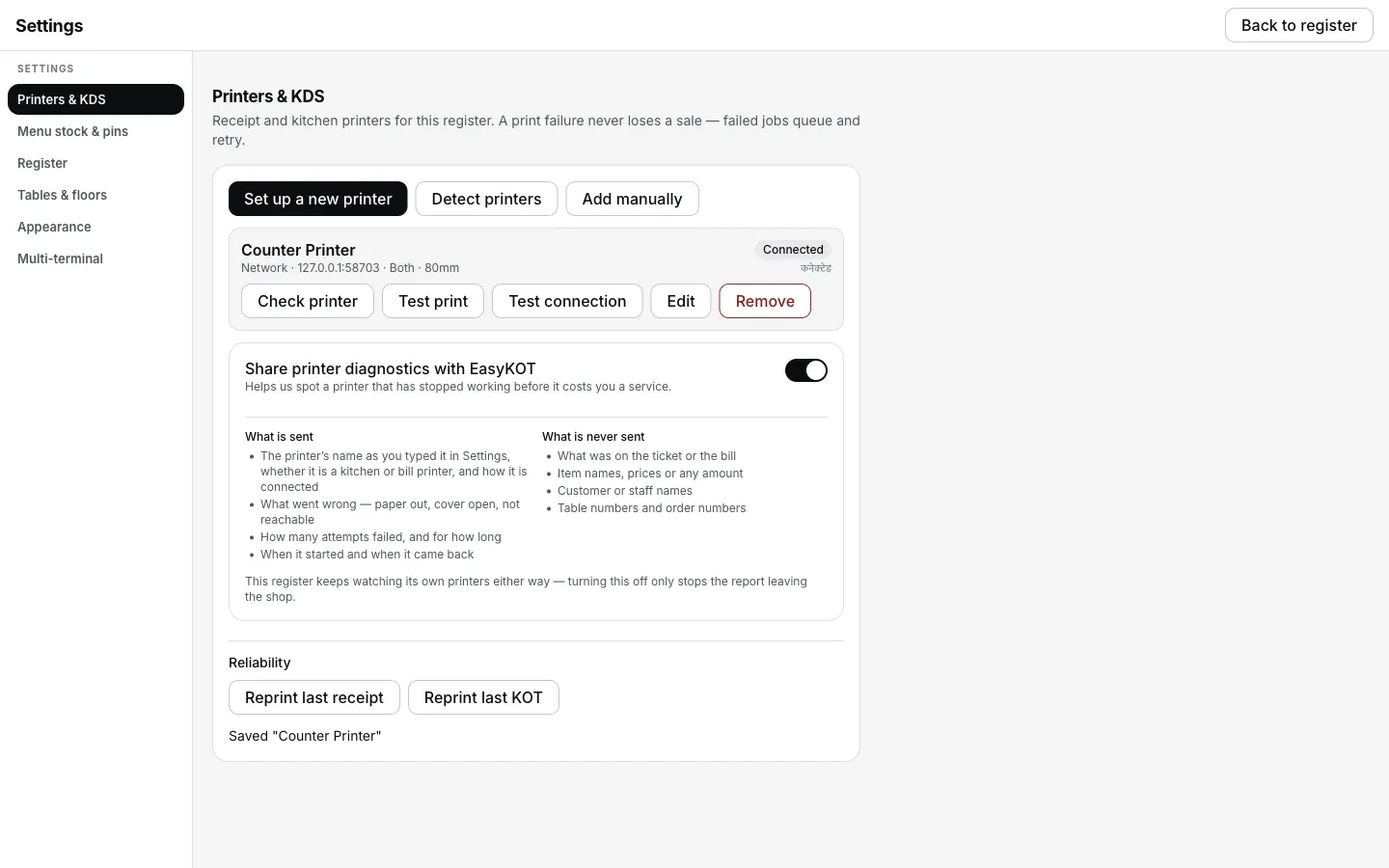
Printer wapas jawaab dene lage toh row pe Connected aata hai aur 5 minute se naye tickets line se nikal jaate hain; purane tickets aapki choice ka wait karte hain.
Jo ticket chhoot gaya, woh kaise nikle.
- Queue mein koi ticket lost nahi hota. App band ho jaaye ya laptop restart ho, jobs bache rehte hain. Woh Desktop App ke andar save hote hain, sirf memory mein nahi.
- 5 minute ke baad woh aapko bulata hai. Itni der print na ho toh row pe “Not printed — waiting for your choice” aata hai aur wahin rehta hai, saath mein Print, Send to <another printer> aur Discard. Jo khana ban ke serve bhi ho gaya, uska ticket Discard karna bilkul theek hai.
- Jo ticket shayad print ho gaya, woh apne aap dobara nahi jaata. Agar data jaane ke baad connection toota, toh job “Needs you — may have printed” pe ruk jaata hai aur aapka wait karta hai. Bina dekhe retry karna hi woh tareeka hai jisse customer ke haath mein do bill aa jaate hain.
Printer ek ticket ke baad ruk gaya: log aur kya poochte hain
Tickets queue mein hain, kya woh khud print ho jaayenge?
Thermal printer ek receipt ke baad kyun ruk jaata hai?
Desktop App khud try karta rehta hai ya mujhe karna padega?
KDS screen pe ticket dikh raha hai, par kitchen printer ne print nahi kiya.
Yeh nahi tha? Toh yeh dekho.
Do bill nikal gaye
Isi sikke ka doosra pehlu: “may have printed” ka matlab kya hai aur copy pe DUPLICATE kyun likha aata hai.
Duplicate ke baare mein padho →Printer cut nahi kar raha
Judi hui slips, atka hua blade, aur Desktop App uske liye kya status dikhata hai.
Cutter fix karo →Kuch bhi print nahi ho raha
Har symptom ki table: wajah, fix, aur Desktop App use dekh sakta hai ya nahi.
Checks shuru karo →Saare printer guides guides hub pe milenge.
3 mahine try kare, phir plan chune.
Restaurant ka kaam hum samajhte hain, kyunki shuruaat bhi wahin se hui. 3 mahine free try kare, bina card details. Hamari kahani padhe.