Restaurant KPIs: the six numbers to check every morning
Six numbers, one screen, five minutes. Last night sits in a line at the top of the dashboard: net sales before GST, orders, average bill. The cards under it are today as it builds, with net sales set against the same weekday last week, beside them what you were paid in, what sold most and what is still open.
Last night is one line at the top. Today is the cards under it.
Open the dashboard at nine in the morning and the first thing on the page is last night in a single line: Yesterday · Tue 8 Sep, with net sales before GST, the order count and the average bill. That is the read you came for and it takes ten seconds. Everything below it is the store's business today, which at nine is nearly empty and fills as the day goes.
The comparison lives on those cards. A restaurant's week has a shape: Tuesday lunch is quiet, Friday dinner is not, and the first weekend after salary day is different again. Measured against the day before, a perfectly normal Tuesday reads as a collapse and you spend the morning looking for a problem that does not exist. So the net sales card carries the same weekday last week beside it, printed as vs last Sat, and by the middle of service you can see whether today is tracking a normal one. For last night, hold the top line against the same weekday a week ago yourself.
Which night a bill belongs to matters here too. The trading day starts at 4am by default and the owner can move it between midnight and 6am in Settings, so a bill rung at 12:40am counts on the night it was earned instead of splitting one service across two dates.
Six numbers, and what each one is allowed to make you do.
Six is what an owner can read standing up, before the vegetables arrive. The first three are on the Yesterday line for last night and on a card for today; the rest are today's only. Each one answers a question, and each one is allowed to trigger a specific, small action. A number that is not allowed to change anything is a number you will stop reading by the end of the month.
| # | The number | What it answers | What it is allowed to make you do |
|---|---|---|---|
| 1 | Net sales: last night on the Yesterday line, and Net sales today (before GST) on the card, against the same weekday last week | Was that a normal night for this weekday? | Ask what was different: rain, a dug-up road, one cook missing, a party that did not come. Not a menu change, on one night's evidence. |
| 2 | Orders, on the Yesterday line and again as Orders today | Fewer guests, or the same guests spending less? | Read it with line 1. Sales down and orders flat is a ticket-size problem. Both down is a footfall problem, and they have different answers. |
| 3 | Average bill (net, before GST), on the Yesterday line and on a card | What one table is worth to you now. | A conversation about portions, add-ons and what the captain offers before the guest asks. A price rise needs more than one morning's number. |
| 4 | How you were paid today, by tender, GST included | Did the money arrive the way the bills say it did? | The card is today's, so take last night's split from the morning email: cash against what was counted, UPI against the bank credits. A gap gets a name today, not at the end of the month. |
| 5 | Top sellers, in units, over the last seven days | What the kitchen should be prepping for. | Set today's prep list, and mark the two or three dishes worth checking against what they cost you to make. |
| 6 | Open right now | Which checks were never settled. | One phone call to the floor while somebody still remembers the table. See below, because at 10am this should almost always be zero. |
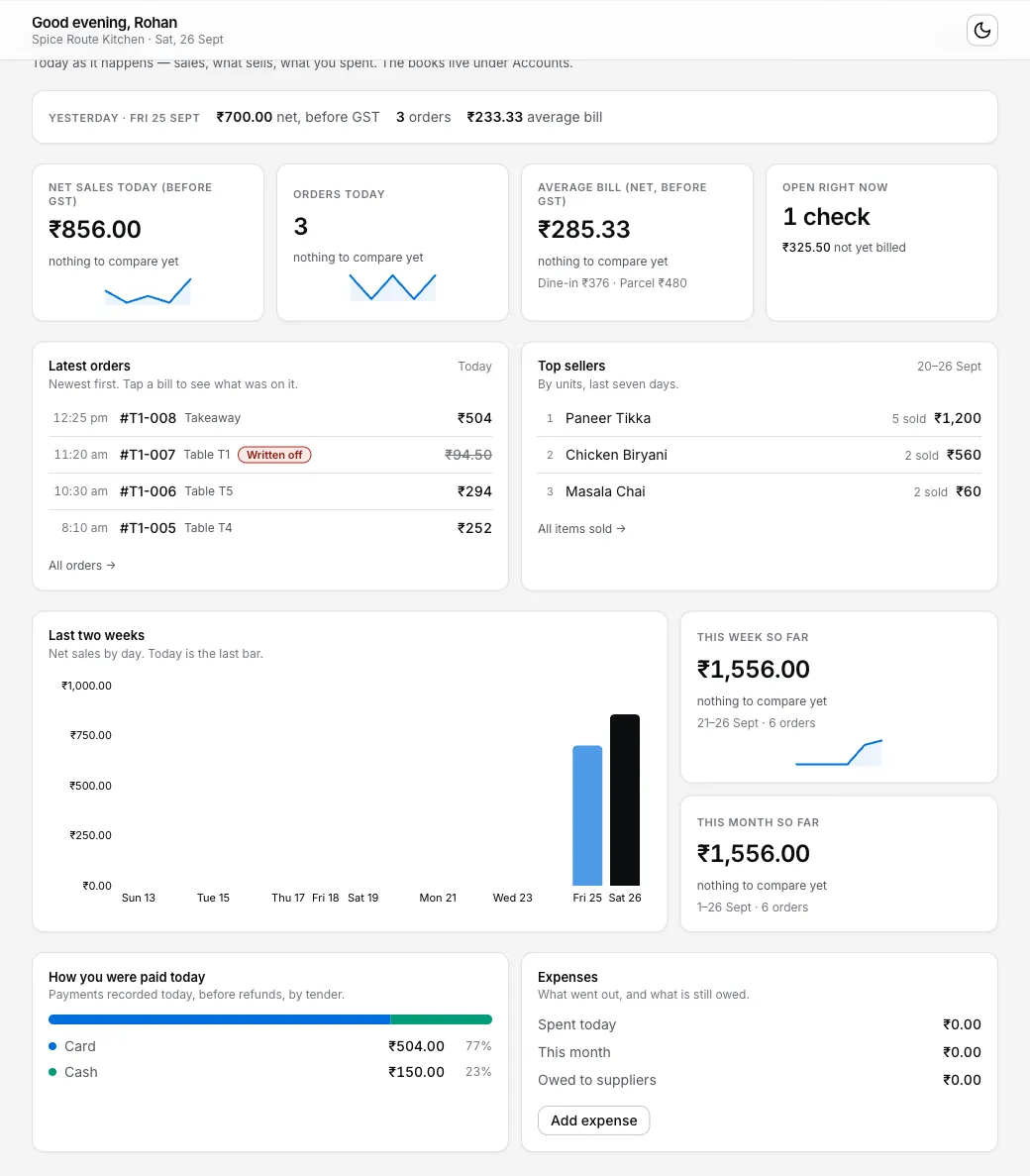
A Saturday dashboard review: Friday's closed-bill figures on top, with today's orders, open check and captured tender mix below.
A seventh line is worth a glance if you spend from the drawer: Expenses shows what went out today and this month, and it is the number that turns a busy month into a thin one without anybody noticing. The weekly close is where it gets dealt with properly.
Six, not thirteen. orderitnow.in, an Indian POS, publishes a 13-KPI daily list (read 2026-09-09) and it is a good list to grow into. Toast makes the point that decides how many you keep: a small set of decision-ready reports (read 2026-09-09) beats a dashboard nobody opens.
Average bill moves without anyone deciding to move it.
Average bill is net sales divided by orders, before GST, and it drifts on its own. Parcel share goes up and the average falls, because a parcel order is usually one or two dishes and no second round of drinks. A captain stops offering the full portion when the guest hesitates. A cheap dish becomes the thing everyone orders. None of that is a decision anybody took, and all of it shows up here first.
There is no honest number to compare it against nationally. The industry's own survey is NRAI's India Food Services Report, which is paid, and the public summaries carry market size rather than ticket size (checked 2026-09-09). Anyone quoting you an average bill for "Indian casual dining" is quoting a guess. So compare yourself to yourself: this month against last month, weekday lunch against weekday lunch. When it moves, the two places to look are what you charge and what gets offered, which is menu pricing and menu engineering, in that order.
How you were paid includes GST. Net sales does not. They will not match.
The two money cards answer different questions and are meant to disagree. How you were paid today is what actually arrived, split into cash, UPI and card, GST included, because that is what the guest handed over. Net sales today (before GST) is the sales figure you compare week on week, with the tax recorded on sales taken out. These cards reflect your configured GST settings; they do not confirm the tax treatment of your business. Review the settings and a sample bill with your accountant. The GST bill post has the rest.
Both of those cards are today, so at nine in the morning they are nearly empty. Last trading date is prepared for email from 08:00 store time, and the longer view is Reports → Sales & collections.
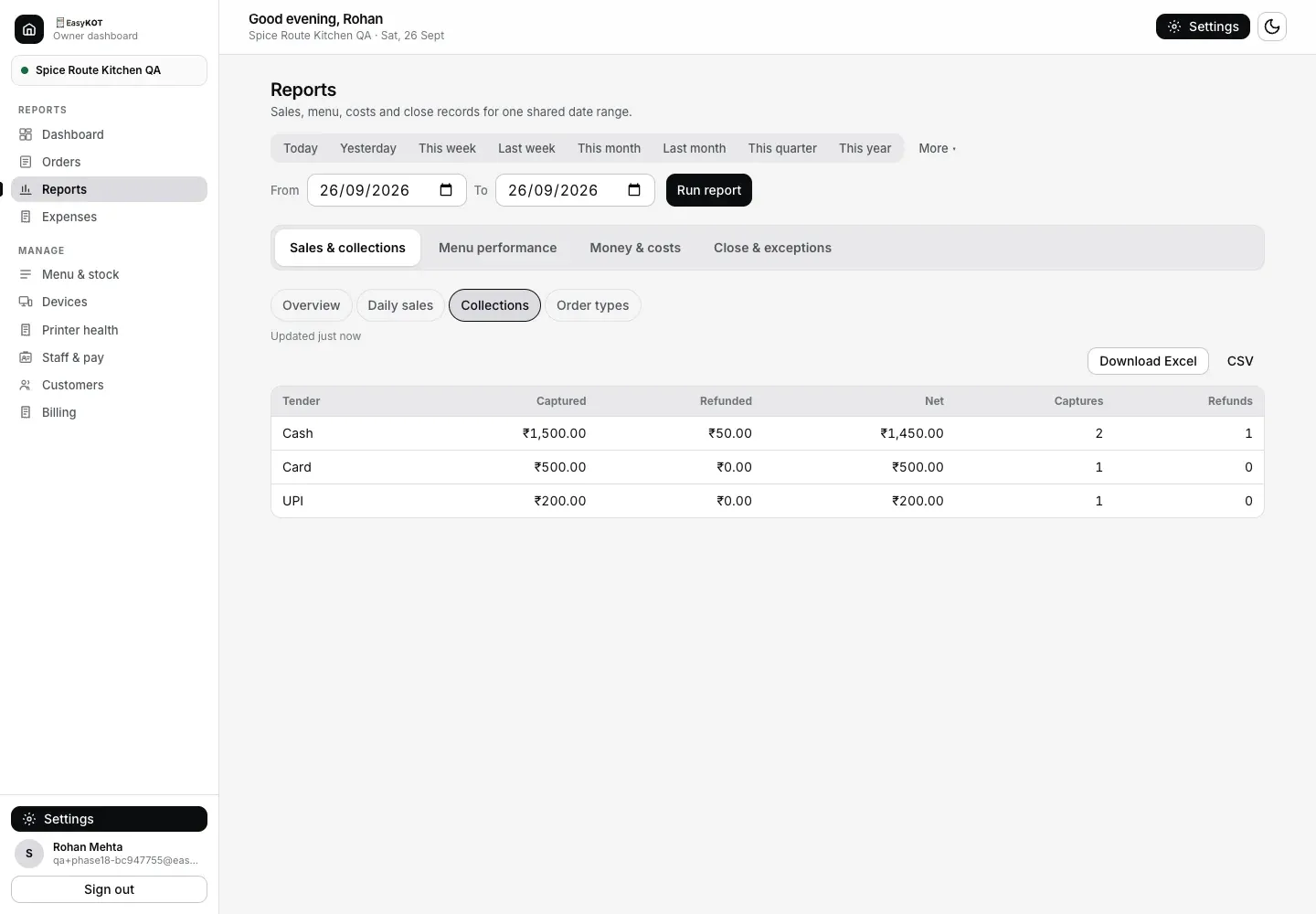
Reports → Sales & collections → Collections. Captured, Refunded and Net stay separate for each tender.
The tender split is where a quiet problem announces itself. UPI carried 24,508.96 million transactions worth ₹29,82,355.95 crore in August 2026 alone (NPCI product statistics, read 2026-09-09), and RBI research puts cash at under 60% of consumer spending in 2024, down from around 80% in 2021, while still making up 50% to 60% of household expenditure (Data For India, RBI Bulletin October 2024). Restaurants sit cash-heavier than that. How much heavier we cannot tell you: two Indian POS vendors publish different restaurant cash shares with nothing behind either, so there is no figure here worth printing.
What is worth watching is your own swing. If cash share climbs on one person's shifts while UPI falls, or the UPI total on the report does not match the credits in your bank the next morning, the usual explanation is a personal QR code standing next to the till. The staff theft post covers that one, and the cash handling routine covers the drawer.
Open right now should be zero by mid-morning.
Open right now is the live floor. At the configured cutoff, eligible synced bills move to Paid · Auto closed, so they contribute their bill value to sales without inventing cash, a payment or a loss. Any check still open by mid-morning is therefore worth a look: it may not have synced, may be empty or fully cancelled, or may still belong to an active service.
The offline EasyKOT Desktop App routine is separate: it can discard an empty check, add the payment for a check whose money did come in, keep a check as Paid · Auto closed, or write off food with a reason and manager PIN. The owner dashboard adds an optional Day close review for bills, actual collections and a counted cash shift. Open an issued eligible bill when real money arrived later; enter only that new amount and review the remaining Sales loss before confirming. The day close guide covers both paths, and the day-end report post is the eight lines to read at night.
If you never open a dashboard, read the morning email.
From 08:00 store time, the summary takes a snapshot of the previous trading date for delivery. It carries orders, average order, Captured split into Cash, UPI and Card, Refunds, Net collected, and net sales before GST. Delivery can be later, and an open business window is marked provisional. It is switched on per store in Settings, alongside the day-close cash-up mail that follows a closed shift on an hourly sweep (gross, refunds, net, opening float, expected, counted, variance). Between the two, an owner who is at the other shop all week still knows what happened at this one.
None of it depends on the shop having internet. The Desktop App bills, prints and settles on its own database and syncs when the line is back, which is what offline billing means in practice. The email uses whatever has synced when the snapshot is prepared. Later offline facts catch up in Reports, so the morning snapshot can be short.
Tomorrow morning, whatever billing system you run: pick the same weekday last week, write both net sales figures on the same line, then the order count, then the tender split. Three minutes, on paper if you like. EasyKOT is ₹299 a month or ₹2,990 a year, plus 18% GST, with three months free and no card, if you would rather the six numbers were waiting for you.
Straight answers.
If I only check one number, which one?
Why compare against the same weekday instead of yesterday?
What is a healthy average bill for an Indian restaurant?
Do I need internet to see these numbers?
Can I get this by email instead of opening a dashboard?
Run it 3 months, then pay for it.
Three months free, full product, no card. Made in India, for the counter: built inside a running restaurant.