EasyKOT Desktop App aapke hisaab se — chhe themes, chaar sizes.
A Desktop App is stared at for ten hours a day: it should suit the room and the eyes doing the staring. Six colour themes with live previews, four sizes that respect fingers, a dark-mode shortcut for the evening dim, and a menu rail that reshapes to your menu's size. All of it on the Desktop App, none of it needing support.
Want to try the themes right now? The live demo runs the real Desktop App : Settings → Appearance is all yours.
Do minute mein poora look set — teen steps.
Pick a theme — each card is a live preview
Open Settings → Appearance. Six theme cards each show a miniature Desktop App in that palette: Monochrome, the clean light default; Graphite, the same discipline after dark; Warm Paper and Velvet for warmer rooms; Marine for a cooler one; Midnight for evening service. Tap 'Use' and the Desktop App repaints instantly. Colour is the only thing that changes: every key stays exactly where your staff learned it.
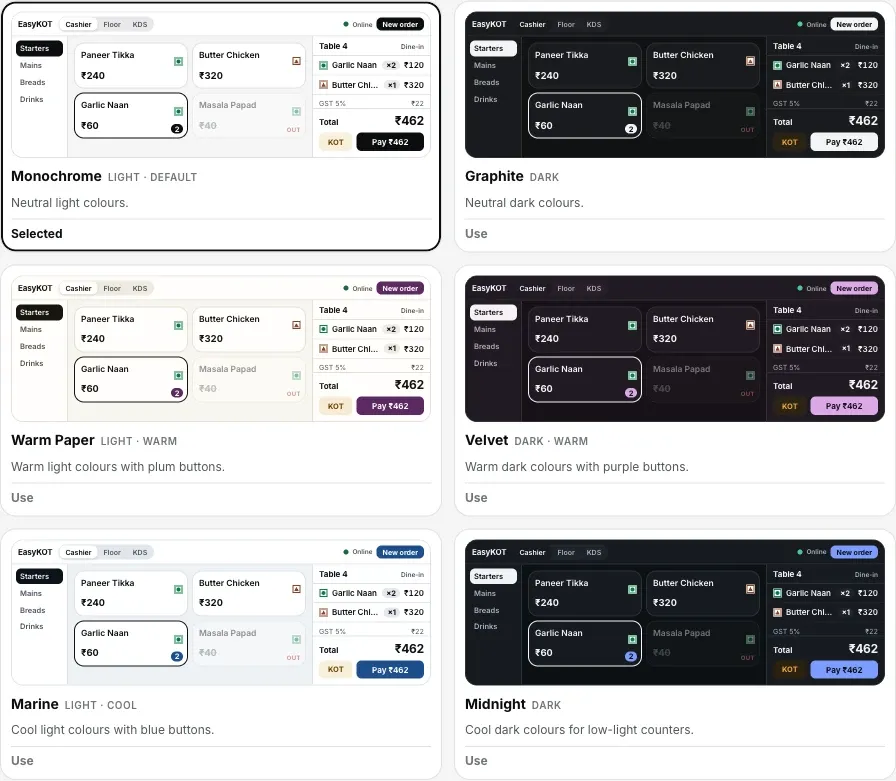
Step 1: every card is the real Desktop App in miniature; tap Use and the Desktop App repaints.
Set the size your counter actually reads at
Under Size & spacing, choose Compact, Default, Comfortable or Spacious. Text and spacing change together: Spacious gives larger text and more room, while Compact fits more dishes on a small laptop. Buttons keep their minimum touch size at every setting.
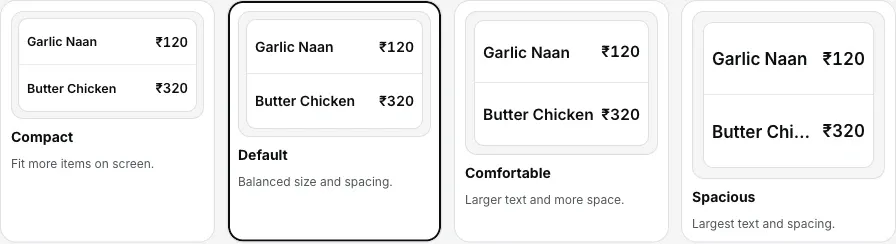
Step 2: four sizes; type and spacing move together, buttons never shrink.
Shape the category rail to your menu
Menu layout offers Simple list, Grouped categories and Expandable categories. Simple list keeps categories together in one list; Grouped categories puts them under their parent headings; Expandable categories opens a parent's sub-categories when tapped. This setting applies across the restaurant and reaches other devices when they reconnect.
Straight answers.
Is there a proper dark mode for evening service?
Theme change karun toh doosre Desktop App pe bhi badlega kya?
Do the themes change what prints?
Does the kitchen screen follow the theme?
Can I make just the text bigger without changing anything else?
Keep tuning the Desktop App.
Draw your floor plan
The Floor tab becomes your hall: tables where they really stand, checks where they really sit.
Build the floor →Kitchen screen setup
The one surface that ignores your theme, and why the pass is always dark.
Set up the KDS →Your first GST bill
Whatever the screen looks like, the paper prints the same: here is the whole path to it.
Make the first bill →Every guide in this cluster is listed on the guides hub.
3 mahine try kare, phir plan chune.
Restaurant ka kaam hum samajhte hain, kyunki shuruaat bhi wahin se hui. 3 mahine free try kare, bina card details. Hamari kahani padhe.