Printer chal raha tha, ab Offline kyun dikha raha hai?
Kal sab theek tha, aaj Offline, aur kuch badla bhi nahi. 10 mein se 9 baar router ne printer ko naya address de diya hai (bijli gayi, router restart hua, ya lease khatam) aur EasyKOT Desktop App purane address pe knock kar raha hai. Desktop App pehle printer ko uske hardware address se dhoondhta hai, isliye aksar aapke pahunchne se pehle yeh khud theek ho jaata hai.
Printer chale ya na chale, sale save ho chuki hai. Desktop App bill pehle apne andar save karta hai, print uske baad. Har symptom ki poori table mein baaki saare cases hain.
Address badla hai. Printer wahin ka wahin hai.
- Router ne printer ko naya address de diya. Router har address ek fixed time ke liye deta hai. Power cut ke baad network ka har device ek saath dobara maangta hai, aur kaun pehle wapas aaya us hisaab se address bant jaate hain. Toh jo printer .50 pe tha, woh .63 pe aa sakta hai.
- Printer ka purana address kisi aur ne le liya. Naye phone ya smart TV ko printer ka purana IP mil gaya, toh knock ka jawaab wahi dega. Tab row pe Offline ke saath alag hint aata hai: us address pe koi jawaab de raha hai, par woh printer nahi hai.
- Printer so gaya, ya cable nikal gayi. Wi-Fi printer khaali baithe apna Wi-Fi band kar dete hain aur pehla knock miss kar dete hain. Isiliye ek miss pe row Offline nahi hoti, lagaatar 2 miss chahiye. Phir bhi Offline rahe toh printer pe jaake power aur network cable check karo.
Pehle yeh karo.
Thoda ruko, Desktop App pehle se dhoondh raha hai
Ek baar accha connection ho jaaye toh Desktop App printer ka hardware address yaad rakhta hai, sirf IP nahi. Row Offline hote hi woh network se poochta hai ki yeh hardware address kahan gaya, naya address save karta hai aur agle check pe phir try karta hai. Raat mein DHCP ne address idhar-udhar kar diye, toh Desktop App kholne tak aksar pata bhi nahi chalta: row Offline hoti hai aur khud wapas aa jaati hai.
Phir bhi Offline hai toh Detect printers chalao
Settings → Printers & KDS → Detect printers rescan karta hai aur batata jaata hai ki abhi kaunsa round chal raha hai: pehle is computer ke USB aur Bluetooth port, phir printers ke factory address, phir network pe broadcast ki kaunse printers hain, phir Wi-Fi pe port 9100 wali har cheez ka sweep. Jo milta jaata hai, dikhta jaata hai. Agar aapka printer saved address se alag address pe mila, toh poori problem yahi thi.
Printer pe hi address check karo
Printer ka feed button dabake rakho aur switch on karo. Status slip niklegi, uspe IP address aur MAC dono honge. IP ke pehle teen number Desktop App ke IP se match hone chahiye: 192.168.1.x se 192.168.1.y theek hai, 192.168.1.x se 192.168.29.y nahi.
Address reserve karo taaki kabhi na badle
Router ke admin page mein DHCP reservation dhoondho (kabhi iska naam Address Reservation ya Static Lease hota hai), aur printer ka MAC uske abhi wale address se jod do. Ek baar, 2 minute, aur har power cut ke baad bhi printer ka address wahi rahega.
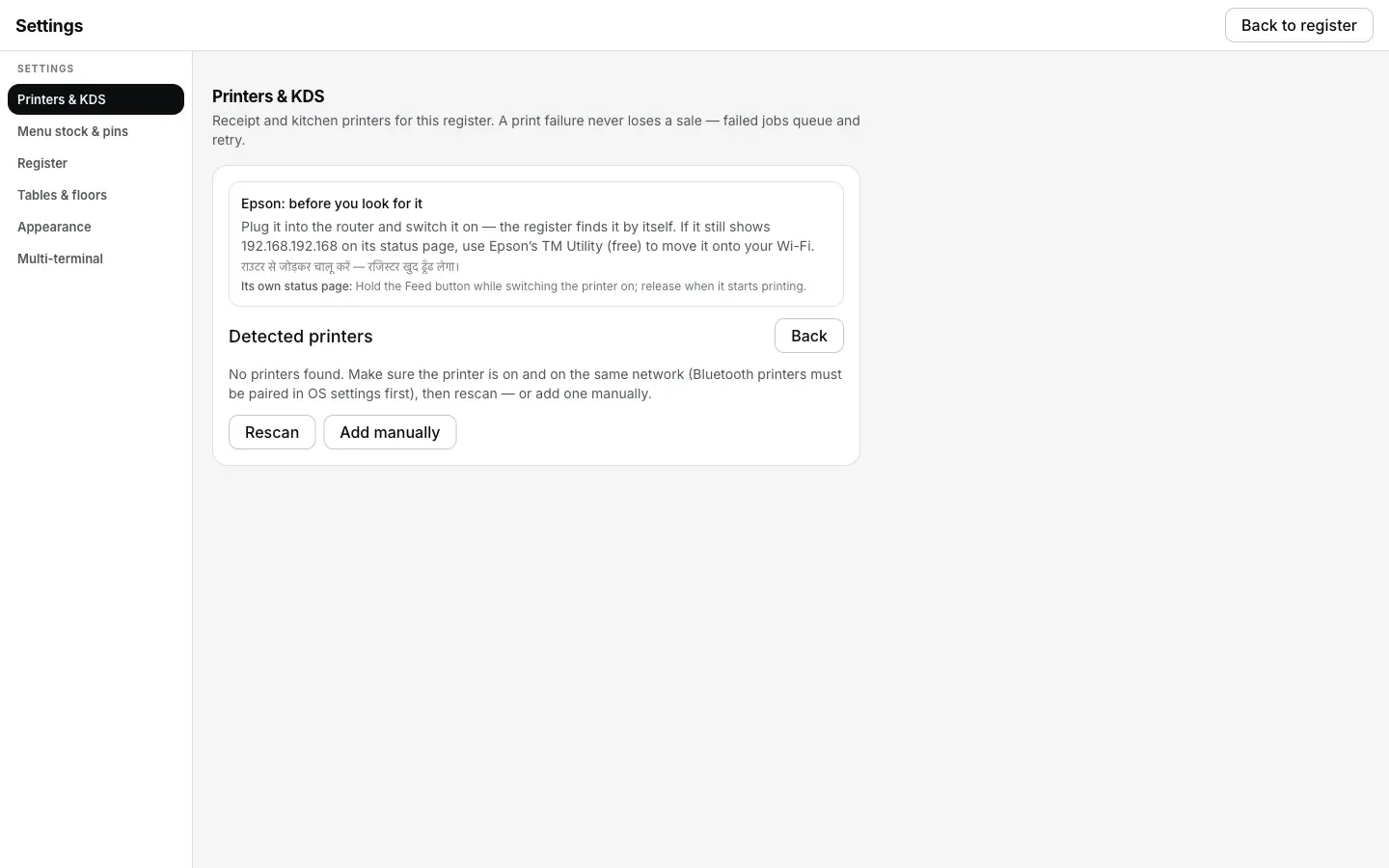
Detect printers ne rescan kiya aur kuch nahi mila: address badal gaya hai, ab printer ki apni status slip dekho.
Printer ki row kya bolti hai.
Settings → Printers & KDS mein har printer ki apni row hoti hai. Us row pe status green dot se nahi, seedhe words mein likha aata hai. Is problem ke exact words yeh hain.
- Jab tak problem hai: “Offline”, saath mein line “Can't reach the printer. Check power and the network cable.” Agar us address pe koi aur jawaab de raha hai, toh hint badal ke “Something answers at that address, but not a printer. Check the address.” ho jaata hai. Row ke neeche ek “How to fix this” khulta hai, jismein wahi fix hai jo is page pe hai.
- Fix hone ke baad: “Connected”. Pichhle 5 minute mein fire hue tickets line se print ho jaate hain; usse purana ticket pehle hi ruk chuka hota hai, uske row pe Print dabao.
Ek miss hua knock Offline nahi hai. Wi-Fi printer apna Wi-Fi sulaata hai aur pehla check aksar miss karta hai, isliye row lagaatar 2 miss ke baad hi badalti hai. Jo printer bas der se jaagta hai, uske liye kabhi jhootha alarm nahi bajta.

Printer wapas aaye toh purane tickets khud print nahi hote. Review se chuno; sale chalti rehti hai.
Jo ticket chhoot gaya, woh kaise nikle.
- Tickets queue hote hain, gayab nahi hote. Printer Offline tha tab jo bhi fire hua, woh Settings → Printers & KDS ke print queue mein baitha hai aur khud retry kar raha hai: 1 second, phir 2, 5, 15, 30 aur 60, uske baad har minute — 5 minute tak.
- 5 minute ke baad woh aapko bulata hai. Row pe “Not printed — waiting for your choice” aata hai aur tab tak dikhta hai jab tak aap kuch karte nahi. Print, Send to <another printer> ya Discard, sab usi row pe ek tap mein.
- Fail hote hi aapko 4 options milte hain. Settle ya fire karte waqt printer na mile, toh Desktop App Retry now, Fix printer, Send to <another printer> aur Skip — keep it for reprint deta hai. Tab tak sale save ho chuki hoti hai. Yeh saare buttons sirf paper ke liye hain.
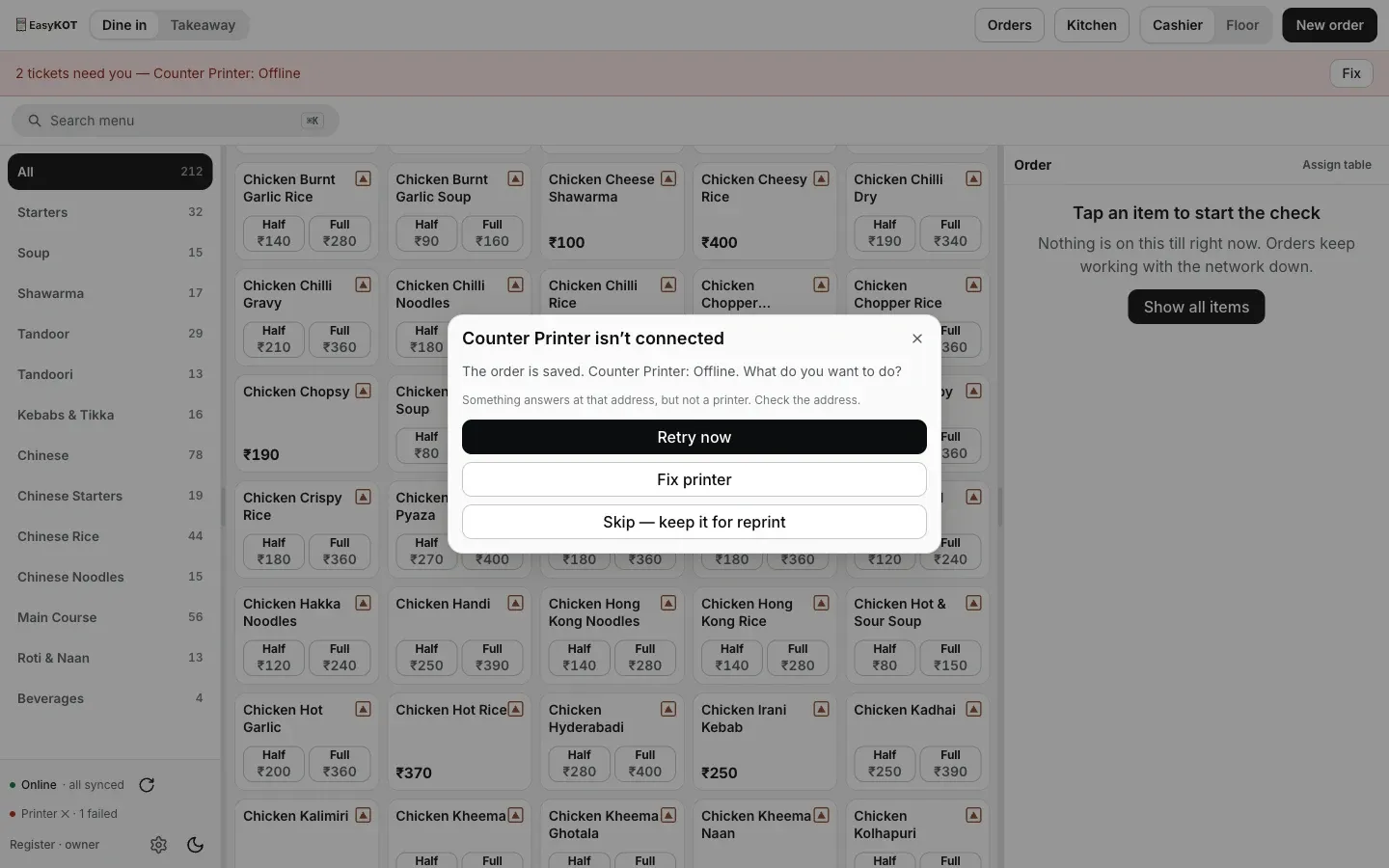
Settle ya fire karte waqt printer na mile, tab yeh options aate hain. Yeh dialog aane tak sale save ho chuki hoti hai.
Printer Offline dikha raha hai: log aur kya poochte hain
Static IP kahan set karu, printer pe ya router pe?
Power cut ke baad printer ne kaam kyun band kar diya?
Kya printer dobara add karna padega?
Offline dikha raha hai, par printer ki light jal rahi hai.
Yeh nahi tha? Toh yeh dekho.
IP se bhi nahi mil raha
Jab router khud Desktop App aur printer ko alag rakh raha ho, aur woh cable jo is setting ko bypass kar deti hai.
Router check karo →Printer doosre network pe hai
Guest Wi-Fi, doosra router, ya laptop jo hotspot pe chala gaya.
Networks compare karo →Thermal printer connect karo
Detect, address field, port 9100 aur paper width, screenshots ke saath.
Printer set up karo →Saare printer guides guides hub pe milenge.
3 mahine try kare, phir plan chune.
Restaurant ka kaam hum samajhte hain, kyunki shuruaat bhi wahin se hui. 3 mahine free try kare, bina card details. Hamari kahani padhe.