How a waiter takes an order — from table to kitchen.
Pick the table, add the dishes and press Send KOT. 'KOT saved' means the round is safe on the phone; the kitchen status below confirms delivery. On restaurant Wi-Fi it goes directly to the EasyKOT Desktop App. Without a connection, the phone holds and retries it, and tells the waiter the kitchen has not received it yet.
Waiter's own phone · Android 8+ · no paper pad, no re-keying at the counter
One round, start to kitchen.
Pick the table
Running lists the tables that already have a tab, oldest first, each with its elapsed timer and its amount. On a waiter's phone it starts with Only my orders ticked: the tabs you opened, added dishes to or sent a KOT for, plus a count of the others and Show all to bring them back. Since Captain 0.2.12, the checkbox sits beside the Running count. Free lists only tables nobody is sitting at, plus a + Takeaway button for a parcel. An occupied table is not in the Free list, so you cannot accidentally open a second tab on it: to add to a table someone else is serving, untick Only my orders and open that existing tab from Running.
- The summary row across the top reads Running · To send · Over 45m: the third number is the one that decides where you walk next.
- Seating timers warn at 45 minutes and go late at 75, with a colour and an outline around the card, so the state reads even under bad light or with colour-blind eyes.
- A check with every dish removed shows Empty and is not counted in Over 45m: nobody is waiting at it. Open it and press Cancel order to close it.
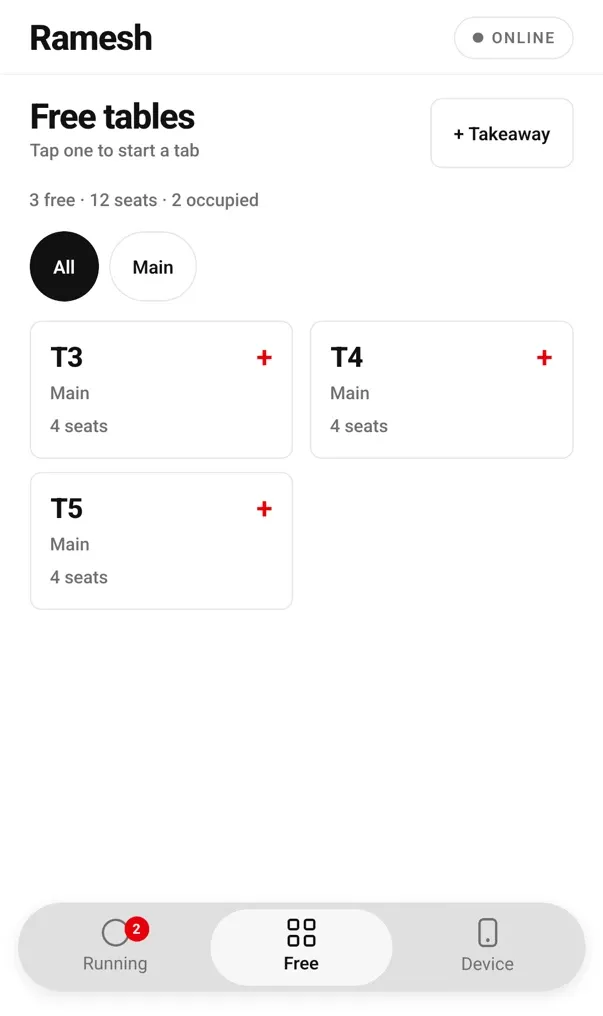
Free tables only: tap one to start a tab.
Add the items
The menu keeps your selected table at the top and shows Choose items → Review order → Send KOT. The first saved dish confirms that the table's order has started. Search by name or tap a category chip. Veg is a green circle, non-veg a brown triangle. A dish that comes in two portions shows Half and Full as two one-tap keys, and add-ons come with their own min and max rules, so you cannot send a combination the kitchen cannot cook. Tap the same dish again and the quantity bumps on the line you have not fired yet: you do not get two rows for two rotis.
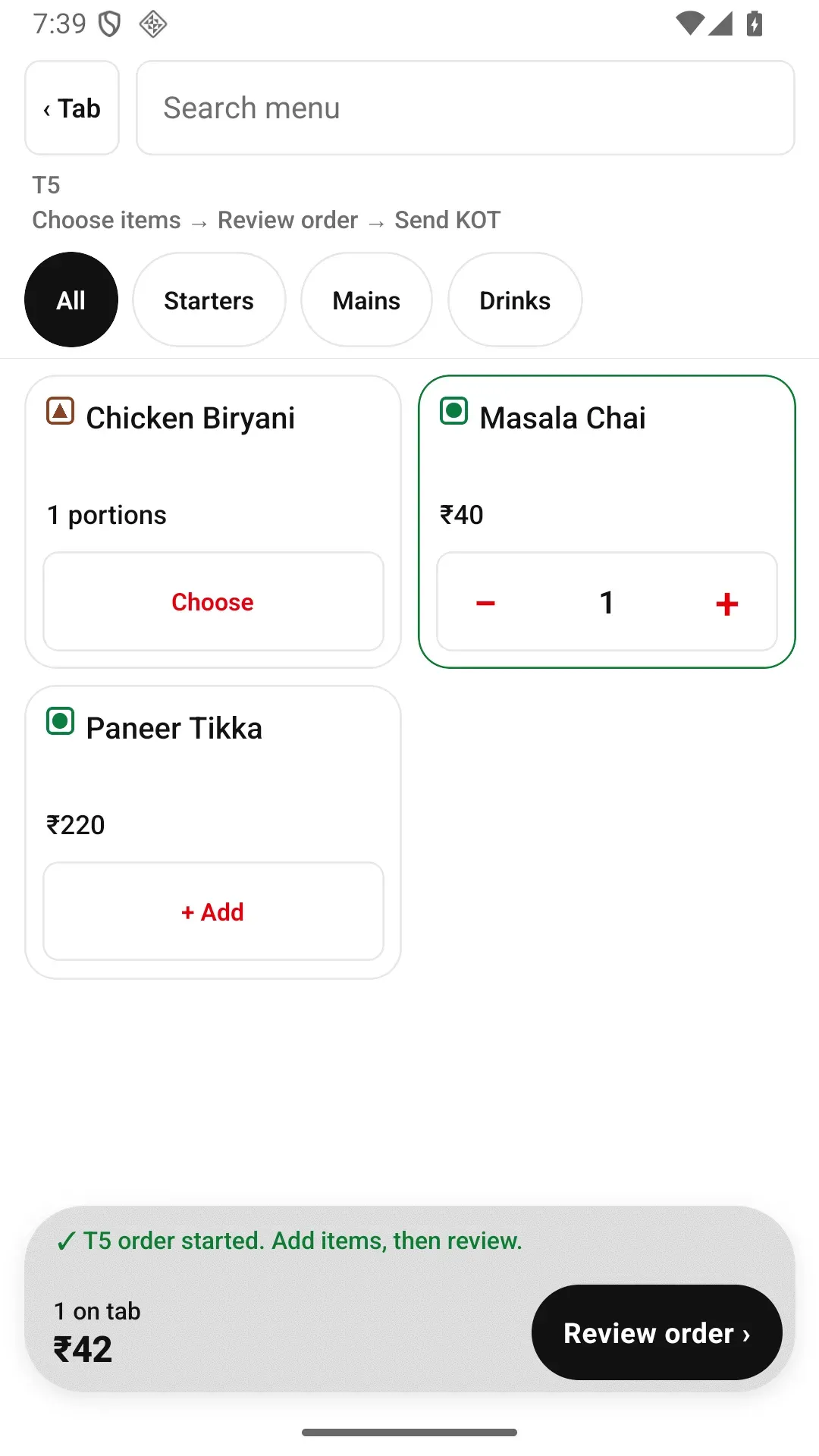
The first dish confirms which table's order started and points to Review order.
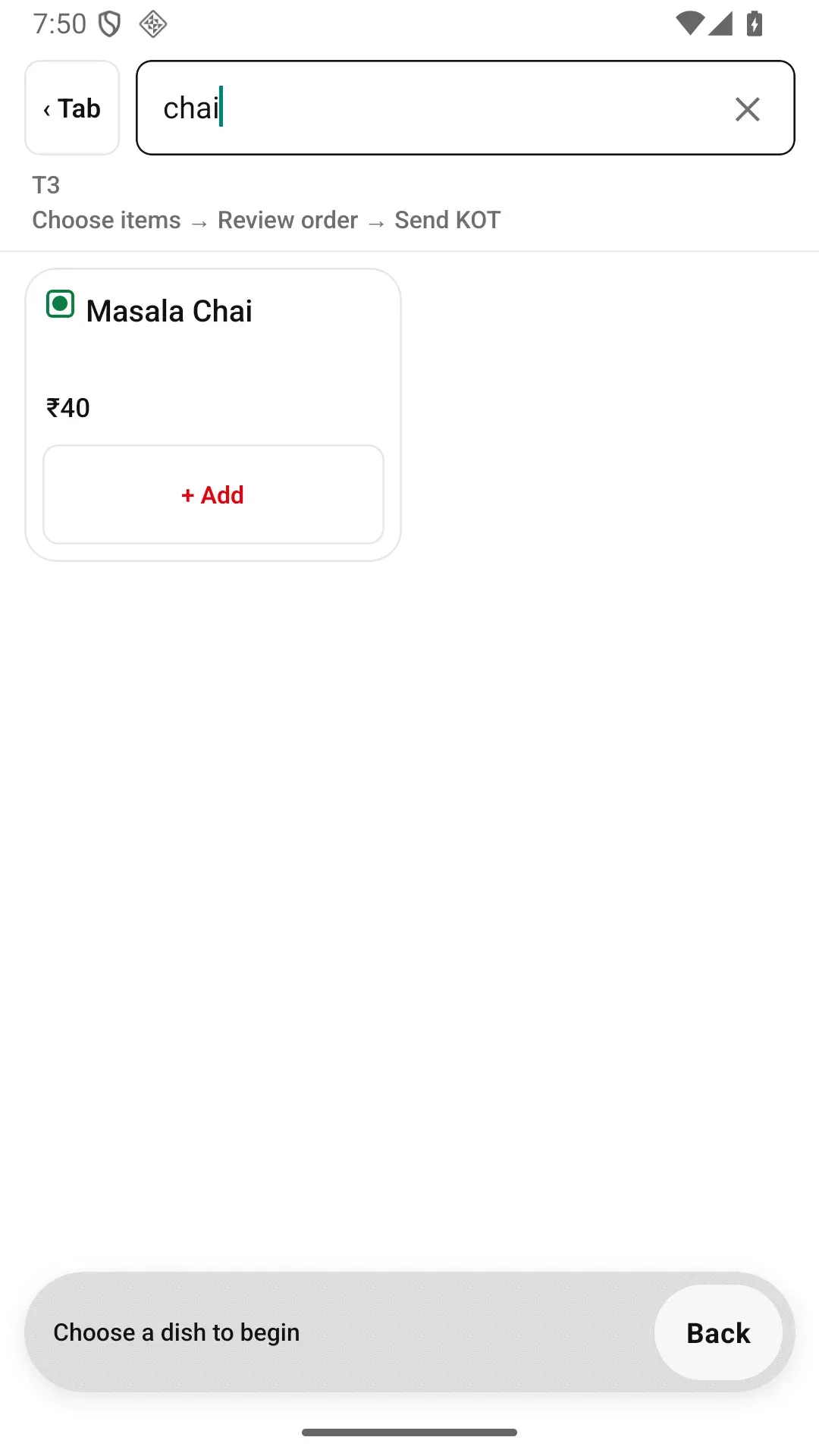
Search by name when the category chips are slower than typing.
Add the note the kitchen actually reads
Any line you have not fired yet takes a cooking note: "no onions", "less spicy", "make it mild". It rides with that line and prints in bold on the KOT, so the note reaches the person at the range and not just the person at the table.
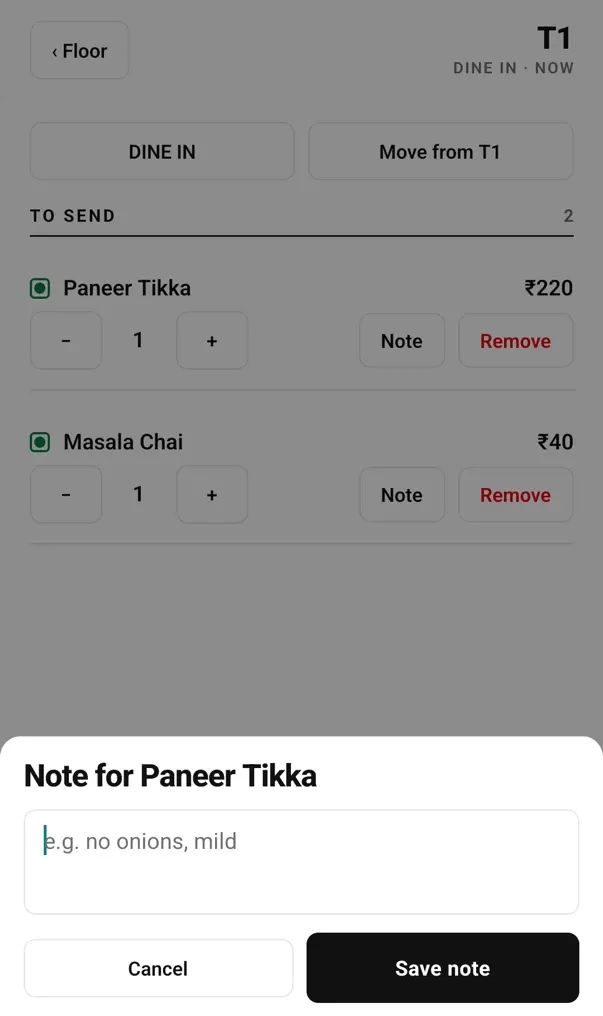
The note sheet for a line not yet fired: it prints in bold on the KOT.
Press Send KOT
The order screen splits into To send and Sent to kitchen, and the button reads Send KOT 3: the count is exactly what is about to go. After the phone saves the round it says KOT saved; check the kitchen status below for delivery. On the restaurant Wi-Fi that is one hop to the Desktop App and the KOT prints, or lands on the kitchen display, about a second later. Off the Wi-Fi with mobile data it takes a few seconds via the server. With neither, the round is held on the phone, says it is waiting for connection, and keeps retrying until the counter confirms it.
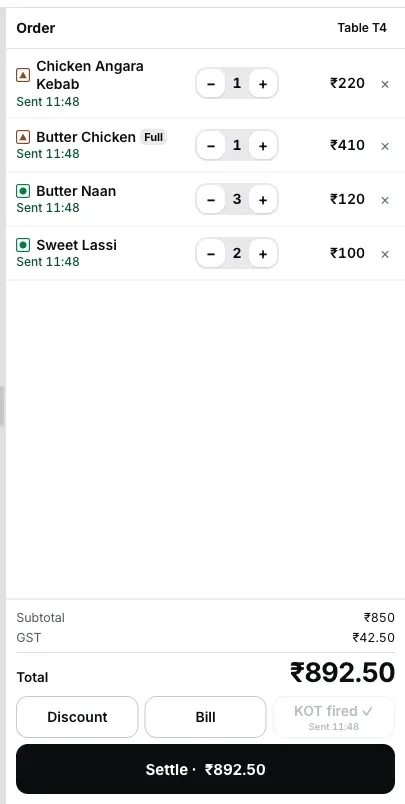
The Desktop App's view of a fired round: the same lines, already on the bill.
Want to watch a fired round land on the Desktop App? Open the live demo on a laptop and ring a round yourself: it is the real Desktop App in the browser, so it needs a laptop-size screen. On a phone right now? EasyKOT on an Android phone is the nearer door.
Running tables, oldest first.
- Your open tabs, with their clock. Running shows the waiter's own open tabs first. Only my orders is ticked and counts the tabs it hides; Show all brings the other open tabs back. Each row shows elapsed time and running amount.
- To send is a to-do list. If a table shows items in To send, somebody typed them and nobody fired them. That is the number to clear before you walk away.
- Free means free. Occupied tables are hidden from the Free tab, so two waiters cannot open two tabs on table 4 in the same minute.
- + Takeaway for a parcel: same menu, same fire, no table.
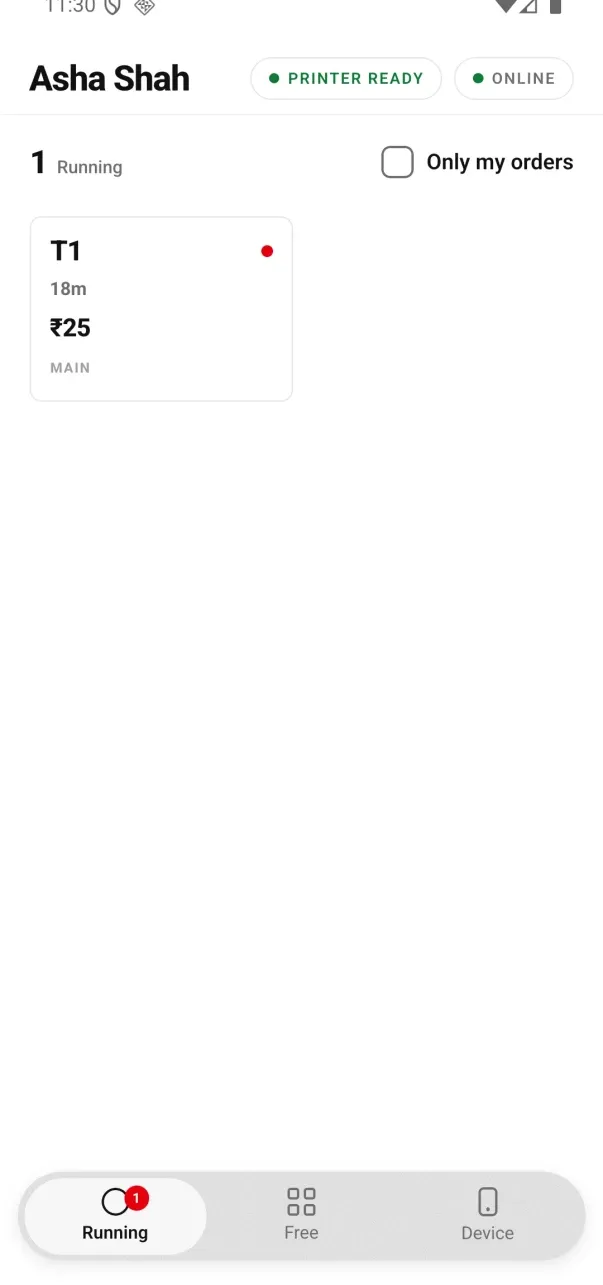
Signed 0.2.12 testing build: the order filter now sits beside the Running count.
Fire again — only the new items print.
The guest orders two more rotis at 9:10. You add them, press Send KOT again, and the kitchen gets a ticket with those two rotis on it, headed Round 2+ with the previous count, so the person at the range knows this is a follow-on and not a re-print of the first ticket. Nothing from round one appears again, and nothing gets cooked twice.
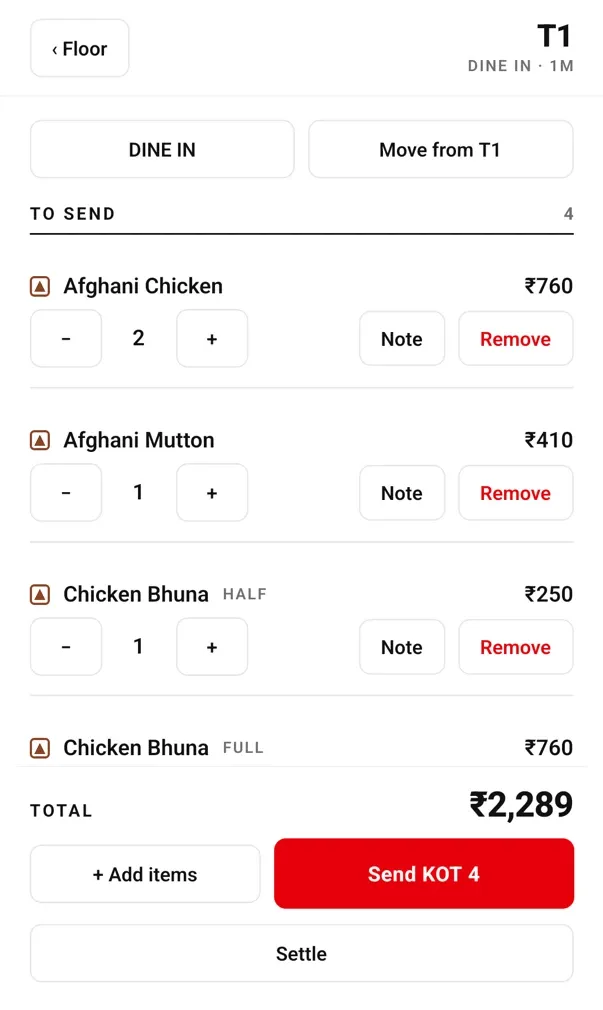
To send sits above Sent to kitchen: the fired lines from round one stay put, and Remove is the only way to take one off.
Why the app is strict about this. A KOT is a promise to cook something. Once a ticket names a dish, the app does not quietly change what that ticket said. New items get a new ticket.
Three waters came, one went back.
- Down is free. A fired line's quantity can go down without another permission. The table is billed for two waters, and no manager has to walk over during a rush to approve the correction.
- Up is not a correction. Pressing + on a fired line opens a new line for the next fire, because the kitchen only cooks what a KOT named. Raising a fired line silently would bill for a plate nobody was told to cook.
- Zero is a write-off. Taking the last unit off a fired line means a cooked dish is being cancelled, so the minus key stops at one and the phone asks you to confirm a removal instead. It is recorded under your name as a cancellation after the kitchen had it.
A check stays correctable until it settles. A returned water should not make the waiter wait for a manager during service.
Cancelling a cooked dish is one confirmation, on the record.
- The captain confirms it themselves. The phone asks once and records the removal under the captain's own name, including that the item went to the kitchen first. On the Desktop App it works the same way: the signed-in staff member picks a reason, and no manager PIN is asked for.
- The removal stays in the record. The line leaves the phone's list, and the check's history keeps what was ordered, who removed it and that the kitchen had already been told.
- Cancel order closes the whole check. If the guest leaves or the order was opened by mistake, open the check and press Cancel order, then tap one of the reasons (Customer left, Customer changed their mind, Ordered by mistake, Duplicate order, Wrong table, Item not available) or write your own. A dialog then shows the table (a takeaway has none), the bill and the reason: press Cancel order if it is the right bill, or Keep order to go back. No manager PIN. If the kitchen already made the dishes, the sheet says so above the reasons. Once any money is recorded on the bill the phone cannot cancel it: settle the balance, or refund at the counter. The Desktop App's Orders list and the owner dashboard show the reason and who cancelled. Nothing is deleted; the cancelled check stays in the day's history.
- Discounts are a rupee amount, not a percentage, and a captain's discount needs a manager PIN. Waiters take orders; managers approve that money change.
- A captain cannot refund, edit the menu, mark an item out of stock, or open reports. Those live on the Desktop App and in the owner dashboard.
Hand it to the counter — or settle at the table.
- Usually: leave it running. The counter already has every round. The cashier prints the GST bill and settles it like any other check: rounds from phones and rounds punched at the counter are one bill.
- At the table: Cash and UPI marking only. The sheet says: "Marking only — no drawer opens and no card is read here." You are recording how the guest paid, not taking a card payment.
- No drawer, no card, no refund from the phone. If a guest wants a card machine or a refund, that is the counter's job.
- The printed bill. By default, Print bill at the counter sends the bill to the counter printer. Since Captain 0.2.12, Take orders and print them gives a captain's phone its own bill series and sends that captain's tables to the compatible Bluetooth or Wi-Fi printer they carry. See printing the first GST bill.
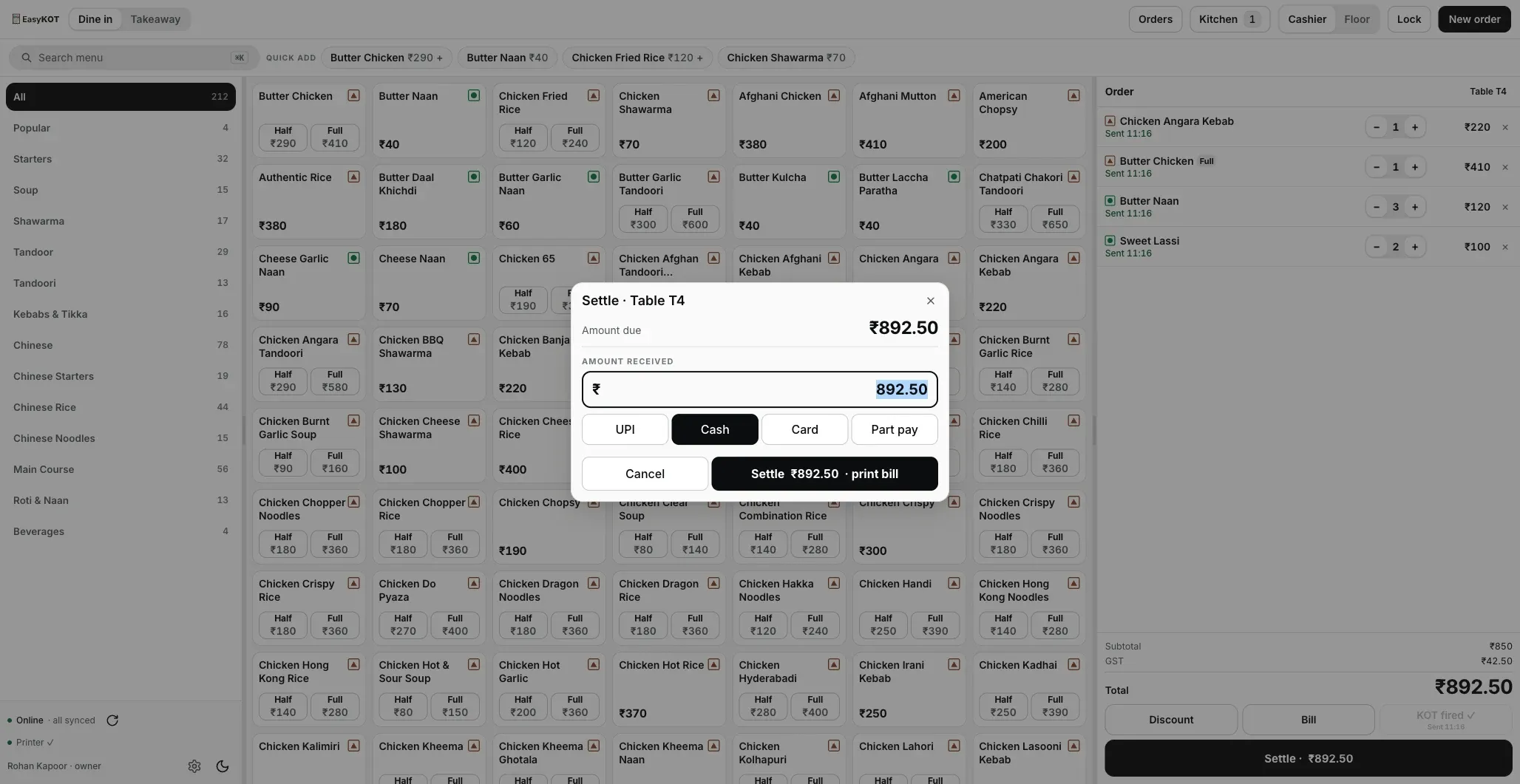
The settle screen on the Desktop App: the phone version marks cash or UPI and stops there.
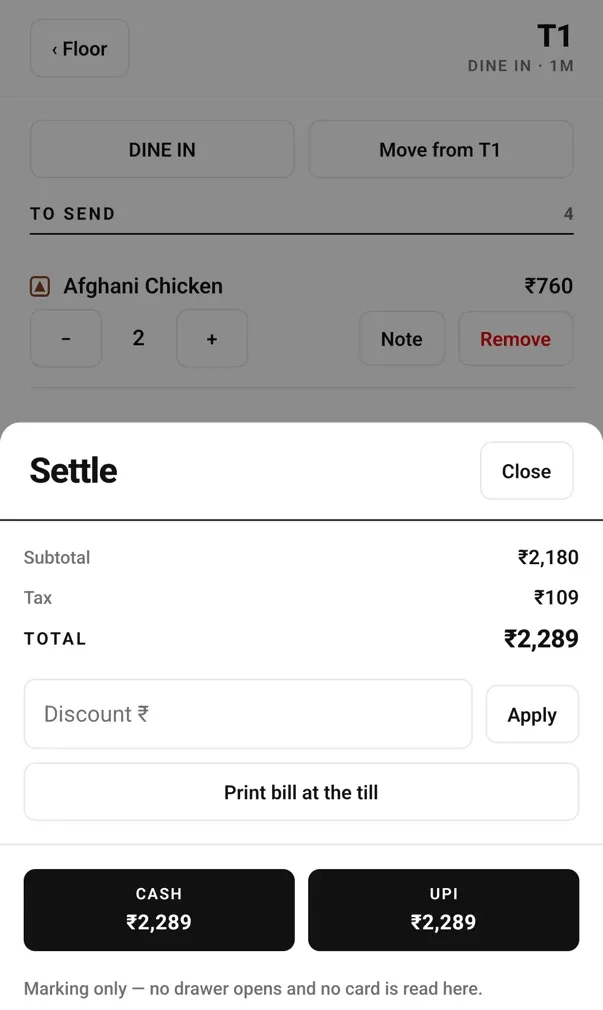
The phone's settle sheet: the footer says exactly what it does and does not do.
Veg, non-veg, and the dish the kitchen has run out of.
- Green circle, brown triangle. The marks are on each menu tile, so staff do not have to remember a dish's food type during service.
- Half and Full are two keys, not a menu. A two-portion dish shows both prices separately, so the waiter need not open another picker or screen and the chosen portion is clear on the bill.
- An 86'd dish stays on screen, greyed out, labelled Out of stock and cannot be added. The waiter can see that the kitchen is out instead of wondering where the dish went.
- The phone cannot mark an item out of stock. That change happens on the Desktop App or in the owner dashboard, and every phone sees it after the update reaches it.
The marks live on the tile itself.
Straight answers.
Can I add items after the KOT is fired?
Can I reduce a quantity after firing?
What if the guest cancels a dish that is already cooking?
Can the waiter cancel the whole order?
Does the kitchen see the special instructions?
Can two waiters work on the same table?
Can a waiter make the bill too?
Does the order survive if the phone loses Wi-Fi mid-order?
Send this page to your waiters.
Paste this page in the staff group. It follows the four actions in the order a waiter uses them, with the corrections and delivery states they need during service.
Before any of this: the setup
The owner's one-time job: add the captain in Staff & pay, tap Connect their phone, show the one-use QR, and give them their own PIN. The Wi-Fi link to the Desktop App is optional.
Set the phone up first →Where the KOT lands
Tickets on a kitchen screen with timers and Bump: an old monitor or tablet on your local network instead of paper.
See the kitchen display →Settle and print the GST bill
When the table is done, verify the payment, record the tender, print the tax invoice with its CGST and SGST split, and close the check.
Print the first GST bill →Deciding whether to put phones on the floor? See the captain app page. Portions and add-ons come from your menu.
Run it 3 months, then pay for it.
Three months free, full product, no card. Made in India, for the counter: built inside a running restaurant.