Which thermal printer to buy for restaurant billing — 58 or 80 mm, USB, LAN or Bluetooth.
Online listings show many brands, two common paper widths and several connection types. Before buying, match the exact model and interface to the device you will use. Review the price bands and ESC/POS support, then print both the test page and a sample bill from that device; treat only that tested setup as compatible.
Check ESC/POS, the connection and the paper size.
A thermal receipt printer is a small heater and a paper roll. What makes it work with a billing software is not the brand, it is the language the software speaks to it, and most receipt printers use the same one, ESC/POS. If the listing says ESC/POS (sometimes as "Epson compatible"), that is the first check. It is not a promise that every model, firmware and connection will behave the same way.
What ESC/POS does not settle is the paper width, the connection, and whether the particular unit in your hands has a working cutter and a full roll in the right way round. Those are the four questions below, and the last one is a test you run yourself.
Why we publish no "works with" brand list. A name on a list is a promise we can only keep by testing that exact model, firmware and cable. So the list is your own printer and the test slip. The EasyKOT Desktop App asks you the paper width when you add a printer, prints a ruler across the full width, and tells you on the paper if the answer was wrong.
Both 58 mm and 80 mm can print bills and KOTs.
| 58 mm (2 inch) | 80 mm (3 inch) | |
|---|---|---|
| Characters per line | 32 | 42, or 48 on the 80mm wide setting |
| Looks like | A parcel counter slip: long dish names wrap | A wider bill: more names, quantities and amounts stay on one line |
| Cutter | Usually tear-bar; auto-cutter on pricier units | Usually auto-cutter |
| Best for | Compact counters, phone-only setups and short slips | Busy counters where readability and an auto-cutter matter |
| Rolls | Cheaper, smaller, more frequent changes | Longer, dearer, fewer changes |
The trap is a mismatch, not a size: an 80 mm bill layout sent to 58 mm paper hard-wraps every long line, so a date like 06/09/2026 breaks across two lines and the total drifts. It happened on a real bill in September 2026, which is why the Desktop App now asks: the width is the one thing about a printer that no cable can reveal.
The connection determines which device can print.
- LAN / Wi-Fi (network). The printer gets an address on your shop's Wi-Fi or a cable to the router; the laptop and the phones can all print to it. The best choice for a kitchen printer and for any shop with more than one Desktop App. The Desktop App finds it by scanning, and hunts for it by hardware address when the router renumbers overnight. Ask the router to reserve its address and it never moves.
- USB. Simplest at a single counter with a laptop: plug in, add, print. Needs the Desktop App (phones cannot drive a USB printer) and a real data cable (a charge-only cable powers the printer and carries nothing, which reads as a dead printer).
- Bluetooth. For phone-only billing: an Android phone and a Bluetooth printer is a complete shop with no laptop. One printer pairs with one phone at a time: a second phone still holding the pairing is the classic "paired but silent" fault. iPhones do not print over Bluetooth to these printers, and Bluetooth from a laptop is built into the Desktop App but unproven on our own machines: treat it as the phone's transport.
- Serial (RS-232). Older units and some kitchen printers. Built into the Desktop App (you type the baud rate) but the least exercised of the four. Buy it only if you already own one.
Many units are sold with two of these (USB + Bluetooth, or USB + LAN) for a little more. If you can, buy the two-connection unit: it is the difference between a printer that follows you from a laptop to a phone and one that does not.
Five checks before you pay.
- ESC/POS on the listing. If it is not there, ask. "Epson compatible" means the same thing.
- Width you decided on above, and rolls of that width in the same order.
- The connection your shop needs: LAN for a kitchen or several Desktop Apps, Bluetooth for a phone, USB for one laptop.
- Auto-cutter if it is the bill printer at a busy counter. Tearing slips by hand at 9pm gets old.
- A cash-drawer port (RJ11) if you keep a drawer: the Desktop App kicks the drawer open through the printer on every settle. Most 80 mm units have it; many 58 mm units do not.
Price bands seen in listings on 7 September 2026.
| Type | Band, as listed | Notes |
|---|---|---|
| 58 mm, USB + Bluetooth | ₹2,000–4,000 | The phone-only printer. Tear-bar on most. |
| 80 mm, USB + LAN, auto-cutter | ₹4,000–10,000 | The counter bill printer; the higher end adds Bluetooth/Wi-Fi and a metal body. |
| 80 mm, service-network brands | ₹10,000–14,000 | Same language, sturdier, longer warranty and a service centre in your city. |
| Paper rolls | ₹25–70 a roll | By the pack of ten; 80 mm rolls dearer than 58 mm. |
Marketplace listings on Amazon.in and Flipkart read on 7 September 2026, rounded to bands; prices move weekly and vary by seller. No brand is named on purpose: none is certified by us yet, so check the exact model, interface and device with the two prints below.
Print the test page, then check a sample bill.
Add the printer in EasyKOT (it scans the network, or you type the address, or plug in USB, or pair Bluetooth), answer the paper width, and press Print test page. The slip carries a ruler of digits across the full width you claimed. If the ruler runs off the edge or stops short, the slip itself tells you which width to pick instead, in lines short enough to read on either roll. That checks the selected width on yourprinter, firmware, interface and device. Then print a sample bill and check item wrapping, totals, tax lines and the cut. Treat that exact setup as compatible only when both prints are correct. The guide is connect a thermal printer.
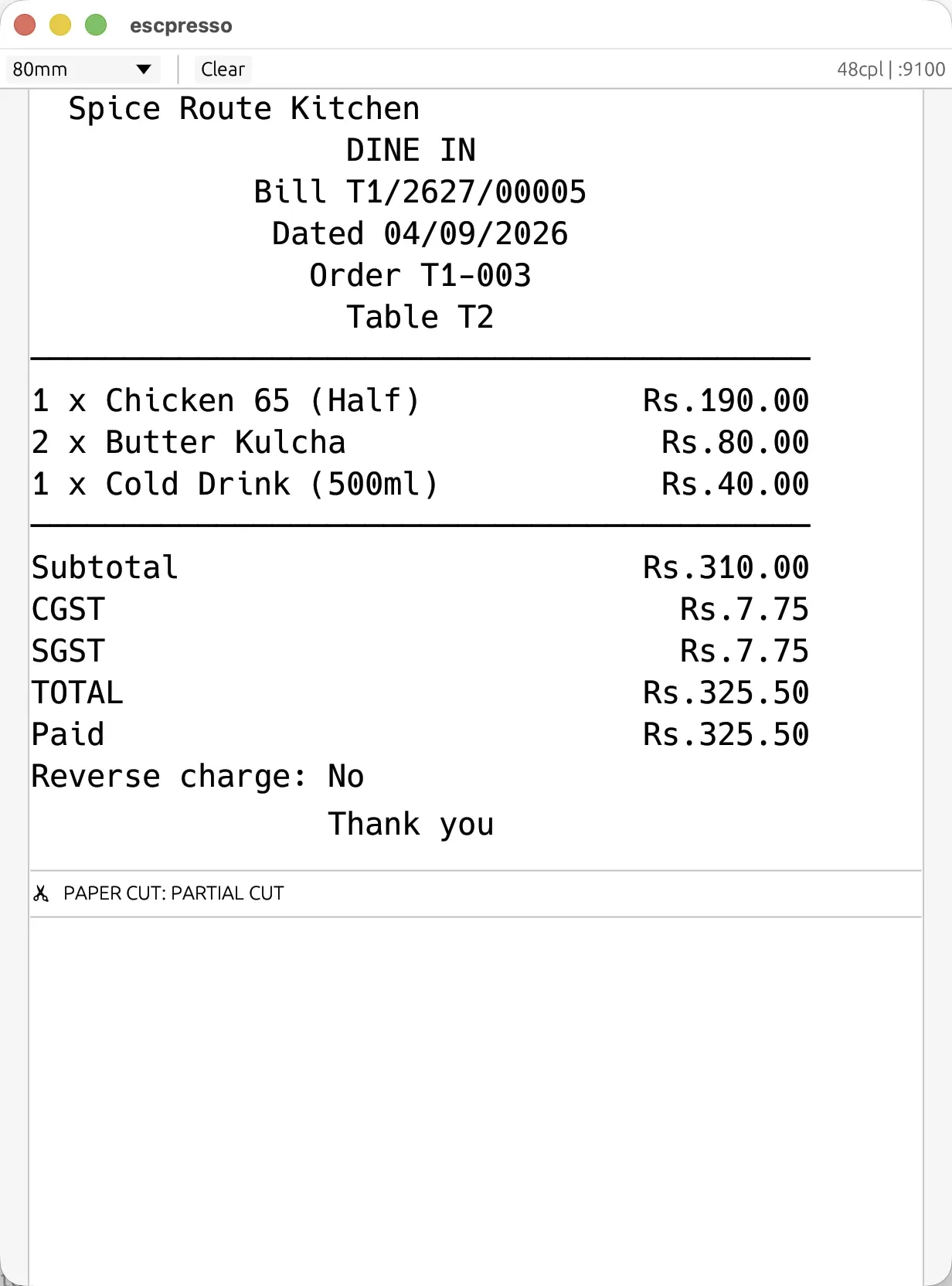
What comes off an 80 mm printer: the exact bytes the Desktop App sends, rendered by a virtual ESC/POS printer. Amounts print as "Rs." because the rupee glyph does not exist in the character sets thermal printers use: deliberate, and what keeps a cheap printer from printing question marks.
When something goes wrong later (blank slips, garbage characters, offline after a router restart, prints once then stops) the Desktop App names the fault on the printer's row and links the fix, and each fault has its own page. A print failure never loses a sale: the sale is written before the paper is tried, the ticket retries for 5 minutes, and if it is still stuck it stays listed for a reprint instead of vanishing.
Straight answers.
Kaunsa printer EasyKOT ke saath chalega?
58mm ya 80mm — kya farak hai?
Bluetooth printer phone se chalega?
USB printer laptop ke bina chalega?
Do thermal printers need ink?
Printer 'band ho jata hai' — kya kare?
Run it 3 months, then pay for it.
Three months free, full product, no card. Made in India, for the counter: built inside a running restaurant.