Restaurant billing ke liye kaunsa thermal printer le?
ESC/POS zaroori hai, lekin bas wahi kaafi nahi. Connection, paper size, cutter aur aapke device se nikla real test print bhi check kare. 58 mm aur 80 mm dono bill print kar sakte hain.
ESC/POS ke saath connection aur paper size bhi check kare.
ESC/POS woh command language hai jisme billing software thermal printer ko text, feed aur cut ke instructions bhejta hai. Listing ya manual mein ESC/POS ya "Epson compatible" pehla check hai.
Printer ka USB, LAN, Wi-Fi ya Bluetooth connection aapke laptop ya phone se match hona chahiye. Paper width sahi select honi chahiye, cutter kaam karna chahiye aur usi device se real test print nikalna chahiye. Ek model ka naam har firmware aur cable ki guarantee nahi hai.
58 mm aur 80 mm dono bill print karte hain.
| 58 mm | 80 mm | |
|---|---|---|
| Line width | 32 characters | 42, ya "80mm wide" setting par 48 |
| Readability | Long names jaldi wrap hote hain | Names aur amount ke liye zyada jagah |
| Cutter | Tear bar common; cutter model par depend | Auto-cutter zyada common |
| Roll | Compact, aam taur par sasta | Lamba chalta hai, jagah aur cost zyada |
58 mm sirf KOT aur 80 mm sirf bill ke liye nahi hai. Dono dono kaam kar sakte hain. Busy counter par readable bill aur auto-cutter useful hote hain; chhote phone counter par compact printer useful ho sakta hai. Loaded roll aur EasyKOT Desktop App ki width setting same rakhe.
Jis device se print karna hai, uske hisaab se connection chune.
- LAN / Wi-Fi. Counter aur kitchen ke network printer ke liye. Device aur printer same local network par hone chahiye; router mein printer ka address reserve karna accha hai.
- USB. Ek Windows ya Mac Desktop App ke liye seedha option. Phone USB printer ko drive nahi karta. Data cable chahiye; charge-only cable kaam nahi karegi.
- Bluetooth. Android phone ke liye. Printer pehle phone settings mein pair kare. Generic Bluetooth printer iPhone ka supported path nahi hai; iOS build Wi-Fi use karta hai.
- Serial (RS-232). Purane desktop printers mein milta hai. Baud rate aur cable match karni padti hai; naya printer le rahe hain toh zaroorat confirm kare.
Payment se pehle yeh 5 cheezein dekhe.
- Listing ya manual mein ESC/POS.
- 58 mm ya 80 mm, aur usi width ke rolls.
- Aapke device ke liye sahi connection.
- Busy bill counter ke liye auto-cutter.
- Drawer use karte hain toh cash-drawer port; model manual se port aur voltage confirm kare.
Listings par 7 September 2026 ko yeh bands the.
| Type | Listed band | Kya dekhe |
|---|---|---|
| 58 mm, USB + Bluetooth | ₹2,000–4,000 | Cutter, Android pairing, rolls |
| 80 mm, USB + LAN, auto-cutter | ₹4,000–10,000 | LAN settings, cutter, service |
| 80 mm, service-network brands | ₹10,000–14,000 | Warranty aur local service centre |
| Paper rolls | ₹25–70 a roll | Width, length aur pack quantity |
Amazon.in aur Flipkart listings 7 September 2026 ko dekhi gayi thi. Prices seller ke saath badalti hain. Koi model EasyKOT-certified nahi bataya gaya.
Test page ke baad sample bill bhi print kare.
Printer ko connection guide se add kare, paper width chune aur Print test page dabaye. Ruler sahi aaye toh sample bill nikale. Dish names, quantity, amount, GST lines aur cut check kare.
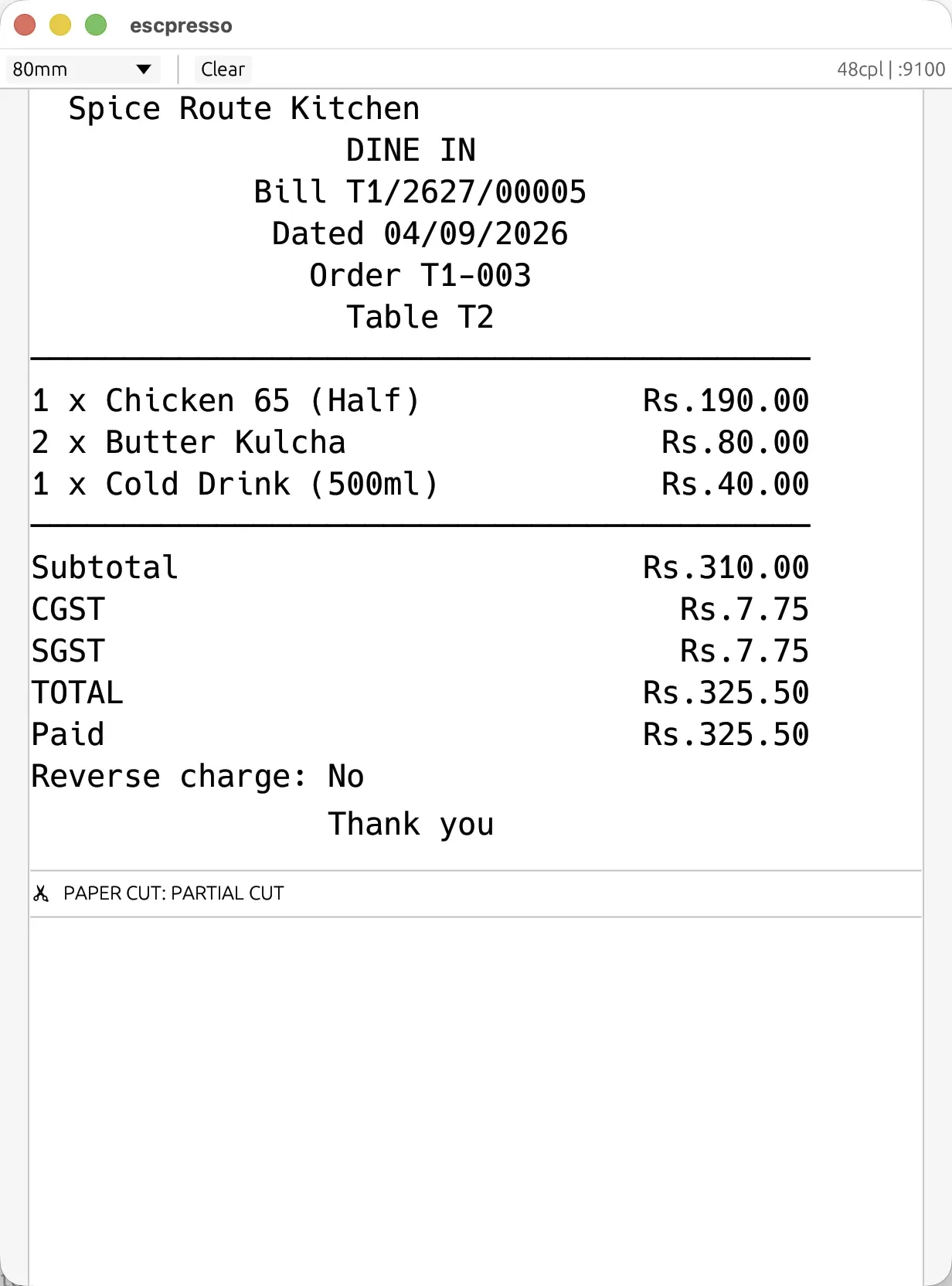
Yeh Desktop App ke print bytes se nikla real 80 mm layout hai. Paper par Rs. aata hai, kyunki thermal-printer character sets mein ₹ glyph reliable nahi hai.
Baad mein blank, garbage ya offline status aaye toh printer troubleshooting guide dekhe. Failed ticket 5 minute ke baad queue se gayab nahi hota; wahan se retry ya doosra printer chune.
Straight answers.
Kaunsa printer EasyKOT ke saath chalega?
58 mm ya 80 mm: kya farak hai?
Bluetooth printer phone se chalega?
USB printer laptop ke bina chalega?
Thermal printer ko ink chahiye?
Printer service ke beech ruk jaaye toh kya kare?
3 mahine try kare, phir plan chune.
Restaurant ka kaam hum samajhte hain, kyunki shuruaat bhi wahin se hui. 3 mahine free try kare, bina card details. Hamari kahani padhe.